AI Agent Framework Comparison 2026: LangGraph vs CrewAI vs Dapr Selection Guide
LangGraph v1.0, CrewAI v1.10, and Dapr Agents v1.0 compared on architecture, dev speed, durability, and cost. Find which multi-agent framework fits your team's production needs in 2026.
“Which agent framework should we use?”
That’s the question I’ve been asked most often this year. Until 2025, it was mostly a two-way debate between LangGraph and CrewAI. Then Dapr Agents v1.0 announced GA at KubeCon Europe 2026, adding a third serious contender. And since all three are now at v1.0 stable, the old excuse — “it’s too experimental for production” — no longer applies.
I’ll be honest: I’m a bit uncomfortable writing this comparison. I’ve used all three. All three are viable. So any “X is the best” conclusion would be a lie. Instead, I want to talk about “which is least bad in which situation.”
LangGraph v1.0 — When You Need Full Control Over Every Transition
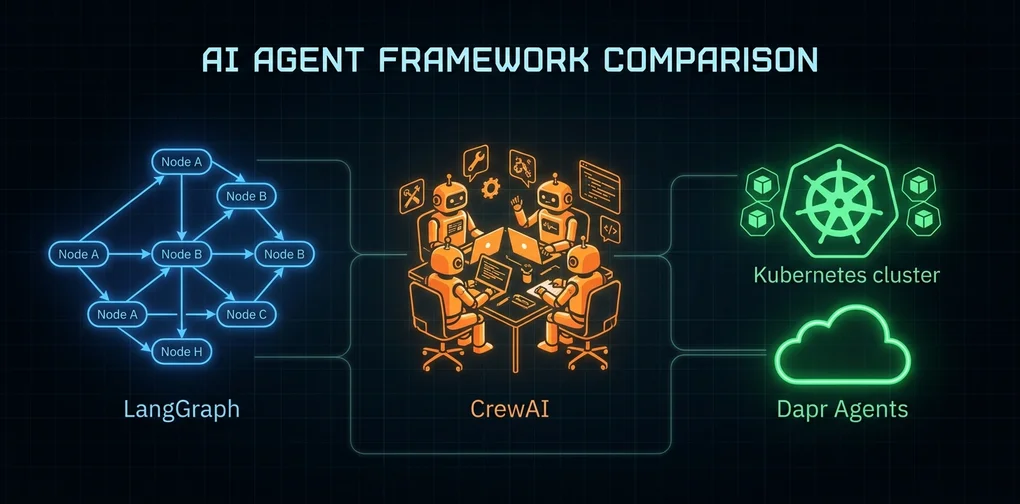
LangGraph models agents as nodes in a directed graph. Nodes are execution units, edges are transition conditions, and state is the data shared between nodes. This approach’s strength is “complete visibility into execution flow.”
from langgraph.graph import StateGraph, END
from typing import TypedDict, Annotated
import operator

class AgentState(TypedDict):
    messages: Annotated[list, operator.add]
    next_step: str

def research_agent(state: AgentState):
    result = llm.invoke(state["messages"])
    return {"messages": [result], "next_step": "writer"}

def writer_agent(state: AgentState):
    result = llm.invoke(state["messages"])
    return {"messages": [result], "next_step": "END"}

def should_continue(state: AgentState):
    return state["next_step"]

graph = StateGraph(AgentState)
graph.add_node("researcher", research_agent)
graph.add_node("writer", writer_agent)
graph.add_conditional_edges("researcher", should_continue)
graph.add_edge("writer", END)
This looks simple but in production, it typically grows to 60〜100 lines. More branching conditions, more complex state schemas — the code grows. That’s both a weakness and a strength: more code means more explicit control flow.
The thing I liked most after actually using it: LangSmith integration. You can trace exactly why an agent moved to a particular node, and what state it carried there. LangGraph was the only framework where I could genuinely debug production misbehavior.
Key LangGraph v1.0 features:
- Durable Checkpointing: Saves mid-execution state for pause-and-resume
- Human-in-the-Loop: Naturally inserts human approval steps into the graph
- Streaming: Real-time output streaming from each node
- LangSmith Integration: Production tracing and error analysis
The downsides are real too. The initial learning curve is steep. Defining state schemas with TypedDict, mentally visualizing the graph while writing code — it takes time to feel natural. Also, the tight coupling to LangChain means extra wrapper work when you want to use non-LangChain LLM clients.
LangGraph’s Human-in-the-Loop pattern — this is one of the core reasons teams choose LangGraph over competitors. You can pause graph execution at any point, collect human feedback, then resume. Here’s the pattern:
from langgraph.graph import StateGraph, END
from langgraph.checkpoint.memory import MemorySaver

checkpointer = MemorySaver()

def draft_review(state: AgentState):
    draft = generate_draft(state["messages"])
    return {"messages": [draft], "awaiting_approval": True}

def apply_feedback(state: AgentState, human_input: str):
    return {"messages": state["messages"] + [human_input], "awaiting_approval": False}

graph = StateGraph(AgentState)
graph.add_node("draft", draft_review)
graph.add_node("feedback", apply_feedback)
# interrupt_before pauses execution before this node
graph.compile(checkpointer=checkpointer, interrupt_before=["feedback"])
This structure is especially valuable for code review automation, content approval workflows, and AI-assisted systems in regulated industries (healthcare, legal). You can express “AI does most of the work, human does final review” as explicit code — not just documentation.
LangGraph is right when:
- Workflows have complex approval gates, conditional branches, and loops
- You need to trace and audit agent behavior in production
- Teams are large and agent logic needs explicit documentation
- Hybrid human-AI collaborative workflows are required
CrewAI v1.10 — When You Need to Ship Fast with Role-Based Teams
CrewAI’s core idea is straightforward: “Think about agent problems as roles and teams.” Define a researcher, writer, and editor, and let them collaborate toward a goal.
from crewai import Agent, Task, Crew, Process

researcher = Agent(
    role='Senior Research Analyst',
    goal='Find accurate, up-to-date information on AI frameworks',
    backstory='You have 10 years of experience analyzing AI tools and frameworks.',
    verbose=True,
    tools=[search_tool, web_scraper]
)

writer = Agent(
    role='Technical Writer',
    goal='Write clear, developer-friendly comparison guides',
    backstory='You specialize in translating complex technical concepts.',
    verbose=True
)

research_task = Task(
    description='Research LangGraph, CrewAI, Dapr Agents current capabilities',
    agent=researcher,
    expected_output='Structured comparison data with key metrics'
)

write_task = Task(
    description='Write a developer guide based on research findings',
    agent=writer,
    expected_output='Complete comparison guide in markdown'
)

crew = Crew(
    agents=[researcher, writer],
    tasks=[research_task, write_task],
    process=Process.sequential
)
With this, you can have a working multi-agent system in under 30 minutes. This is a very similar approach to the role-based agent patterns covered in Claude Code Agentic Workflow Patterns.
New in CrewAI v1.10.1:
- Native MCP support: Connect MCP servers directly as tools
- A2A (Agent-to-Agent) protocol: Communicate with agents from other frameworks
- Streaming: Real-time agent response streaming
- Hierarchical process: Manager agents directing other agents
2026 benchmarks show CrewAI achieves 40% faster development time versus LangGraph, and a 45s vs 68s latency advantage on the same 5-step research workflow. But it consumes about 18% more tokens — that overhead comes from the role/backstory definitions and internal prompt overhead.
What I honestly found lacking in CrewAI: failure scenario handling is weak. When one agent throws an exception, the entire crew stops or retries in unexpected ways. That was the most anxiety-inducing part in production. There’s no equivalent of LangGraph’s conditional edges for routing failures to alternative nodes.
Also, memory management is per-crew, making it unsuitable for long-running agents. If an agent needs to run for more than a day, start with Dapr or LangGraph from day one.
CrewAI’s hierarchical process — beyond simple sequential execution, a Manager agent dynamically delegates tasks to specialists:
from crewai import Agent, Task, Crew, Process

manager = Agent(
    role='Project Manager',
    goal='Coordinate research and writing tasks efficiently',
    backstory='Experienced project manager who knows how to delegate effectively.',
    allow_delegation=True
)

crew = Crew(
    agents=[manager, researcher, writer, editor],
    tasks=[main_task],
    process=Process.hierarchical,
    manager_agent=manager
)
The Manager agent decomposes incoming tasks and assigns sub-tasks to the right specialists. This pattern lets CrewAI go beyond simple sequential pipelines into genuine multi-agent orchestration. One important observation: with MCP now natively supported, the boundary between agent tools and external services has largely disappeared. What previously required custom wrappers is now unified through MCP servers.
CrewAI is right when:
- You need a working prototype quickly
- Roles are clearly defined (content pipelines, customer support triage)
- Your team isn’t familiar with AI agents and needs an intuitive API
- You want to rapidly integrate external tools via the MCP ecosystem
Dapr Agents v1.0 — When Your Agents Must Survive Kubernetes
Dapr Agents has a different philosophy. While LangGraph and CrewAI focus on “how to make agents smarter,” Dapr Agents focuses on “how to keep agents alive.”
A 2026 survey of MCP production environments found 52% of 2,181 endpoints were dead after deployment. That number is why Dapr Agents exists.
from dapr_agents import Agent, tool
from dapr_agents.workflow import AgentWorkflow

@tool
def search_documentation(query: str) -> str:
    """Search technical documentation"""
    return search_api.search(query)

@tool
def create_ticket(title: str, description: str) -> str:
    """Create a support ticket"""
    return jira_api.create(title=title, description=description)

# Runs on Dapr's durable workflow layer
workflow = AgentWorkflow(
    agents=[
        Agent(name="triage", tools=[search_documentation]),
        Agent(name="creator", tools=[create_ticket])
    ],
    workflow_id="support-pipeline-001"
)

# Restores state from workflow_id even after node restart
result = await workflow.run("Handle customer support ticket #4521")
The key differentiator is the workflow ID. Even if a process dies, even if a Pod restarts, the same workflow_id resumes execution from where it stopped. This is possible because state is persisted to external stores like Redis or PostgreSQL. Dapr supports 30+ state stores as plugins.
As covered in detail in the Dapr Agents v1.0 GA analysis, the core is CNCF ecosystem integration: Prometheus, OpenTelemetry, Kubernetes RBAC — teams already running Dapr can add the agent layer at very low cost.
But there are clear situations where I wouldn’t recommend Dapr Agents. For teams not yet on Kubernetes, it’s overkill. Installing Dapr itself, understanding the sidecar pattern, and configuring a state store can take weeks. Also, agent logic is Python-only and writing agents directly in TypeScript or Go is still limited.
Dapr Agents is right when:
- Your infrastructure already runs Kubernetes + Dapr
- Long-running 24/7 agents with SLA requirements
- Agent failure recovery is business-critical
Side-by-Side Framework Comparison
| Criteria | LangGraph v1.0 | CrewAI v1.10 | Dapr Agents v1.0 |
|---|---|---|---|
| Code Complexity | High (60〜100 lines) | Low (20〜30 lines) | Medium (40〜60 lines) |
| Learning Curve | Steep | Gentle | Medium (requires Dapr knowledge) |
| Prototype Speed | Slow | Fast (40% advantage) | Medium |
| Production Durability | High | Medium | Highest (durable workflow) |
| Long-running agents | Possible | Unsuitable | Optimized |
| Observability | LangSmith integration | Basic logging | Full OpenTelemetry |
| Kubernetes dependency | None | None | Strong |
| MCP support | Via external tools | v1.10.1 native | Plugin-based |
| A2A protocol | Planned | v1.10.1 supported | Native |
| Token overhead | Low | Medium (+18%) | Low |
Choosing by Your Criteria
When someone asks me which framework to choose, I ask three questions.
1. Do you need something working now, or something still alive in 6 months?
Right now: CrewAI. If 6 months matters more: LangGraph or Dapr. The choice between those two comes from the next question.
2. Are you already running Kubernetes?
Yes: seriously evaluate Dapr Agents. If Dapr is already deployed, adding the agent layer costs almost nothing. No: go with LangGraph.
3. Does your agent workflow have lots of conditional branches and loops, or is it mostly sequential role handoffs?
The former needs LangGraph’s graph model. The latter works with either CrewAI or Dapr Agents.
I currently reference the LangGraph-based approach most for this blog’s automation system. Looking at how Stripe processed 1,300 PRs with autonomous agents, they also chose graph-based approaches where complex branching was needed. The ground truth is always “how you use it,” not “which framework you pick.”
Cost and Operations Considerations
The cost structure of these three frameworks differs more than you might expect.
LangGraph: The open-source library is free. Using LangSmith alongside it adds a subscription — roughly $39/user/month for development teams. LangGraph works without LangSmith, but production debugging capabilities drop significantly. Think of it as “free tool, paid observability.”
CrewAI: Open-source, free. CrewAI Cloud offers managed execution, but most teams run it on their own infrastructure. That 18% token overhead is real money at scale. A team spending $10,000/month on LLM API calls could save roughly $1,800/month by using LangGraph instead of CrewAI for the same workflows.
Dapr Agents: Dapr itself is open-source, but running Kubernetes is not free. A minimum 3-node cluster on AWS EKS starts around $200〜400/month. Diagrid’s managed Dapr Cloud lets you run Dapr Agents without Kubernetes, but that adds subscription costs. The hidden cost of Dapr: the time investment to understand the sidecar pattern and state store configuration.
Who Actually Chose What
Patterns I’ve observed directly or confirmed from public case studies:
Teams that chose LangGraph: Mostly teams with prior agent experience. Anyone who has debugged misbehaving agents in production immediately understood why LangSmith tracing matters. “Don’t know you need it until you’ve lived without it” describes LangSmith perfectly.
Teams that chose CrewAI: Teams prioritizing fast time-to-market, or teams approaching AI agents for the first time. The role/team metaphor is intuitive enough that non-technical stakeholders (PMs, marketers) could follow the architecture without explanation. More common in startups and small teams.
Teams that chose Dapr Agents: Without exception, infrastructure-focused teams already operating Kubernetes. These teams view agents as “a new service type” rather than “an AI feature.” Most common in fintech, healthcare, and enterprise SaaS.
Migration Strategy — Start Fast, Harden What Matters
If choosing from scratch feels overwhelming, this sequence is pragmatic:
Phase 1: Prototype with CrewAI (1〜2 weeks) Phase 2: Refactor failure-prone or complex-branching parts with LangGraph (2〜4 weeks) Phase 3: Migrate long-running SLA-critical agents to Dapr Agents (as needed)
CrewAI is LangChain-compatible, meaning you can mix it with LangGraph. This enables incremental migration — you don’t have to decide everything upfront. In practice, teams that execute this well tend to prioritize Phase 2 by business importance rather than error rate — the workflows that matter most get hardened first.
Conclusion — No Right Answer, But There Are Criteria
Honestly, all three frameworks are production-ready as of 2026. LangGraph v1.0, CrewAI v1.10.1, Dapr Agents v1.0 — all GA, all stable.
One thing I deliberately avoided in this piece: telling you which to use. I’ve used all three across different projects, and each was the right choice in its context. When someone asks me “which is best?” my honest answer is still “it depends.” That’s not a cop-out — that’s the true answer.
One thing I can say strongly: if you’re running an agent system without MCP integration, now is the time to reconsider. CrewAI’s native MCP support in v1.10.1 is accelerating the collapse of boundaries between agent frameworks and external tool ecosystems.
Whichever framework you choose, my shared advice from experience is one thing: define your state management strategy first. Where does the agent read state, where does it write it, how does it recover from failure — deciding these before the framework selection will reduce the cost of changing course later. Frameworks can be swapped. A poorly designed state architecture requires a full system redesign to fix.
Was this helpful?
Your support helps me create better content. Buy me a coffee.
Related Articles
-
MCP Gateway — Who Controls Your AI Agent's Tool Calls?
Covers similar topics in AI/ML, DevOps, architecture with comparable difficulty.

-
Claude Code Agent Teams: 5-Team Setup and Production Guide
Covers similar topics in automation, AI/ML, DevOps, architecture with comparable difficulty.

-
Claude Code CLI Migration Guide: Comparing Copilot, Gemini, and Codex
Covers similar topics in automation, AI/ML, DevOps, architecture with comparable difficulty.