
Amazon Kiro Analysis — Can a Spec-Driven AI IDE Replace Claude Code?
A deep look at AWS's spec-driven AI IDE Kiro using official docs and community reviews. Covers EARS-notation requirements, Agent Hooks, Steering Files, and an honest comparison with Claude Code — including where Kiro wins and where it falls short.
A new player entered the AI coding tool market. Amazon’s Kiro, released publicly in July 2025, isn’t just another AI autocomplete — it’s an IDE built on the philosophy that specs should come before code. As someone who uses Claude Code daily, I wanted to understand what that actually means in practice.
Let me give you the bottom line first: Kiro and Claude Code aren’t competing directly. They’re solving different problems. But if you don’t understand what those problems are, you’ll misuse both.
A note on this analysis: Kiro is a GUI IDE. I attempted CLI installation in a sandbox environment, but since it’s a macOS app at its core, automated headless testing has limits. Instead, I analyzed the official documentation, release notes, GitHub issues, and community reviews, and reproduced the .kiro/ directory structure to show you what working with it looks like. I won’t claim to have tested features I didn’t run.
The Problem Kiro Is Solving: The “Vibe Coding” Trap
Kiro’s tagline is “Beyond Vibe Coding.” To understand why that matters, you have to see what vibe coding actually produces.
Here’s how many teams use AI coding tools today: you type “build user authentication,” the agent generates code, it works, and everyone moves on. Two months later, nobody can explain why it was designed that way. There’s no requirements doc, design decisions only happened verbally, and tests were bolted on afterward. That’s the vibe coding trap in a nutshell.
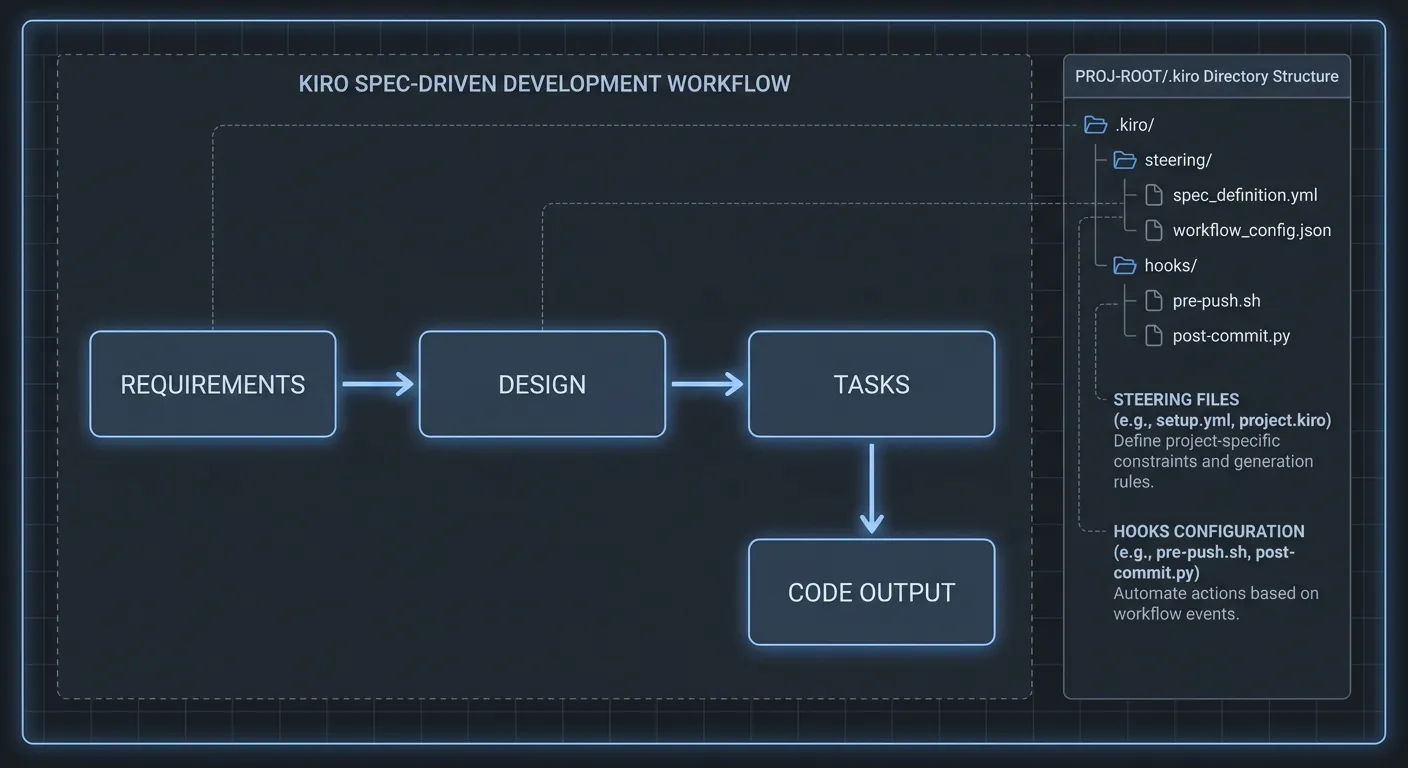
Kiro’s answer: don’t go from prompt to code directly. Generate a requirements document first, review a technical design, assemble a task list, then write the code. The developer approves each stage before the next one starts.
This approach has real value in specific contexts. When I wrote about spec-driven development methodology, the biggest advantage I identified was exactly this: traceability. Knowing why a decision was made, months later, is worth more than people realize until they need it.
How the Spec Workflow Actually Works
Kiro’s spec system generates three structured files under .kiro/specs/, in sequence.
.kiro/
├── steering/
│   ├── product.md      # What the product does and who uses it
│   ├── tech.md         # Stack, frameworks, key dependencies
│   └── structure.md    # Folder layout, architectural conventions
├── specs/
│   └── user-auth/
│       ├── requirements.md    # EARS-notation requirements
│       ├── design.md          # Technical design, sequence diagrams
│       └── tasks.md           # Discrete, trackable implementation tasks
└── hooks/
    └── on-save.json    # Automated actions triggered on file events
The linchpin is requirements.md. Kiro uses EARS (Easy Approach to Requirements Syntax) notation to structure requirements. Here’s what it looks like:
## User Story: Assign Task to Team Member

WHEN a project manager assigns a task to a developer
THE SYSTEM SHALL update the assignee and send a notification
SO THAT the developer knows about their new assignment

**Acceptance Criteria:**
- WHEN task.assignee_id is updated THEN notify the previous assignee
- WHEN task.assignee_id is set to null THEN task becomes unassigned
- IF assignee_id does not exist THEN return HTTP 404 with "User not found"
The format is readable as natural language but structured enough that an AI has less room to misinterpret intent. Developers find it easier to review than pure prose. That’s a real win.
design.md captures the technical implementation: sequence diagrams, schema changes, API endpoint design. tasks.md breaks that into a concrete checklist.
# Implementation Tasks

- [ ] 1. Add assignee_id field to Task model (migration required)
- [ ] 2. Create PATCH /tasks/{task_id}/assign endpoint
- [ ] 3. Implement notification service
- [ ] 4. Write tests for edge cases (null assignee, invalid user ID)
- [ ] 5. Update OpenAPI schema documentation
When you click “Run all Tasks,” Kiro analyzes task dependencies and runs independent ones in parallel. According to the official docs, this cuts execution time significantly for most feature specs.
Agent Hooks and Steering Files: Where Kiro Genuinely Wins
This is the part that I found genuinely interesting. Both Claude Code and Kiro have Hooks concepts, but they approach it differently.
Claude Code’s Hooks system ties shell commands to Claude Code execution events. It’s powerful, but the configuration is JSON and shell scripts — there’s a technical floor to entry.
Kiro’s Agent Hooks work in natural language. You define hook behavior as prose:
“Whenever a React component is saved: 1) If no corresponding test file exists in
__tests__, create one with basic render tests. 2) If it exists, update it to cover any new props or functions. 3) Run the tests to confirm they pass.”
That’s the actual example from the official documentation. You can attach these AI-powered actions to file save, file create, and file delete events. Code quality gates, without writing any scripts. For teams that want automated enforcement without tooling expertise, this is a meaningful advantage.
Steering Files are simpler but practical. Write your project context once in Markdown files under .kiro/steering/, and Kiro carries that context into every conversation. You stop typing “this project uses FastAPI and PostgreSQL” at the start of every session. Claude Code’s CLAUDE.md does something similar, but Kiro’s three-file structure (product.md, tech.md, structure.md) enforces a cleaner separation.
Honestly, these two features represent genuine ground Kiro has that Claude Code doesn’t. The natural-language hook definitions and structured steering are things Kiro built well.
Pricing and Real Limitations
The current Kiro plans:
| Plan | Price | Credits | Estimated usage |
|---|---|---|---|
| Free | Free | 50 | ~1-2 hours of active AI coding |
| Pro | $20/mo | 1,000 | Normal daily development |
| Pro+ | $40/mo | 2,000 | Heavy users |
| Power | $200/mo | 10,000 | Teams / enterprise |
Free tier’s 50 credits is enough to evaluate the workflow but not for daily use — it runs out fast. Pro at $20/month with 1,000 credits is the realistic starting point for most developers.
Compare that to Claude Code Max at $100/month. Kiro Pro looks much cheaper. But since the working style is fundamentally different, it’s not an apples-to-apples comparison.
MCP (Model Context Protocol) is supported — configured via .kiro/mcp.json, same pattern as other MCP clients. But as I noted when comparing OpenAI Codex and Claude Code, the maturity and breadth of Claude Code’s MCP ecosystem is in a different league right now.
One honest complaint: Kiro is a VS Code fork. The upside is full VS Code extension compatibility. The downside is that it’s essentially useless for terminal-centric workflows. If you’re a Neovim user or you prefer terminal-first development, Kiro is a hard sell as a primary tool.
What Actually Separates Kiro from Claude Code
The question I keep getting: “Can Kiro replace Claude Code?”
My answer is no — not now, anyway. Here’s why specifically.
Model power: Kiro runs Claude Sonnet + Amazon Nova. Claude Code gives you direct access to Claude Opus 4. For complex reasoning and multi-step tasks, that performance difference is real.
Speed and flexibility: Claude Code skips the spec phase entirely. For bug fixes, quick refactoring, and exploratory coding, Claude Code is dramatically faster. Kiro’s spec generation process has value, but it takes time. Adding a spec step to a 10-minute change is overhead, not process.
Workflow integration: Claude Code’s agentic workflow patterns are mature. Connections to GitHub, Jira, Slack, and internal APIs flow through MCP without custom setup. Kiro supports MCP too, but the ecosystem isn’t there yet.
The core philosophy: This is the real split. Claude Code says “I’ll implement what you want.” Kiro says “let’s work through what you actually need before we write any code.” Speed versus rigor. Neither is wrong; they optimize for different things.
In practice, the pattern I see in the community is: use Kiro for planning complex features, use Claude Code for implementation and iteration. That’s probably the most rational combination right now.
My Honest Take: Who Should Use This
I don’t think Kiro is overhyped. The problem it’s solving is real, and the approach makes sense. But some context matters.
Kiro makes sense when:
- Multiple developers are building a complex feature together
- Requirements change often and traceability matters
- You want automated quality gates without writing scripts
- VS Code is already your primary editor
Kiro doesn’t fit when:
- You’re working solo and speed is paramount
- You prefer terminal-centric development
- Claude Code or Cursor already fits your workflow and you don’t want to change it
- 80% of your work is modifying existing code or fixing bugs
I think spec-first development is likely where AI coding tools are heading. The current pattern of agents generating code on demand gets messy at scale. Having specs drive code — rather than the other way around — is more sustainable long-term.
But “sustainable long-term” doesn’t mean “switch today.” Try the free tier with 50 credits, see whether the spec workflow fits how you think. One session is enough to know whether this tool clicks with you.
One last observation worth noting: Amazon licensed Claude from Anthropic for Kiro. That means an AWS-hosted IDE running on an Anthropic model. The AI tools ecosystem is getting tangled in ways that make competitive analysis interesting.
References:
Was this helpful?
Your support helps me create better content. Buy me a coffee.
Related Articles
-
Cursor 3 vs Claude Code vs Windsurf: Best AI Tool in 2026
The companion piece to this article. Read the Cursor/Claude Code/Windsurf comparison first to see the full 2026 AI IDE landscape.

-
Specification-Driven Development in the AI Era: Writing Code with Markdown
Covers the philosophical background of spec-driven development. Good pre-reading to understand how Kiro operationalizes this approach in an IDE.
-
Building Automated Code Review Systems with Claude Code Hooks
Deep dive into Claude Code's Hooks system. Read alongside Kiro's Agent Hooks to clearly see the difference in automation philosophy between the two tools.