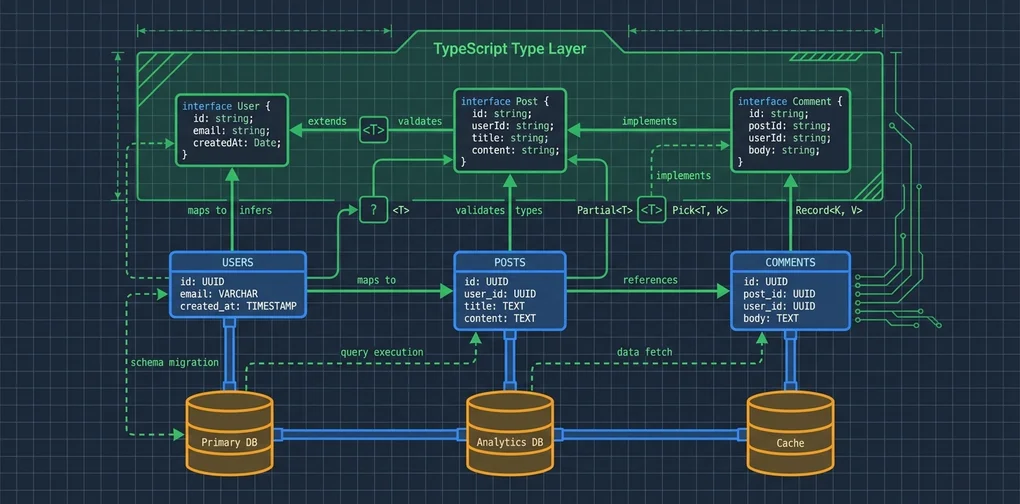
Drizzle ORM Complete Guide: Type-Safe TypeScript DB Layer
Type-safe SQLite and PostgreSQL in TypeScript with Drizzle ORM 0.45 and drizzle-kit — schema, migrations, transactions, and the async gotcha you need to know.
The first time I used Prisma, the thing that threw me off wasn’t the API. It was opening a migration file. You run prisma migrate dev, something happens, and your database changes. But actually reading what got executed? That was harder than it should be. The feeling that something quiet was happening somewhere I couldn’t see never stopped bothering me.
Drizzle ORM sits on the opposite end of that spectrum. The philosophy is basically: “if you know SQL, just add TypeScript type safety on top.” In practice, drizzle-kit generate spits out a plain .sql file you can actually read. You see exactly what will run, review it, and commit it. That’s it.
At the time I’m writing this, Drizzle ORM is on version 0.45.2 and has picked up a lot of momentum on GitHub. I ran everything in a sandbox, all the way through: CRUD, migrations, transactions, the Relations API. I also hit one unexpected gotcha that I want to document clearly.
Installation and Initial Setup
The package split is clean. drizzle-orm is the runtime library; drizzle-kit is the migration tool. Pick a DB driver based on what you’re using.
# SQLite setup
npm install drizzle-orm better-sqlite3
npm install -D drizzle-kit @types/better-sqlite3 typescript ts-node

# PostgreSQL setup
npm install drizzle-orm postgres
npm install -D drizzle-kit
Versions I tested with:
drizzle-orm: 0.45.2drizzle-kit: 0.31.10better-sqlite3: 12.10.0- Node.js: v22.22.0
Your tsconfig.json needs moduleResolution: "bundler" or "node16" or higher.
{
  "compilerOptions": {
    "target": "ES2022",
    "module": "ESNext",
    "moduleResolution": "bundler",
    "strict": true,
    "outDir": "./dist"
  }
}
Schema Definition: SQL Column Types Become TypeScript Types
What makes Drizzle’s schema interesting is that SQL column types map directly to TypeScript types. The schema file IS a TypeScript file.
// schema.ts
import { integer, sqliteTable, text, real } from "drizzle-orm/sqlite-core";
import { relations } from "drizzle-orm";

export const users = sqliteTable("users", {
  id: integer("id").primaryKey({ autoIncrement: true }),
  name: text("name").notNull(),
  email: text("email").notNull().unique(),
  // timestamp mode: auto-converts to JS Date objects
  createdAt: integer("created_at", { mode: "timestamp" })
    .$defaultFn(() => new Date()),
});

export const posts = sqliteTable("posts", {
  id: integer("id").primaryKey({ autoIncrement: true }),
  title: text("title").notNull(),
  content: text("content").notNull(),
  authorId: integer("author_id")
    .notNull()
    .references(() => users.id),
  views: integer("views").notNull().default(0),
  rating: real("rating"), // nullable column — no .notNull()
  publishedAt: integer("published_at", { mode: "timestamp" }),
});

// Relations definition (used by db.query API)
export const usersRelations = relations(users, ({ many }) => ({
  posts: many(posts),
}));

export const postsRelations = relations(posts, ({ one }) => ({
  author: one(users, {
    fields: [posts.authorId],
    references: [users.id],
  }),
}));
integer("created_at", { mode: "timestamp" }) makes the SQLite storage explicit while giving you a Date type at the TypeScript level. For PostgreSQL, swap in import { pgTable, serial, varchar, timestamp } from "drizzle-orm/pg-core". The core API stays nearly identical.
One difference from Prisma worth noting: Prisma uses a separate .prisma file and generates types via the CLI. In Drizzle, the schema is just a TypeScript file, so you can check and modify types directly in your editor. I find this significantly more transparent.
Generating Migrations with drizzle-kit
// drizzle.config.ts
import type { Config } from "drizzle-kit";

export default {
  schema: "./schema.ts",
  out: "./migrations",
  dialect: "sqlite",
  dbCredentials: {
    url: "./local.db",
  },
} satisfies Config;
npx drizzle-kit generate --config=drizzle.config.tsActual output:
Reading config file '/path/to/drizzle.config.ts'
2 tables
posts 7 columns 0 indexes 1 fks
users 4 columns 1 indexes 0 fks

[✓] Your SQL migration file ➜ migrations/0000_lonely_toxin.sql 🚀
Generated SQL:
CREATE TABLE `posts` (
  `id` integer PRIMARY KEY AUTOINCREMENT NOT NULL,
  `title` text NOT NULL,
  `content` text NOT NULL,
  `author_id` integer NOT NULL,
  `views` integer DEFAULT 0 NOT NULL,
  `rating` real,
  `published_at` integer,
  FOREIGN KEY (`author_id`) REFERENCES `users`(`id`)
    ON UPDATE no action ON DELETE no action
);
--> statement-breakpoint
CREATE TABLE `users` (
  `id` integer PRIMARY KEY AUTOINCREMENT NOT NULL,
  `name` text NOT NULL,
  `email` text NOT NULL,
  `created_at` integer
);
--> statement-breakpoint
CREATE UNIQUE INDEX `users_email_unique` ON `users` (`email`);
That SQL runs directly on the database, nothing hidden. I can open it, read exactly what it does, understand it fully, and commit it to version control. Compared to Prisma, where migration generation feels more like a black box, this is a meaningful improvement for my workflow.
npx drizzle-kit migrate --config=drizzle.config.tsOr programmatically:
import { drizzle } from "drizzle-orm/better-sqlite3";
import { migrate } from "drizzle-orm/better-sqlite3/migrator";
import Database from "better-sqlite3";

const sqlite = new Database("./local.db");
const db = drizzle(sqlite);

// Applies SQL files from migrations folder in order
migrate(db, { migrationsFolder: "./migrations" });
If you’re working with Node.js’s built-in SQLite, check out my Node.js Built-in SQLite Guide. Drizzle supports it via drizzle-orm/node-sqlite3.
Basic CRUD With Actual Execution Results
import Database from "better-sqlite3";
import { drizzle } from "drizzle-orm/better-sqlite3";
import { eq, desc, gt, sql } from "drizzle-orm";

const sqlite = new Database(":memory:");
const db = drizzle(sqlite, { schema });
INSERT with returning:
const insertedUsers = await db
  .insert(users)
  .values([
    { name: "Jangwook Kim", email: "kim@jangwook.net", createdAt: new Date() },
    { name: "Alice Dev", email: "alice@example.com", createdAt: new Date() },
  ])
  .returning({ id: users.id, name: users.name });
Output:
[
  { id: 1, name: 'Jangwook Kim' },
  { id: 2, name: 'Alice Dev' }
]
.returning() works correctly with SQLite. Worth noting: older SQLite versions didn’t support the RETURNING clause, but better-sqlite3’s latest version handles it fine.
SELECT with filter and orderBy:
const popularPosts = await db
  .select({ id: posts.id, title: posts.title, views: posts.views, rating: posts.rating })
  .from(posts)
  .where(gt(posts.views, 100))
  .orderBy(desc(posts.views));
Output:
[
  { id: 3, title: 'SQLite in Production', views: 234, rating: 4.2 },
  { id: 1, title: 'Drizzle ORM Introduction', views: 142, rating: 4.7 }
]
Operators like gt(), lt(), eq(), and(), or(), like() compose cleanly. If the types don’t match (say you pass gt(posts.views, "100") with a string), TypeScript catches it at compile time.
JOIN:
const postsWithAuthor = await db
  .select({ postTitle: posts.title, authorName: users.name, views: posts.views })
  .from(posts)
  .innerJoin(users, eq(posts.authorId, users.id))
  .orderBy(desc(posts.views));
Output:
[
  { postTitle: 'SQLite in Production', authorName: 'Alice Dev', views: 234 },
  { postTitle: 'Drizzle ORM Introduction', authorName: 'Jangwook Kim', views: 142 },
  { postTitle: 'TypeScript Type Safety', authorName: 'Jangwook Kim', views: 89 }
]leftJoin, rightJoin, and fullJoin follow the same pattern throughout.
Relations API: The Convenience of db.query
One of the more compelling reasons to pick Drizzle: define Relations in your schema once, and db.query handles nested data fetching without you writing manual JOINs.
// Must pass schema to drizzle() for db.query to work
const usersWithPosts = await db.query.users.findMany({
  with: {
    posts: { columns: { title: true, views: true, rating: true } },
  },
  where: eq(users.id, 1),
});
Output:
[
  {
    "id": 1,
    "name": "Jangwook Kim",
    "email": "kim@jangwook.net",
    "createdAt": "2026-06-10T06:27:18.000Z",
    "posts": [
      { "title": "Drizzle ORM Introduction", "views": 142, "rating": 4.7 },
      { "title": "TypeScript Type Safety", "views": 89, "rating": 4.5 }
    ]
  }
]
Similar to TypeORM’s find({ relations: [...] }). Drizzle generates SQL to avoid N+1 queries, but I’d recommend enabling logging in development to verify what it’s actually sending to the DB.
Transactions: Where the Gotcha Hides
This one caught me off guard. better-sqlite3 is a synchronous driver. SQLite is a file-based synchronous database, so the driver is built that way on purpose.
The problem: using async inside a Drizzle transaction callback throws an error.
// ❌ Error: "Transaction function cannot return a promise"
try {
  await db.transaction(async (tx) => {
    await tx.insert(users).values({ name: "Test", email: "test@test.com" });
  });
} catch (err) {
  console.error(err.message); // "Transaction function cannot return a promise"
}
I hit this exact error during testing. My first reaction was that I’d made a mistake somewhere, but it’s a fundamental better-sqlite3 constraint. The fix is to use synchronous callbacks.
// ✅ Correct (synchronous)
db.transaction((tx) => {
  tx.update(users)
    .set({ balance: 800 })
    .where(eq(users.name, "Alice"))
    .run(); // .run() for synchronous execution

  tx.update(users)
    .set({ balance: 700 })
    .where(eq(users.name, "Bob"))
    .run();
});
.run() is the synchronous execution method. No await needed.
Rollback is automatic when you throw inside the callback:
try {
  db.transaction((tx) => {
    tx.update(users).set({ balance: 0 }).where(eq(users.name, "Alice")).run();
    throw new Error("Simulated failure — triggers rollback");
  });
} catch (err) {
  // Alice's balance is unchanged — rollback worked correctly
}
I tested this and confirmed the rollback works as expected.
PostgreSQL and MySQL are different. Their drivers are async by design, so async/await inside transactions works fine.
If you’re building with SQLite and need a TypeScript REST API with Hono.js, keep this async/sync constraint in mind from the start. It’s a lot easier than refactoring later.
Aggregate Queries and Raw SQL
import { sql } from "drizzle-orm";

const stats = await db
  .select({
    avgRating: sql<number>`AVG(${posts.rating})`,
    totalViews: sql<number>`SUM(${posts.views})`,
    postCount: sql<number>`COUNT(*)`,
  })
  .from(posts);
Output: { "avgRating": 4.466666666666667, "totalViews": 485, "postCount": 3 }
Incrementing a value in an UPDATE:
// Increment views by 10
const updated = await db
  .update(posts)
  .set({ views: sql`${posts.views} + 10` })
  .where(eq(posts.authorId, 1))
  .returning({ id: posts.id, title: posts.title, views: posts.views });
Column references inside sql template literals are processed by Drizzle, so they’re safe from SQL injection.
Prisma vs Drizzle: An Honest Comparison
| Criteria | Drizzle ORM | Prisma |
|---|---|---|
| Learning curve | Fast if you know SQL | Need to learn Prisma schema syntax |
| Migration transparency | Direct SQL files | CLI-managed |
| Type safety | Schema IS TypeScript | Code-generated types |
| Bundle size | Light (~300KB) | Heavier (Prisma Client) |
| Docs/ecosystem | Maturing | More mature |
| ORM style | SQL-like, low-level control | Higher abstraction, more convenience |
| Edge/Serverless | Excellent fit | May need HTTP proxy |
This isn’t a “which is better” question — it’s about fit. If you’re comfortable with SQL and want full visibility into your migrations, Drizzle feels more natural. If your team needs a safer abstraction with a mature ecosystem behind it, Prisma is a solid choice and I wouldn’t argue against it.
My main criticism of Drizzle: the documentation still has rough edges. The API itself works well, but some edge-case behaviors (like the transaction async error) aren’t obvious from reading the docs. You find them by running into them.
Production Considerations
Connection pooling: better-sqlite3 is a single-connection synchronous driver, which makes it a poor fit for serverless or multi-threaded environments. For PostgreSQL:
import { Pool } from "pg";
import { drizzle } from "drizzle-orm/node-postgres";

const pool = new Pool({ host: "localhost", user: "postgres", database: "mydb", max: 10 });
const db = drizzle(pool);
Query logging: Turn it on during development.
const db = drizzle(sqlite, { schema, logger: true });drizzle-kit studio
Since Drizzle 0.30, drizzle-kit studio ships built-in. It’s a local browser-based DB viewer.
npx drizzle-kit studio --config=drizzle.config.tsOpens at https://local.drizzle.studio. You get table listing, data browsing, and basic editing. Think Prisma Studio but free. Don’t point it at a production database, though. There’s no authentication layer.
Combining with TypeScript Zod
You can generate Zod validation schemas directly from your Drizzle schema:
npm install drizzle-zod zodimport { createInsertSchema } from "drizzle-zod";
import { z } from "zod";
// Auto-excludes id, createdAt, etc.
const insertPostSchema = createInsertSchema(posts, {
title: z.string().min(1).max(200),
content: z.string().min(10),
rating: z.number().min(1).max(5).optional(),
});
type NewPost = z.infer<typeof insertPostSchema>;Your DB schema and API validation stay in sync automatically. If a DB column is notNull(), the Zod schema marks it as required. For a deeper look at Zod itself, see my TypeScript Zod v4 + Claude API Structured Output Guide.
My overall take: Drizzle ORM is for TypeScript developers who know SQL and don’t want to give up control for the sake of type safety. The migration transparency alone is worth considering. Being able to open the generated .sql file and know exactly what will run against your database is an underrated feature. The async transaction gotcha is real, but it’s avoidable once you know about it. And honestly, the fact that the error message told me precisely what was wrong (even if the fix wasn’t spelled out) beats a silent failure any day.
I plan to follow this up with a post showing Drizzle + Hono.js for a complete REST API.
When to use Drizzle, and when to avoid it
What matters more than the feature list is whether the tool fits your situation. Here’s how I’d decide after using it.
Drizzle is a good fit when:
- Your team is already comfortable with SQL. Drizzle doesn’t hide SQL, it just adds types on top, so the more you know SQL the smaller the learning curve.
- You’re deploying to edge or serverless runtimes (Cloudflare Workers, Vercel Edge, and similar). The runtime library has zero dependencies and stays tiny, which helps cold starts and bundle size.
- You want to review and commit the migration SQL yourself.
drizzle-kit generateemits human-readable.sql, so schema changes show up plainly in code review. - You need fine-grained query control. Writing complex JOINs, window functions, or DB-specific features directly through the
sqltemplate feels natural.
You’re better off avoiding Drizzle when:
- Your team barely knows SQL and expects the ORM to abstract the data model as much as possible. Prisma’s declarative schema and generated client have a lower barrier here.
- You need very mature docs, tutorials, and third-party guides. Drizzle is improving fast, but some edge cases aren’t as well-documented as Prisma yet.
- Automated data-preserving migrations (like column-rename detection) or a rich GUI workflow are core requirements.
Drizzle vs Prisma in one line: “Want to control the SQL → Drizzle. Want to forget the SQL → Prisma.” Both give you enough type safety. The real difference is the abstraction level and migration transparency. The same reasoning applies to picking test tools in my Vitest 4 migration guide — switching tools always starts from “where does my current workflow hurt.”
If you want to see type safety carried all the way to the API layer, my MCP server TypeScript SDK step-by-step guide covers the same idea in a different context.
References (primary sources)
This post is based on hands-on runs plus the following official sources.
- Drizzle ORM official docs — schema, migrations, Relations API, and drizzle-kit reference
- drizzle-team/drizzle-orm (GitHub) — source code, release notes, issue tracker
- drizzle-team/drizzle-orm-docs (GitHub) — source of the docs site
- WiseLibs/better-sqlite3 (GitHub) — the synchronous SQLite driver (basis for the transaction behavior)
- better-sqlite3 (npm) — version and install details
Frequently Asked Questions
Should I choose Drizzle ORM or Prisma?
How do I build a type-safe DB layer with Drizzle?
How do I generate and apply migrations?
Why does using async in a better-sqlite3 transaction throw an error?
Was this helpful?
Your support helps me create better content. Buy me a coffee.
Related Articles
-
Building Your Own MCP Server with TypeScript — A Practical @modelcontextprotocol/sdk Tutorial
Goes one level deeper into TypeScript.

-
Node.js Built-in SQLite: A Practical Guide — No npm Install Required
Continues the hands-on sqlite experience.

-
Migrating from Jest to Vitest 4: A Complete 2026 Guide
Worth reading alongside this in the same TypeScript track.