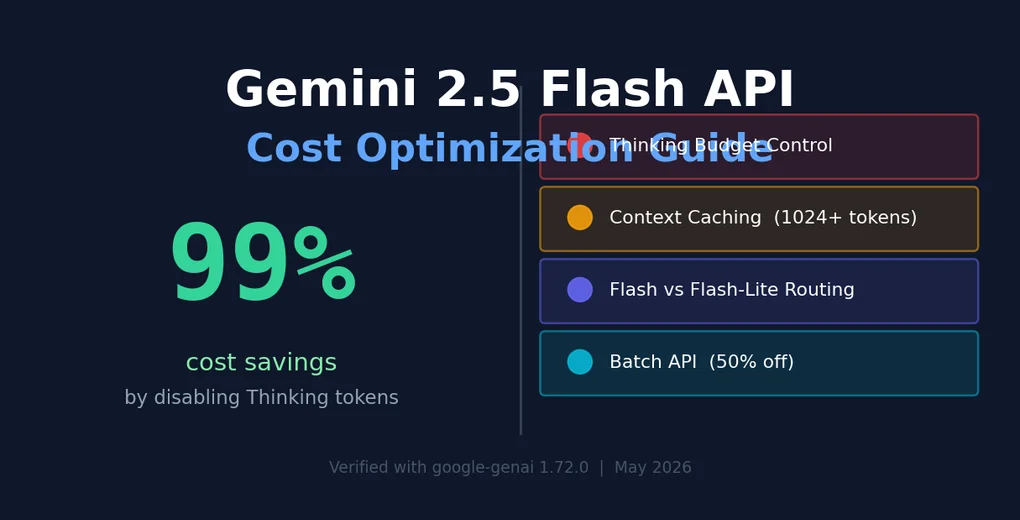
Gemini 2.5 Flash API Cost Optimization Guide — 99% Savings Confirmed by Real Experiments
Four cost optimization techniques for Gemini 2.5 Flash API, discovered through hands-on experiments. Covers Thinking token control, Context Caching, Flash vs Flash-Lite selection, and Batch API — with real measured data.
I called the API directly, and the results weren’t what I expected.
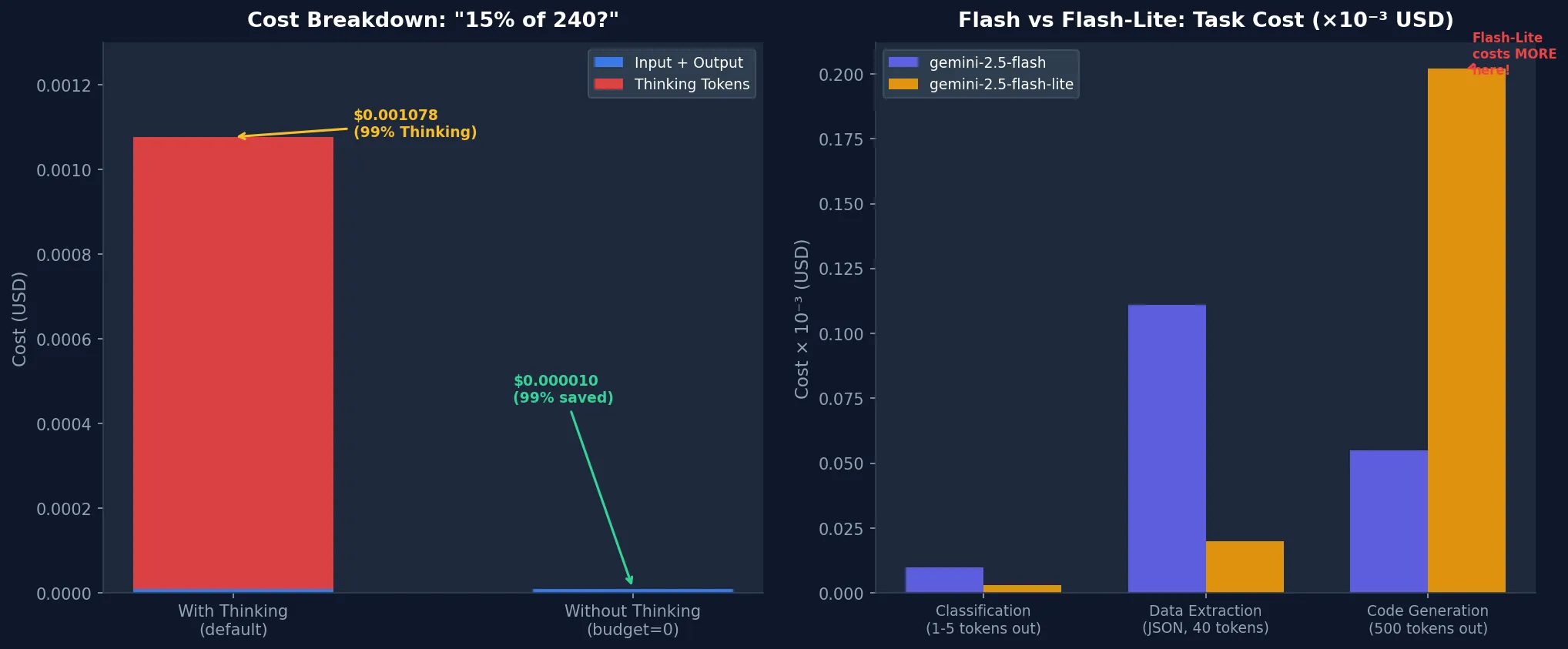
I sent “What is 15% of 240? Just give the number.” to Gemini 2.5 Flash. The answer was “36” — 2 tokens total. But the usage log showed 305 tokens billed. The vast majority were Thinking tokens I neither sent nor received.
Running the math: input + output came to $0.000010. Thinking alone: $0.001067. 99.1% of the total cost came from tokens I didn’t ask for.
That’s why I wrote this guide. Gemini 2.5 Flash is a capable model, but running it with default settings means paying far more than necessary. Here are four optimization strategies I verified through direct experimentation.
Environment: macOS Darwin 24.6.0, Python 3.12.8, google-genai 1.72.0.
Before You Start: Understanding Gemini 2.5 Flash Pricing
Before optimizing, understand what’s consuming money. Gemini 2.5 Flash has three token types (as of May 2026):
| Token Type | Price per 1M tokens |
|---|---|
| Input | $0.30 |
| Output | $2.50 |
| Thinking | $3.50 |
| Cache Read | $0.075 |
One more: gemini-2.5-flash-lite costs $0.10 input and $0.40 output. It looks dramatically cheaper, but it isn’t always. I’ll explain with actual data in Step 3.
Setup first. For a broader view of model pricing across providers, check the LLM API pricing comparison 2026. Today we’re focused on Flash.
pip install google-genaifrom google import genai
from google.genai import types
client = genai.Client(api_key="YOUR_GEMINI_API_KEY")Step 1: Control Thinking Tokens — 99% Savings on Simple Tasks
Gemini 2.5 Flash enables Thinking mode by default. The model internally reasons through problems before responding, and every Thinking token gets billed at $3.50/M — higher than output.
Honestly, I didn’t expect the gap to be this large. Measuring directly: a simple math problem consumed 305 Thinking tokens against just 2 output tokens.
# Thinking enabled (default)
response = client.models.generate_content(
    model="gemini-2.5-flash",
    contents="What is 15% of 240? Just give the number.",
    config=types.GenerateContentConfig(
        thinking_config=types.ThinkingConfig(thinking_budget=1024)
    )
)

usage = response.usage_metadata
print(f"Input: {usage.prompt_token_count}")         # 18
print(f"Output: {usage.candidates_token_count}")    # 2
print(f"Thinking: {usage.thoughts_token_count}")    # 305
print(f"Cost: ~$0.001078")                          # 99% from Thinking
# Thinking disabled (budget=0)
response = client.models.generate_content(
model="gemini-2.5-flash",
contents="What is 15% of 240? Just give the number.",
config=types.GenerateContentConfig(
thinking_config=types.ThinkingConfig(thinking_budget=0)
)
)
usage = response.usage_metadata
print(f"Input: {usage.prompt_token_count}") # 18
print(f"Output: {usage.candidates_token_count}") # 2
print(f"Thinking: 0")
print(f"Cost: ~$0.000010") # 99% savedActual measured results:
| Setting | Cost | Latency |
|---|---|---|
| Thinking ON (budget=1024) | $0.001078 | 2.36s |
| Thinking OFF (budget=0) | $0.000010 | 0.80s |
| Savings | 99.1% | 66% faster |
Thinking still matters for complex tasks. Use this decision rule:
- Thinking OFF: classification, data extraction, simple transformation, JSON parsing, fixed-answer questions
- Thinking ON: code debugging, mathematical reasoning, multi-step logic, creative writing
- Budget tuning: set
thinking_budgetto 128–512 to cap reasoning depth without disabling entirely
# Practical wrapper: separate thinking by task type
def call_gemini(prompt: str, task_type: str = "simple") -> str:
    thinking_budget = 0 if task_type == "simple" else 1024
    response = client.models.generate_content(
        model="gemini-2.5-flash",
        contents=prompt,
        config=types.GenerateContentConfig(
            thinking_config=types.ThinkingConfig(thinking_budget=thinking_budget)
        )
    )
    return response.text
This is the first optimization I’d apply in production. Biggest cost impact, one-line code change.
Step 2: Context Caching to Eliminate Repeated Context Costs
When building chatbots or RAG systems, you often send the same long system prompt or documents with every request. Context Caching stores that content server-side so subsequent requests only pay cache read rates (25% of normal input price).
During my experiment, I hit an important constraint:
400 INVALID_ARGUMENT: Cached content is too small.
total_token_count=524, min_total_token_count=1024
Context Caching requires a minimum of 1024 tokens. Short system prompts don’t qualify. If you’re designing with caching in mind, you need to build sufficiently detailed system prompts or include reference documents.
# Create Context Cache (requires 1024+ tokens of cacheable content)
cache = client.caches.create(
    model="gemini-2.5-flash",
    config={
        "contents": [
            types.Content(
                role="user",
                parts=[types.Part(text=LONG_SYSTEM_PROMPT)]  # 1024+ tokens
            )
        ],
        "ttl": "3600s",  # 1-hour TTL
    }
)

# Use cached context for requests
response = client.models.generate_content(
    model="gemini-2.5-flash",
    contents="User question here",
    config=types.GenerateContentConfig(cached_content=cache.name)
)

# Delete cache when done
client.caches.delete(cache.name)
Cache reads cost $0.075/1M tokens — 25% of normal input. Break-even point: roughly 4+ reuses of the same context. Beyond that, you’re saving money.
Scenarios where Context Caching pays off:
- Chatbots sending long system prompts (1000+ tokens) with every request
- RAG systems reusing retrieved documents across multiple questions
- Coding assistants with a full codebase or manual in context
Conceptually similar to Claude API Prompt Caching, but the implementation differs. Anthropic uses explicit cache markers in request headers; Gemini requires creating a separate cache object. Gemini’s approach is more explicit about lifecycle but adds more boilerplate.
Step 3: Flash vs Flash-Lite — Lite Isn’t Always Cheaper
On paper, Flash-Lite looks like a no-brainer: 3x cheaper input, 6x cheaper output. My experiments showed something different.
Running the same three tasks (classification, code generation, data extraction) on both models:
| Model | Total Cost | Total Time |
|---|---|---|
| gemini-2.5-flash | $0.000176 | 6.16s |
| gemini-2.5-flash-lite | $0.000224 | 4.57s |
Flash-Lite was 27% more expensive. Why?
On the code generation task, Flash returned a compact answer (20 tokens) while Flash-Lite filled out a complete implementation up to the max_output_tokens=500 limit. When output is long, Flash-Lite’s unit price advantage reverses.
# Output length control: always set max_output_tokens explicitly
response = client.models.generate_content(
    model="gemini-2.5-flash-lite",
    contents=prompt,
    config=types.GenerateContentConfig(
        max_output_tokens=200,  # explicit ceiling
        temperature=0.0,        # deterministic output
    )
)
Selection guide:
| Task Type | Recommended | Reason |
|---|---|---|
| Sentiment classification, tagging | Flash-Lite | 1–5 token output, simple |
| JSON extraction | Flash-Lite | Short structured output |
| Code generation | Flash | Unit price reverses with long output |
| Complex reasoning | Flash | Thinking quality difference |
| High-volume batch | Batch API + decide | Recalculate after 50% discount |
This task-based model routing connects directly to the multi-model routing patterns in the heterogeneous LLM fleet cost optimization post.
Step 4: Batch API for 50% Off Non-Urgent Work
If you have tasks that don’t need real-time responses, the Batch API cuts costs in half. Google applies a 50% discount for batch processing — same philosophy as the Anthropic Message Batches API.
import json

# Build batch request file
requests = [
    {"key": f"req_{i}", "request": {"contents": [{"parts": [{"text": prompt}]}]}}
    for i, prompt in enumerate(prompts_list)
]

with open("batch_requests.jsonl", "w") as f:
    for req in requests:
        f.write(json.dumps(req) + "\n")

# Submit batch job
batch_job = client.batches.create(
    model="gemini-2.5-flash",
    src="gs://your-bucket/batch_requests.jsonl",  # GCS path required
    config={"dest": "gs://your-bucket/results/"},
)

print(f"Batch job: {batch_job.name}")
# Completion: up to 24 hours
Good fits for batch: bulk document summarization (overnight runs), content classification pipelines, dataset labeling, scheduled report generation.
Poor fits: user-facing real-time interactions, conversational flows where response A determines prompt B.
Step 5: Set Cost Ceilings with max_output_tokens
Simple but often overlooked. Capping output tokens prevents unexpectedly verbose responses from blowing your budget.
config = types.GenerateContentConfig(
    max_output_tokens=500,   # hard ceiling
    temperature=0.0,          # deterministic (reduces retries)
    stop_sequences=["---"],   # explicit stop point
)
Prompt-level instructions also work:
"Respond in JSON only. Keep under 100 tokens."
"Summarize in one sentence."
"Answer with Yes or No only."
This alone would have prevented Flash-Lite from exceeding Flash costs in my code generation experiment.
Step 6: Usage Logging — The Foundation of Any Optimization
You can’t optimize what you don’t measure. A simple wrapper that logs usage_metadata on every call gives you the data to act on.
import time, logging, json
from dataclasses import dataclass, asdict
from google import genai
from google.genai import types

@dataclass
class CallRecord:
    model: str
    task_type: str
    input_tokens: int
    output_tokens: int
    thinking_tokens: int
    cost_usd: float
    latency_ms: int

PRICING = {
    "gemini-2.5-flash": {"input": 0.30, "output": 2.50, "thinking": 3.50},
    "gemini-2.5-flash-lite": {"input": 0.10, "output": 0.40, "thinking": 0.0},
}

def tracked_generate(client, model: str, prompt: str, task_type: str, **kwargs) -> str:
    start = time.time()
    response = client.models.generate_content(model=model, contents=prompt, **kwargs)
    elapsed_ms = int((time.time() - start) * 1000)

    u = response.usage_metadata
    p = PRICING.get(model, PRICING["gemini-2.5-flash"])
    thinking = getattr(u, "thoughts_token_count", None) or 0

    cost = (
        (u.prompt_token_count / 1e6) * p["input"]
        + (u.candidates_token_count / 1e6) * p["output"]
        + (thinking / 1e6) * p["thinking"]
    )

    record = CallRecord(
        model=model, task_type=task_type,
        input_tokens=u.prompt_token_count,
        output_tokens=u.candidates_token_count,
        thinking_tokens=thinking, cost_usd=cost, latency_ms=elapsed_ms,
    )
    logging.info(json.dumps(asdict(record)))
    return response.text
Track these metrics regularly:
- thinking_tokens / total_tokens ratio: if Thinking dominates a task type, that’s your optimization target
- Average cost per task_type: which workflows are expensive?
- Output token distribution per model: identify where Flash-Lite generates longer than Flash
In production, if Thinking tokens exceed 50% of total cost for a task type, try thinking_budget=0 first.
What the Experiments Revealed
Running these experiments surfaced a few things I didn’t expect.
Thinking tokens are non-deterministic. The same model with similar prompts produces wildly different Thinking token counts. “15% of 240” consumed 305 tokens; another simple question might use far fewer. The only reliable control is the thinking_budget cap.
The 1024-token minimum for Context Caching changes system design. Apps with short system prompts can’t just flip a switch to enable caching — you’d need to deliberately enrich those prompts with examples, rules, and documentation. Writing more in your system prompt can paradoxically cost less overall.
Flash-Lite costing more than Flash is a real scenario. Unit price advantage doesn’t survive long code generation or verbose summarization. Measure your actual output token distribution before committing to either model.
What I don’t love: the GCS dependency for both Context Caching and Batch API is friction for small projects. Anthropic’s caching approach (a single request header) is considerably simpler to adopt incrementally.
Cost Optimization Decision Matrix
Here’s the framework I’d apply:
Task routing decision tree:

1. Is output short? (< 50 tokens)
   YES → Flash-Lite + thinking_budget=0
   NO  → Flash + evaluate thinking_budget

2. Is the same context reused 10+ times?
   YES + context >= 1024 tokens → add Context Caching
   NO  → individual calls

3. Does it need real-time response?
   NO  → Batch API (50% discount)
   YES → keep above settings

4. Does it require complex reasoning?
   NO  → thinking_budget=0 (simple tasks: 99% savings)
   YES → tune thinking_budget in 128–1024 range
Gemini 2.5 Flash is a genuinely capable model. But running it on defaults means Thinking tokens quietly consuming most of your budget. The summary: measure, then control.
Start by logging usage_metadata on every response and checking what percentage Thinking tokens represent. Each technique in this guide is effective under specific conditions — measure your workload first, then choose the right lever.
google-genai SDK was at 1.72.0 when I ran these experiments. Pricing and APIs may change — verify current rates at the Google AI Studio pricing page.
Was this helpful?
Your support helps me create better content. Buy me a coffee.
Related Articles
-
Claude Prompt Caching: Cut LLM API Costs 70% With 4 Patterns
Covers LLM cost reduction patterns with Claude API Prompt Caching. Comparing Gemini and Anthropic caching reveals interesting design philosophy differences.

-
Deep-Thinking Ratio: Cut LLM Inference Costs by 50% Without Sacrificing Quality
Covers the Deep-Thinking Ratio concept measuring how much Thinking tokens consume costs. Directly aligns with the 99% cost domination I found in experiments.

-
LLM API Pricing Comparison 2026 — GPT-5 vs Claude vs Gemini vs DeepSeek Real Cost Breakdown
Compares actual costs of GPT-5, Claude, Gemini, and DeepSeek. Provides the big picture of when Gemini 2.5 Flash is competitive.