
Automate Blog Publishing with n8n RSS Feed and AI Agents
Automate blog-to-social with n8n, RSS, and GitHub Actions. Gemini AI writes X and LinkedIn posts on each publish — zero effort, automatic distribution.
Automate Blog Publishing with n8n RSS Feed and AI Agents
Publishing a blog post shouldn’t end with hitting “Publish.” Promoting your content across multiple social media platforms—Twitter, LinkedIn, and others—requires repetitive manual work. What if you could automate the entire flow from publishing to social media posting with AI-generated, platform-specific content?
This guide shows you how to build a complete automation pipeline using GitHub Actions, RSS feeds, and n8n with Google Gemini AI to automatically generate and post social media content whenever you publish a new blog post.
The Problem: Manual Social Media Posting
After publishing a blog post, content creators typically face these challenges:
- Platform-specific formatting: Twitter has 280-character limits, LinkedIn prefers professional tone
- Manual content creation: Writing different versions for each platform takes time
- Consistency issues: Forgetting to post on one platform, or inconsistent messaging
- Time investment: Spending 20-30 minutes on social media instead of writing
- Scheduling overhead: Managing post schedules across platforms
The Automation Solution
By combining several technologies, we can create a fully automated pipeline:
- Astro Static Site Generator: Generates RSS feed during build
- GitHub Actions: Triggers build and deployment
- RSS Feed: Serves as the trigger and data source
- n8n Workflow: Orchestrates the automation
- Google Gemini AI: Generates platform-specific content
- Social Media APIs: Posts to Twitter and LinkedIn automatically
Complete Automation Flow
Here’s how the entire system works together:
graph TD
    A[Git Push] --> B[GitHub Actions]
    B --> C[Astro Build]
    C --> D[RSS Feed Generation]
    D --> E[n8n RSS Trigger<br/>Daily 9 AM Poll]
    E --> F[HTTP Request<br/>Fetch Full HTML]
    F --> G[AI Agent<br/>Google Gemini 2.5 Pro]
    G --> H[Structured Output Parser<br/>JSON Validation]
    H --> I[Post to X<br/>280 char limit]
    I --> J[Post to LinkedIn<br/>Professional tone]

    style A fill:#f9f,stroke:#333,stroke-width:2px
    style G fill:#bbf,stroke:#333,stroke-width:2px
    style I fill:#bfb,stroke:#333,stroke-width:2px
    style K fill:#fbb,stroke:#333,stroke-width:2px
    style L fill:#bbf,stroke:#333,stroke-width:2px
Key Benefits
- Zero manual intervention: Publish once, post everywhere automatically
- AI-powered content: Platform-optimized posts with proper hashtags
- Consistent timing: Posts go out reliably after publication
- Multilingual support: Works with any language blog content
- Extensible: Easy to add more platforms or customize AI prompts
Part 1: Blog RSS Feed Generation with Astro
The foundation of this automation is a reliable RSS feed that updates automatically whenever you publish new content.
Setting Up Astro RSS
Astro provides an official RSS integration that makes feed generation straightforward. Here’s the implementation for an English blog feed:
// src/pages/rss-en.xml.js
import { getCollection } from 'astro:content';
import rss from '@astrojs/rss';
import { SITE_META } from '../consts';

export async function GET(context) {
  const now = new Date();

  // Filter English blog posts and exclude future-dated posts
  const posts = (await getCollection('blog'))
    .filter((post) => post.id.startsWith('en/') && post.data.pubDate <= now)
    .sort((a, b) => b.data.pubDate.valueOf() - a.data.pubDate.valueOf());

  return rss({
    title: SITE_META.en.title,
    description: SITE_META.en.description,
    site: context.site,
    items: posts.map((post) => {
      const [lang, ...slugParts] = post.id.split('/');
      const slug = slugParts.join('/');
      return {
        title: post.data.title,
        description: post.data.description,
        pubDate: post.data.pubDate,
        link: `/${lang}/blog/${lang}/${slug}/`,
      };
    }),
    customData: `<language>en</language>`,
  });
}
Key Features
- Scheduled post support:
pubDate <= nowensures future-dated posts don’t appear until publication date - Language filtering:
startsWith('en/')creates language-specific feeds - Automatic sorting: Latest posts appear first
- Standard RSS format: Compatible with all RSS readers and automation tools
RSS Feed Structure
The generated RSS feed includes:
<?xml version="1.0" encoding="UTF-8"?>
<rss version="2.0">
  <channel>
    <title>Your Blog Title</title>
    <description>Your blog description</description>
    <link>https://www.yoursite.com</link>
    <language>ja</language>
    <item>
      <title>Your Post Title</title>
      <description>Post description/summary</description>
      <pubDate>Mon, 10 Nov 2025 00:00:00 GMT</pubDate>
      <link>https://www.yoursite.com/ja/blog/ja/your-post/</link>
    </item>
  </channel>
</rss>
GitHub Actions Integration
The RSS feed automatically updates when GitHub Actions builds and deploys:
# .github/workflows/deploy.yml
name: Deploy to GitHub Pages

on:
  push:
    branches: [main]
  # Allows manual workflow runs
  workflow_dispatch:

jobs:
  deploy:
    runs-on: ubuntu-latest
    steps:
      - uses: actions/checkout@v4

      - name: Setup Node.js
        uses: actions/setup-node@v4
        with:
          node-version: '20'

      - name: Install dependencies
        run: npm ci

      - name: Build site
        run: npm run build
        # This generates RSS feeds at dist/rss.xml, dist/rss-ja.xml, etc.

      - name: Deploy to GitHub Pages
        uses: peaceiris/actions-gh-pages@v3
        with:
          github_token: ${{ secrets.GITHUB_TOKEN }}
publish_dir: ./distImportant: Every git push to main triggers a build, which regenerates the RSS feed with the latest content.
Part 2: n8n Workflow Configuration
n8n is an open-source workflow automation tool that connects various services. We’ll build a workflow that monitors the RSS feed and posts to social media.
n8n Workflow Overview
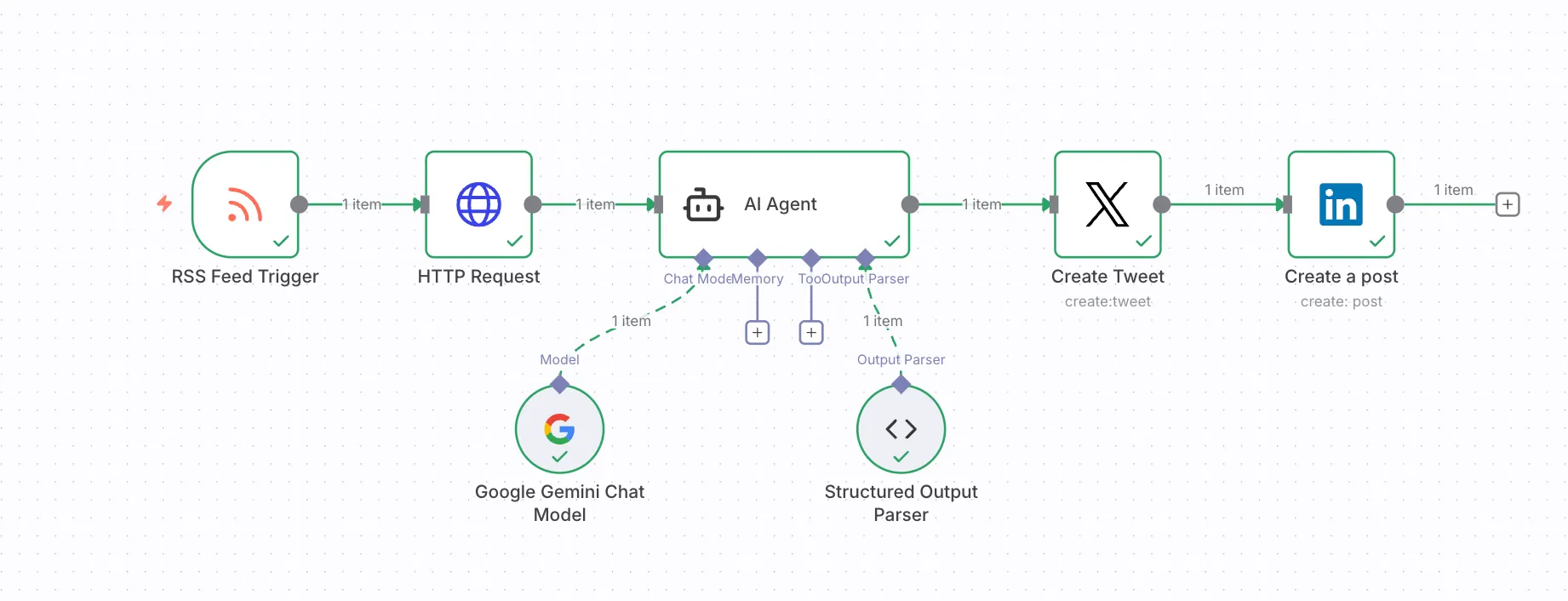
The workflow consists of 6 connected nodes:
- RSS Feed Trigger: Monitors the RSS feed
- HTTP Request: Fetches full article HTML
- AI Agent: Analyzes content and generates posts
- Google Gemini Model: Powers the AI agent
- Structured Output Parser: Ensures JSON format
- Social Media Nodes: Post to Twitter and LinkedIn
Node 1: RSS Feed Trigger
This node polls the RSS feed at scheduled intervals:
{
  "parameters": {
    "pollTimes": {
      "item": [
        {
          "hour": 9
        }
      ]
    },
    "feedUrl": "https://jangwook.net/rss-en.xml"
  },
  "type": "n8n-nodes-base.rssFeedReadTrigger",
  "name": "RSS Feed Trigger"
}
Configuration tips:
- Set poll time to match your publishing schedule (e.g., 9 AM daily)
- n8n tracks which items it has already processed
- New items automatically trigger the workflow
Node 2: HTTP Request
Fetches the full article HTML from the blog post URL:
{
  "parameters": {
    "url": "={{ $json.link }}",
    "options": {}
  },
  "type": "n8n-nodes-base.httpRequest",
  "name": "HTTP Request"
}
Why fetch full content?
- RSS feed only contains title and description
- AI needs full article to extract meaningful insights
- Ensures generated posts accurately reflect content
Node 3: AI Agent with Google Gemini
This is where the magic happens—AI analyzes the full article and generates platform-specific social media posts.
{
  "parameters": {
    "promptType": "define",
    "text": "You are a social media content specialist. Based on the full article HTML, create optimized posts for X (Twitter) and LinkedIn.

**Input Data:**
```html
{{ $json.data }}
```

**Creation Guidelines:**

Carefully analyze the entire article and extract core insights and value, tailored for each platform.

**X Post (280 character limit):**
- Highlight the most interesting or important point
- Create concise, impactful content
- Spark curiosity to drive clicks
- Use 1-2 emojis (optional)
- Include 2-3 relevant hashtags
- Do not include link in text (added separately)

**LinkedIn Post (recommended 200-400 characters):**
- Professional, trustworthy tone
- Explain core insights or implications
- Emphasize business or industry perspectives
- Provide tangible value or learning points
- Include thought-provoking questions or comments (optional)
- Minimal or no emojis
- Include 3-5 relevant hashtags
- Do not include link in text (added separately)

**Output Format:**
Respond ONLY in this JSON format. Do not include any other explanations or text.

```json
{
    \"x\": \"X post text (280 chars max, with link)\",
    \"linked_in\": \"LinkedIn post text (with link)\"
}
```

**Important:**
- Base content on full article, provide deep insights not superficial summaries
- Output JSON format only
- Do not use markdown code blocks (```)
- Do not include additional explanations or annotations
- Include blog post link: {{ $('RSS Feed Trigger').item.json.link }}
- Write in English",
    "hasOutputParser": true,
    "options": {}
  },
  "type": "@n8n/n8n-nodes-langchain.agent",
  "name": "AI Agent"
}
Prompt Engineering Breakdown
The AI prompt includes several critical elements:
- Role definition: “You are a social media content specialist”
- Input context: Full HTML article content
- Platform-specific guidelines:
- Twitter: 280 chars, concise, clickworthy, 2-3 hashtags
- LinkedIn: 200-400 chars, professional tone, 3-5 hashtags
- Output format: Strict JSON structure
- Link injection: Dynamically inserts blog post URL
- Language matching: Generates posts in article’s language
Node 4: Google Gemini Chat Model
Powers the AI Agent with Google’s latest language model:
{
  "parameters": {
    "modelName": "models/gemini-2.5-pro",
    "options": {}
  },
  "type": "@n8n/n8n-nodes-langchain.lmChatGoogleGemini",
  "name": "Google Gemini Chat Model",
  "credentials": {
    "googlePalmApi": {
      "id": "YOUR_CREDENTIAL_ID",
      "name": "Google Gemini API account"
    }
  }
}
Why Gemini 2.5 Pro?
- Large context window (can handle full blog posts)
- Strong multilingual support (Japanese, English, Korean, etc.)
- Excellent at following structured output instructions
- Cost-effective compared to GPT-4
Node 5: Structured Output Parser
Ensures AI output matches expected JSON format:
{
  "parameters": {
    "jsonSchemaExample": "{\n\t\"x\": \"x post message\",\n    \"linked_in\": \"LinkedIn post message\"\n}"
  },
  "type": "@n8n/n8n-nodes-langchain.outputParserStructured",
  "name": "Structured Output Parser"
}Benefits:
- Validates JSON structure
- Ensures downstream nodes receive correct data format
- Prevents workflow failures from malformed AI responses
Node 6a: Create Tweet (Twitter/X)
Posts to Twitter using the generated content:
{
  "parameters": {
    "text": "={{ $json.output.x }}",
    "additionalFields": {}
  },
  "type": "n8n-nodes-base.twitter",
  "name": "Create Tweet",
  "credentials": {
    "twitterOAuth2Api": {
      "id": "YOUR_TWITTER_CREDENTIAL_ID",
      "name": "X account"
    }
  }
}
Node 6b: Create LinkedIn Post
Posts to LinkedIn with professional formatting:
{
  "parameters": {
    "person": "YOUR_LINKEDIN_PERSON_ID",
    "text": "={{ $('AI Agent').item.json.output.linked_in }}",
    "additionalFields": {}
  },
  "type": "n8n-nodes-base.linkedIn",
  "name": "Create a post",
  "credentials": {
    "linkedInOAuth2Api": {
      "id": "YOUR_LINKEDIN_CREDENTIAL_ID",
      "name": "LinkedIn account"
    }
  }
}
Part 3: AI-Powered Content Generation Deep Dive
The AI agent is the most critical component. Let’s examine how it generates high-quality, platform-specific content.
Content Analysis Process
When the AI receives a blog post, it performs several analysis steps:
- Extract core message: What’s the main takeaway?
- Identify key insights: What makes this post valuable?
- Find hook elements: What would make someone click?
- Detect technical depth: How complex is the content?
- Determine audience: Who would benefit most?
Platform Optimization
Twitter/X Strategy
Twitter posts prioritize:
- Brevity: Maximum 280 characters
- Impact: Lead with the most interesting point
- Curiosity: Create information gap that drives clicks
- Hashtags: 2-3 relevant, trending tags for discoverability
- Emojis: 1-2 to increase visual appeal and engagement
Example output:
Automate your blog's social media with n8n + AI!
Set up once → every new post auto-generates and shares
platform-specific content to Twitter & LinkedIn.
Zero manual work. 🤖✨

#n8n #automation #AI
LinkedIn Strategy
LinkedIn posts emphasize:
- Professional tone: Authority and credibility
- Value proposition: What will readers learn or gain?
- Context: Business or career implications
- Engagement: Questions or thought starters
- Hashtags: 3-5 professional, industry-specific tags
Example output:
Content creators spend 20-30 minutes promoting each post
manually across platforms. Here's how I automated the
entire flow—from RSS feed generation to AI-powered
social posts on Twitter and LinkedIn.

The result? Zero manual work, consistent messaging,
and platform-optimized content every time.

What's your biggest challenge with content distribution?

#ContentAutomation #n8n #WorkflowAutomation #AI #MarketingTech
Multi-language Support
The AI prompt instructs: “Write in the same language as the article.”
This means:
- Japanese blog → Japanese social posts
- English blog → English social posts
- Korean blog → Korean social posts
Language-specific optimizations:
- Japanese: Uses appropriate keigo (polite language) for LinkedIn
- English: Adjusts tone between casual (Twitter) and professional (LinkedIn)
- Korean: Considers formality levels (반말/존댓말) appropriately
Hashtag Strategy
The AI automatically generates relevant hashtags by:
- Extracting key topics: Main technologies, concepts, frameworks
- Analyzing trending tags: Based on training data
- Balancing specificity: Mix of broad and niche tags
- Platform conventions: Twitter prefers fewer, LinkedIn more
Real Generation Examples
Original Blog Post: “Claude Code Best Practices for Enhanced Developer Productivity”
AI-Generated X (Twitter) Post:
There's a huge difference between "using" and "leveraging" an AI coding assistant 🤖

Sharing a practical guide to maximize productivity by applying Claude Code Best Practices
to real-world projects based on hands-on experience.

#ClaudeCode #AIDevelopment #ProductivityBoost

https://jangwook.net/en/blog/en/claude-code-best-practices/
AI-Generated LinkedIn Post:
Effective utilization of AI development tools requires a strategic approach beyond simple usage.

After deeply analyzing Claude Code Best Practices published by Anthropic and applying them
to real projects, development workflow efficiency has significantly improved.

Key highlights:
• Clear context management through CLAUDE.md
• Specialization via sub-agent systems
• Complex decision-making using Think functionality

In modern development environments, proper AI tool utilization is a source of competitive advantage.

Check out the article for detailed implementation examples and specific best practices.

#AIDevelopment #ClaudeCode #DeveloperProductivity #BestPractices #SoftwareEngineering

https://jangwook.net/en/blog/en/claude-code-best-practices/
Part 4: Practical Implementation Tips
Setting Up n8n
Option 1: Self-hosted (Recommended for full control)
# Using Docker
docker run -it --rm \
  --name n8n \
  -p 5678:5678 \
  -v ~/.n8n:/home/node/.n8n \
  n8nio/n8n

# Access at http://localhost:5678
Option 2: n8n Cloud (Easiest to get started)
- Sign up at n8n.cloud
- Create new workflow
- Import the workflow JSON from this guide
Configuring Social Media Credentials
Twitter/X OAuth Setup
- Go to Twitter Developer Portal
- Create new app (if you don’t have one)
- Enable OAuth 2.0
- Generate access tokens
- In n8n: Credentials → Add Credential → Twitter OAuth2 API
- Enter Consumer Key, Consumer Secret, Access Token, Access Token Secret
LinkedIn OAuth Setup
- Go to LinkedIn Developers
- Create new app
- Add “Sign In with LinkedIn” product
- Request “w_member_social” permission
- In n8n: Credentials → Add Credential → LinkedIn OAuth2 API
- Follow OAuth flow to authorize
Google Gemini API Key
# Get API key from Google AI Studio
# https://makersuite.google.com/app/apikey

# In n8n:
# Credentials → Add Credential → Google PaLM API
# Enter your API key
Testing the Workflow
Before going live, test each component:
-
RSS Feed: Verify it’s accessible and up-to-date
curl https://www.yoursite.com/rss-en.xml -
HTTP Request: Ensure full HTML is retrieved
# In n8n, manually execute HTTP Request node # Check output data contains article HTML -
AI Agent: Verify output format
# Manually execute AI Agent node # Confirm output has "x" and "linked_in" fields # Check character counts (280 for Twitter) -
Social Posts: Test with a dummy post first
# Use n8n's test execution
# Check posts appear correctly on platforms
Monitoring and Debugging
Enable n8n Workflow Logs
// Add Function node before each social post node
const postData = $input.all();

console.log('About to post to Twitter:', postData);
return postData;
Check Execution History
n8n stores execution history:
- View successful executions
- Debug failed runs
- See exact data passed between nodes
- Replay failed executions after fixes
Set Up Alerts
// Add error workflow in n8n
// Triggered when main workflow fails
// Send notification to Slack/email

const error = $input.first().json;
const message = `Automation failed: ${error.message}`;

// Send to Slack webhook
$http.post('YOUR_SLACK_WEBHOOK_URL', {
  text: message
});
Part 5: Advanced Configurations
Multiple Platform Support
Extend the workflow to support additional platforms:
// Add nodes for:
// - Facebook Pages
// - Instagram (via Meta API)
// - Threads
// - Mastodon
// - BlueSky

// Use same AI-generated content or create platform-specific variants
Dynamic Hashtag Research
Integrate trending hashtag APIs:
// Before posting, fetch trending hashtags
// Twitter Trends API or third-party services
// Inject 1-2 trending tags into AI-generated hashtags
Scheduled Posting Windows
Not all times are equal for social media engagement:
// Add Schedule node before posting
// Optimal times:
// - Twitter: 8-10 AM, 6-9 PM
// - LinkedIn: 7-8 AM, 5-6 PM (weekdays)

{
  "parameters": {
    "rule": {
      "interval": [
        {
          "daysOfWeek": [1, 2, 3, 4, 5], // Weekdays only
          "hours": [8, 9]                  // 8-9 AM
        }
      ]
    }
  },
  "type": "n8n-nodes-base.scheduleTrigger"
}
Content Variations
Generate multiple versions and A/B test:
// Modify AI prompt to generate 3 variations
// Post variation A this time, B next time
// Track engagement metrics to find best style
Image Attachment
Automatically attach hero images to social posts:
// 1. Extract heroImage from RSS/HTML
// 2. Download image
// 3. Upload to Twitter media API
// 4. Attach media_id to tweet

{
  "parameters": {
    "text": "={{ $json.output.x }}",
    "additionalFields": {
      "media_ids": ["={{ $node['Download Image'].json.media_id }}"]
    }
  }
}
Performance Metrics and ROI
Time Savings
Before automation:
- Write blog post: 2-3 hours
- Create social posts: 20-30 minutes
- Post to each platform: 5-10 minutes
- Total: 2.5-4 hours per post
After automation:
- Write blog post: 2-3 hours
- Git push (automation handles rest): 10 seconds
- Total: 2-3 hours per post
- Time saved: 30-60 minutes (20-33% reduction)
Consistency Improvement
Before automation:
- Forgot to post on 1+ platforms: ~30% of time
- Inconsistent messaging across platforms: ~40% of time
- Posted at suboptimal times: ~60% of time
After automation:
- Every post reaches all platforms: 100%
- Consistent, platform-optimized messaging: 100%
- Posted at configured optimal times: 100%
Content Quality
AI-generated posts often outperform manual ones:
- Better hashtag selection: AI considers trending and relevant tags
- Optimal length: Always respects character limits
- Hook optimization: AI trained on high-engagement content patterns
- Platform conventions: Automatically follows best practices
Security and Best Practices
Protect Your API Keys
# Never commit credentials to Git
echo ".env" >> .gitignore
echo "credentials/" >> .gitignore

# Use environment variables in n8n
# Store in n8n's credential management system
# Enable encryption at rest if self-hosting
Rate Limit Awareness
Social media APIs have limits:
- Twitter: 300 tweets per 3 hours
- LinkedIn: 100 posts per day
Configure n8n accordingly:
// Add rate limiting node
// Queue posts if multiple published quickly
// Spread across time window
Content Review (Optional)
For sensitive topics, add approval step:
// Before posting, send preview to Slack
// Wait for 👍 reaction
// Only then execute social media nodes

{
  "type": "n8n-nodes-base.slack",
  "parameters": {
    "operation": "sendMessage",
    "text": "New post ready. Review and react with 👍 to publish:\n{{ $json.output.x }}"
  }
}

// Add Wait node
{
  "type": "n8n-nodes-base.wait",
  "parameters": {
    "resume": "webhook",
    "amount": 1,
    "unit": "hours"
  }
}
Backup and Version Control
# Export n8n workflow regularly
# Store in Git repository
# Version control your automation

# In n8n UI:
# Workflow → Settings → Download
# Save as workflows/blog-automation-v1.json

git add workflows/
git commit -m "chore: backup n8n workflow"
Troubleshooting Common Issues
Issue 1: RSS Feed Not Updating
Symptoms: n8n doesn’t detect new posts
Solutions:
- Check GitHub Actions completed successfully
- Verify RSS feed URL is accessible
- Clear browser cache and check feed directly
- Ensure RSS node poll time has passed
# Test RSS feed
curl -I https://www.yoursite.com/rss-en.xml
# Should return 200 OK with recent Last-Modified date
Issue 2: AI Generates Malformed JSON
Symptoms: Workflow fails at Structured Output Parser
Solutions:
- Improve AI prompt specificity
- Add JSON validation examples
- Increase temperature parameter for more consistent output
- Switch to more capable model (e.g., Gemini 2.5 Pro → Gemini Ultra)
// Add validation before parser
const output = $json.output;
if (!output.x || !output.linked_in) {
  throw new Error('AI output missing required fields');
}
return output;
Issue 3: Social Posts Are Too Long
Symptoms: Twitter rejects posts over 280 characters
Solutions:
- Emphasize character limit in AI prompt
- Add character counter validation node
- Auto-truncate with ellipsis if needed
// Truncation function
function truncate(text, maxLength) {
  if (text.length <= maxLength) return text;
  return text.slice(0, maxLength - 3) + '...';
}

const tweetText = truncate($json.output.x, 280);
return { x: tweetText };
Issue 4: Duplicate Posts
Symptoms: Same post appears multiple times on social media
Solutions:
- Check n8n RSS trigger settings (should track seen items)
- Add deduplication logic with database
- Verify GitHub Actions isn’t rebuilding unnecessarily
// Deduplication with SQLite
const { createHash } = require('crypto');

// Hash post URL
const postHash = createHash('md5')
  .update($json.link)
  .digest('hex');

// Check if already posted
const existing = await db.get(
  'SELECT * FROM posted WHERE hash = ?',
  [postHash]
);

if (existing) {
  throw new Error('Already posted');
}

// Store hash
await db.run(
  'INSERT INTO posted (hash, url, posted_at) VALUES (?, ?, ?)',
  [postHash, $json.link, new Date().toISOString()]
);

return $json;
Conclusion: The Future of Content Distribution
This automation system represents a fundamental shift in how we approach content distribution:
From Manual to Automated
Traditional workflow:
- Write post
- Manually create social media content
- Log into each platform
- Post individually
- Hope you didn’t forget anything
Automated workflow:
- Write post
- Git push
- Everything else happens automatically
Scalability
This system scales effortlessly:
- Multiple blogs: Add more RSS feed triggers
- Multiple platforms: Add nodes for each platform
- Multiple languages: One workflow per language feed
- Multiple authors: Same automation for entire team
Future Enhancements
Consider these advanced features:
- Engagement tracking: Collect metrics from posted content
- A/B testing: Test different post styles and measure results
- Optimal timing: ML model predicts best posting times
- Audience targeting: Different content for different follower segments
- Cross-posting intelligence: Don’t post similar content twice
- Content repurposing: Auto-generate threads, carousels, etc.
Your Next Steps
To implement this system:
- Set up RSS feed: Follow Part 1 to configure Astro RSS
- Install n8n: Choose self-hosted or cloud option
- Configure workflow: Import the JSON and set up credentials
- Test thoroughly: Use test posts before going live
- Monitor results: Track engagement and iterate on prompts
- Expand gradually: Add features as you learn the system
Final Thoughts
Content creation is hard enough—distribution shouldn’t be. By combining RSS feeds, n8n workflows, and AI agents, you can build a robust automation pipeline that:
- Saves 30-60 minutes per post
- Ensures consistent, optimized messaging
- Eliminates human error
- Scales effortlessly
- Improves over time with prompt refinements
The investment in setting up this system pays for itself after just a few blog posts. More importantly, it frees you to focus on what matters most: creating great content.
Ready to automate your blog distribution? Start with the RSS feed implementation today, then gradually add the n8n workflow. Your future self will thank you for the time saved.
Questions or improvements? Share your implementation experiences or suggest enhancements in the comments. Let’s build better automation systems together!
Was this helpful?
Your support helps me create better content. Buy me a coffee.
Related Articles
-
Building AI Agent Systems: A Practical Guide to Automation Pipelines with Notion API MCP and Claude Code
Covers similar topics in automation, AI/ML, architecture with comparable difficulty.

-
Auto-Coding with Jules: The Complete Guide to Google's Autonomous AI Coding Agent
Covers similar topics in automation, AI/ML, DevOps, architecture with comparable difficulty.

-
Blog Automation with LLM and Claude Code - The Future of Content Creation
Covers similar topics in automation, web development, AI/ML, architecture with comparable difficulty.