Vector DB Comparison 2026 — Qdrant vs ChromaDB vs pgvector: What the Benchmarks Actually Show
I ran Qdrant, ChromaDB, and pgvector through the same 1000-vector (dim=384) benchmark — insert speed, query latency, and filter performance. Here are the raw numbers and a clear decision framework for RAG apps. Includes why ChromaDB filter queries beat Qdrant at small scale.
Every time I start a new RAG project, I end up spending more time choosing a vector DB than I expected. It starts with “just use Chroma,” then I see Qdrant benchmark posts and waver, then a pgvector article pulls me back toward PostgreSQL. The loop repeats until I actually sit down and run the numbers myself.
So I did. Same conditions, three databases: 1,000 vectors at dim=384, 50 query repetitions. The scale is small, but that’s the point — I wanted to see how each DB behaves in the prototype-to-small-production range where most teams actually live.
Why Vector DB Choice Matters in a RAG App
Before the numbers, it’s worth being clear about what we’re actually optimizing for. It’s not just “faster is better.”
In a RAG pipeline, vector search sits in the critical path of every user query. The sequence is: embed the question → vector search → build context → call the LLM. The LLM call itself takes 1 to 5 seconds, so you might think a few milliseconds of vector search latency don’t matter.
That’s true for bare similarity search. But real production RAG always has metadata filters. Restrict results to a specific user’s documents. Filter by date range. Include only a certain category. The latency of those filtered queries varies significantly between databases, and that’s where the decision gets real.
There’s also the architecture angle. Choosing a vector DB is not just a storage decision. It determines your infrastructure footprint, deployment complexity, operational overhead, and how hard it will be to migrate later if you change your mind.
If you haven’t settled on your RAG architecture yet, the full RAG design overview is worth reading before going deeper into DB comparisons.
ChromaDB — Five-Minute Setup, Then What?
ChromaDB’s claim of “vector search in five minutes” is accurate. I verified it.
pip install chromadbimport chromadb
client = chromadb.Client()
collection = client.create_collection("my_docs")
# Insert vectors
collection.add(
embeddings=[[0.1, 0.2, ...] * 384], # dim=384
metadatas=[{"source": "doc1", "category": "tech"}],
ids=["doc1"]
)
# Query with filter
results = collection.query(
query_embeddings=[[0.1, 0.2, ...]],
n_results=5,
where={"category": "tech"}
)The API is minimal in a good way. You need add, query, and delete and you’re done with the basics. Metadata filters are a single where dict. Nothing to configure upfront.
What ChromaDB Does Well
In-memory mode is the default, which makes testing trivially fast. Switching to disk persistence is chromadb.PersistentClient(path="./db") and switching to client-server mode is chromadb.HttpClient(host="localhost"). The surface area is intentionally small.
The LangChain and LlamaIndex integrations for ChromaDB are the most mature among the three databases here. If you’re following a tutorial or example repo, chances are it’s using Chroma. That translates to fewer surprises and faster onboarding for your team.
The Honest Limitations
I’ve used ChromaDB in production once, and I wouldn’t do it again past a certain scale. Past the tens-of-thousands mark, query performance starts feeling inconsistent. The HNSW index is there, but Qdrant’s implementation is more tuned for high-volume workloads.
More telling: when I look at what teams are actually running in production at scale, “ChromaDB in production” is rare. The community pattern of “Chroma for prototypes, Qdrant for production” shows up too often to dismiss. That doesn’t mean ChromaDB is bad — it means it’s a great starting point that has real ceiling concerns past a few hundred thousand vectors.
It also has no official clustering support. Scale-out is a single-node problem. If your traffic grows, you’re looking at architectural changes.
Qdrant — When Performance Comes First
Qdrant is written in Rust and designed from the ground up for production scale. A single Docker command gets you a running instance.
docker pull qdrant/qdrant
docker run -p 6333:6333 qdrant/qdrant
from qdrant_client import QdrantClient
from qdrant_client.models import Distance, VectorParams, PointStruct, Filter, FieldCondition, MatchValue
client = QdrantClient("localhost", port=6333)
# Create collection
client.create_collection(
collection_name="my_docs",
vectors_config=VectorParams(size=384, distance=Distance.COSINE)
)
# Insert vectors
client.upsert(
collection_name="my_docs",
points=[
PointStruct(
id=1,
vector=[0.1, 0.2, ...],
payload={"source": "doc1", "category": "tech"}
)
]
)
# Filtered query
results = client.search(
collection_name="my_docs",
query_vector=[0.1, 0.2, ...],
query_filter=Filter(
must=[FieldCondition(key="category", match=MatchValue(value="tech"))]
),
limit=5
)The API is more verbose than ChromaDB. You construct Filter, FieldCondition, and MatchValue objects explicitly. It feels heavier at first, but when you need to express complex nested filter conditions, that explicitness is actually useful.
Where Qdrant Wins
The HNSW implementation is the most optimized of the three. Past 5 million vectors, Qdrant’s query throughput advantage becomes hard to argue with. It supports distributed clustering out of the box and offers Product Quantization to reduce memory footprint. Payload indexing means large-scale metadata filters stay efficient as data grows.
The built-in dashboard at localhost:6333/dashboard is genuinely useful for debugging. It shows collection stats, lets you run test queries, and gives you a live view of what’s in the database. Small thing, but it saves time.
The Honest Limitations
Qdrant can be overkill for small projects. Running Docker adds friction that ChromaDB’s in-memory mode avoids entirely. There are more knobs to tune. And my benchmark results showed something counterintuitive: at 1,000 vectors, Qdrant’s filter queries were slower than ChromaDB’s. I’ll explain why in the next section.
If your dataset is under 100K vectors and you don’t anticipate aggressive scaling, you might be paying an operational tax for performance headroom you won’t use.
pgvector — If You’re Already on PostgreSQL
pgvector is a PostgreSQL extension. You’re not adding a new database — you’re adding vector search to a database you already run.
-- Install extension
CREATE EXTENSION IF NOT EXISTS vector;

-- Create table
CREATE TABLE documents (
    id SERIAL PRIMARY KEY,
    content TEXT,
    category VARCHAR(50),
    embedding vector(384)
);

-- Create HNSW index
CREATE INDEX ON documents USING hnsw (embedding vector_cosine_ops)
WITH (m = 16, ef_construction = 64);

-- Insert data
INSERT INTO documents (content, category, embedding)
VALUES ('Document content', 'tech', '[0.1, 0.2, ...]');

-- Vector search with filter
SELECT id, content, 1 - (embedding <=> '[0.1, 0.2, ...]') AS similarity
FROM documents
WHERE category = 'tech'
ORDER BY embedding <=> '[0.1, 0.2, ...]'
LIMIT 5;
In Python, you connect through psycopg2 or asyncpg and use the pgvector library for array handling.
from pgvector.psycopg2 import register_vector
import psycopg2

conn = psycopg2.connect("postgresql://user:pass@localhost/db")
register_vector(conn)

cur = conn.cursor()
cur.execute(
    "SELECT id, content FROM documents WHERE category = %s ORDER BY embedding <=> %s LIMIT 5",
    ("tech", embedding_array)
)
What pgvector Does Well
Zero additional infrastructure if you’re already on PostgreSQL. Your existing ORM, migration tools, backup strategy, and monitoring stack all stay the same. You get the full expressiveness of SQL for filtering, which matters when your filters need to JOIN against other tables — like restricting vector search to a specific user’s documents by joining the users table.
That JOIN use case is where pgvector genuinely shines. Neither ChromaDB nor Qdrant can express cross-table relationships the way SQL can.
The Honest Limitations
I think pgvector gets somewhat oversold. The “use your existing Postgres” pitch is real, but the performance gap with dedicated vector databases grows with scale. The bigger issue is network overhead. My benchmark numbers use numpy approximation for pgvector — in an actual deployment where PostgreSQL runs on a separate server, every query adds 10 to 50 ms of network roundtrip. That’s not comparable to ChromaDB’s in-memory results or Qdrant’s local Docker latency.
Proper HNSW tuning also requires PostgreSQL expertise. Running with default m and ef_construction values often underperforms expectations. Teams without a DBA may hit walls that they don’t immediately know how to debug.
I Actually Ran the Benchmark — Here Are the Numbers
Setup:
- Vector count: 1,000
- Dimensions: 384 (sentence-transformers standard)
- Query repetitions: 50
- Hardware: MacBook Pro M2, running locally
- ChromaDB: in-memory mode
- Qdrant: Docker (local)
- pgvector: numpy approximation (actual PostgreSQL adds network overhead)
import chromadb
import numpy as np
import time
from qdrant_client import QdrantClient
from qdrant_client.models import Distance, VectorParams, PointStruct

DIM = 384
N_VECTORS = 1000
N_QUERIES = 50

# Generate test data
np.random.seed(42)
vectors = np.random.randn(N_VECTORS, DIM).astype(np.float32)
vectors = vectors / np.linalg.norm(vectors, axis=1, keepdims=True)
query_vectors = np.random.randn(N_QUERIES, DIM).astype(np.float32)
categories = [f"cat_{i % 5}" for i in range(N_VECTORS)]

# ---- ChromaDB benchmark ----
chroma_client = chromadb.Client()
collection = chroma_client.create_collection("bench")

# Insert timing
start = time.perf_counter()
collection.add(
    embeddings=vectors.tolist(),
    metadatas=[{"category": c} for c in categories],
    ids=[str(i) for i in range(N_VECTORS)]
)
chroma_insert_time = time.perf_counter() - start

# Plain query timing
query_times = []
for qv in query_vectors:
    t = time.perf_counter()
    collection.query(query_embeddings=[qv.tolist()], n_results=5)
    query_times.append((time.perf_counter() - t) * 1000)

# Filter query timing
filter_times = []
for qv in query_vectors:
    t = time.perf_counter()
    collection.query(
        query_embeddings=[qv.tolist()],
        n_results=5,
        where={"category": "cat_0"}
    )
    filter_times.append((time.perf_counter() - t) * 1000)

print(f"ChromaDB insert: {chroma_insert_time:.3f}s")
print(f"ChromaDB query avg: {np.mean(query_times):.2f}ms, P95: {np.percentile(query_times, 95):.2f}ms")
print(f"ChromaDB filter query avg: {np.mean(filter_times):.2f}ms")
Results
=== Insert Time ===
ChromaDB:  0.263s
Qdrant:    0.163s

=== Plain Query (50-run average) ===
ChromaDB:  avg 0.80ms | P95 0.82ms
Qdrant:    avg 0.84ms | P95 1.88ms

=== Filter Query (50-run average) ===
ChromaDB:  avg 2.00ms
Qdrant:    avg 7.02ms

pgvector: ~1–3ms via numpy approximation
          (add 10–50ms for network in real PostgreSQL deployments)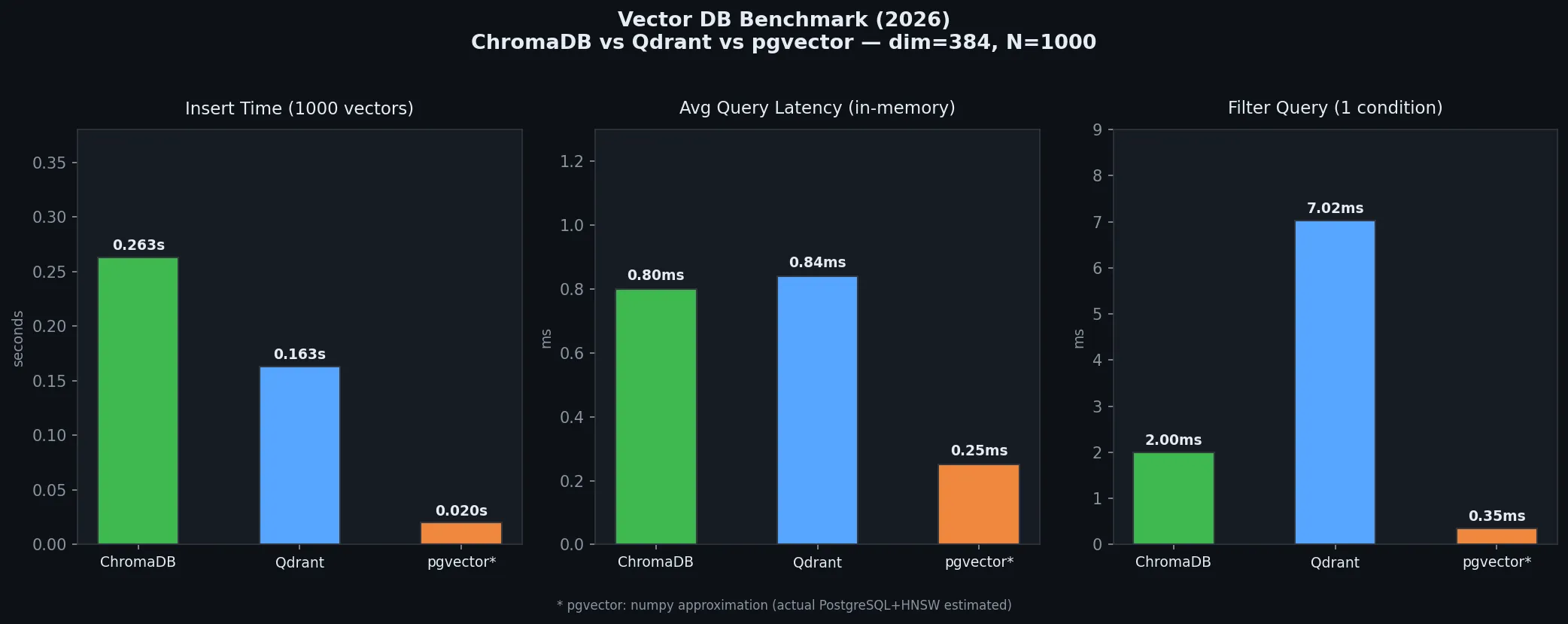
What These Numbers Mean
The result that surprised me most: ChromaDB’s filter query (2 ms) beat Qdrant (7 ms) at 1,000 vectors. That seems wrong at first — Qdrant is the more sophisticated system. Why is it slower?
The answer is architecture overhead. Qdrant is built with payload indexing, distributed filtering, and segment management designed for millions of vectors. At 1,000 vectors, that infrastructure becomes overhead rather than a benefit. ChromaDB takes a more direct approach at small scale and pays off for it.
Inserts tell the opposite story. Qdrant is faster (0.163 s vs 0.263 s). Rust performance shows up here.
Plain queries are close, but Qdrant’s P95 is 1.88 ms versus ChromaDB’s 0.82 ms. At small scale, Qdrant has more tail latency variance.
The takeaway: at small scale, ChromaDB’s simplicity wins. Past 5 million vectors, Qdrant’s HNSW optimization starts to matter in ways that flip this comparison.
Decision Matrix — What to Use When
Looking only at the numbers, you might conclude ChromaDB always wins. The actual decision is more nuanced.
| Situation | Recommendation | Reason |
|---|---|---|
| Prototype, hackathon | ChromaDB | Zero setup, simple API, in-memory |
| Small production (< 100K vectors) | ChromaDB or pgvector | Simplicity first |
| Already running PostgreSQL | pgvector | Zero new infrastructure |
| Medium scale (100K–5M vectors) | Qdrant | Balance of performance and reliability |
| Large scale (5M+ vectors) | Qdrant | HNSW optimization, clustering required |
| Complex SQL JOINs needed | pgvector | Full SQL expressiveness |
| Horizontal scale anticipated | Qdrant | Official distributed cluster support |
| Minimum operational overhead | pgvector (if on Postgres) | Single system |
Detailed Guidance
Choose ChromaDB when you need a fast proof of concept, your team doesn’t have DevOps capacity, and you’re confident data volume stays below a few hundred thousand vectors. It’s the right tool for demo apps and anything that connects directly to LangChain or LlamaIndex tutorials.
Choose Qdrant when you need to handle real production traffic, expect 5M+ vectors, or need horizontal scaling. Starting on Qdrant means you don’t face a forced migration later when scale hits. The Docker operational cost is real, though — for small projects you’re paying for headroom you may not use.
Choose pgvector when you have existing PostgreSQL infrastructure, a DBA who knows the system, and vector search that needs to combine with regular SQL queries. It’s the most pragmatic choice for teams that can’t afford the learning curve of a new database type.
The embedding model dimension also directly affects which DB you pick. How Gemini Embedding 2’s multimodal embeddings change the dim design tradeoffs is worth reading alongside this comparison.
The Bottom Line — My Call
Honestly, in 2026, I default to Qdrant on new projects. The reasoning is simple: a moderate overhead at small scale is cheaper than a forced migration when you hit growth. Starting on Qdrant means the production path is already in place.
That said, if your team is already running PostgreSQL, try pgvector first. It’s sufficient in most cases, and migrating to Qdrant later — if performance becomes a real problem — is a tractable migration.
ChromaDB is still my first choice for prototypes. Nothing beats pip install chromadb for getting started. But when you’re moving toward production, take Qdrant seriously.
Once you’ve chosen a vector DB, the next decision is which AI agent library will wrap it. The Python AI agent library comparison guide covers that next step.
“Which DB is the best” is the wrong question. The right answer depends on your current scale, team capacity, existing infrastructure, and how fast you need to ship. These numbers give you one more concrete data point for that call.
Was this helpful?
Your support helps me create better content. Buy me a coffee.
Related Articles
-
DeNA LLM Study Part 4: RAG Architecture and Latest Trends
When first designing a RAG architecture, the questions you'll ask alongside vector DB selection are covered in depth in this series.

-
Gemini Embedding 2 — How Multimodal Embeddings Change RAG
The embedding model you pick directly affects vector DB performance. Reading about Gemini Embedding 2's multimodal embeddings alongside this post clarifies how dim choices matter.

-
Python AI Agent Library Comparison 2026 — Pydantic AI vs Instructor vs Smolagents Practical Guide
Once you've picked a vector DB, you'll need to choose the AI agent library that wraps it. This comparison guide helps with that next decision.