Google ADK vs LangGraph 2026 — I Installed and Compared Both
Google ADK vs LangGraph in 2026: sandbox comparison of code, deps, state management, branching, and CLI. Pick the right AI agent framework for your use case.
Every time a new AI agent framework drops, my first instinct is to install it and figure out what’s actually different. When Google open-sourced ADK (Agent Development Kit), I set up a clean sandbox environment and ran Google ADK v1.32.0 alongside LangGraph v1.1.10. This post is what I found.
Code-Assembled Pipelines vs Explicit Graphs
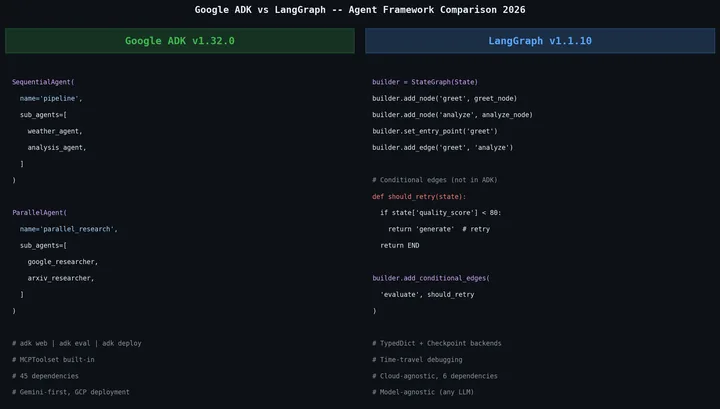
Google ADK’s core message is “apply software development principles to AI agents.” That becomes concrete the moment you write code. ADK defines agents as Python classes and functions. Built-in orchestrators (SequentialAgent, ParallelAgent, LoopAgent) let you declare flow naturally inside your code.
from google.adk.agents import Agent, SequentialAgent, ParallelAgent

weather_agent = Agent(
    name="weather_agent",
    model="gemini-2.5-flash",
    instruction="Get weather data using the get_weather tool.",
    tools=[get_weather],
)

analysis_agent = Agent(
    name="analysis_agent",
    model="gemini-2.5-flash",
    instruction="Analyze the weather data and give a forecast.",
)

# Sequential execution: weather → analysis
pipeline = SequentialAgent(
    name="weather_pipeline",
    sub_agents=[weather_agent, analysis_agent],
)
No separate graph definition, no edge declarations. The Python code itself expresses the flow.
LangGraph takes the opposite approach. It models agent workflows as explicit graphs. Nodes represent processing stages; edges define transitions between them. You design the graph first, then add logic on top.
from typing import TypedDict, Annotated
from langgraph.graph import StateGraph, END
from langgraph.graph.message import add_messages
from langchain_core.messages import HumanMessage, AIMessage

class State(TypedDict):
    messages: Annotated[list, add_messages]

def greet_node(state: State):
    return {"messages": [AIMessage(content="Hello from LangGraph!")]}

def analyze_node(state: State):
    last = state["messages"][-1].content
    return {"messages": [AIMessage(content=f"Analysis: {last}")]}

builder = StateGraph(State)
builder.add_node("greet", greet_node)
builder.add_node("analyze", analyze_node)
builder.set_entry_point("greet")
builder.add_edge("greet", "analyze")
builder.add_edge("analyze", END)

graph = builder.compile()
The way I see it: ADK says “assemble a pipeline in code”; LangGraph says “design a state machine.” Neither is objectively better. It comes down to which feels more natural for your problem.
The Dependency Gap Is Shocking
pip install google-adk langgraphBoth install fine, but pip show reveals a stark difference:
Google ADK v1.32.0, 45 direct dependencies:
aiosqlite, anyio, authlib, click, fastapi,
google-api-python-client, google-auth,
google-cloud-aiplatform, google-cloud-bigquery,
google-cloud-bigquery-storage, google-cloud-bigtable,
google-cloud-dataplex, google-cloud-discoveryengine,
google-cloud-pubsub, google-cloud-secret-manager,
google-cloud-spanner, google-cloud-speech,
google-cloud-storage, google-genai, graphviz,
httpx, jsonschema, mcp, opentelemetry-api,
opentelemetry-exporter-gcp-logging,
opentelemetry-exporter-gcp-monitoring,
opentelemetry-exporter-gcp-trace,
... (45 total)
LangGraph v1.1.10, 6 direct dependencies:
langchain-core, langgraph-checkpoint,
langgraph-prebuilt, langgraph-sdk,
pydantic, xxhash
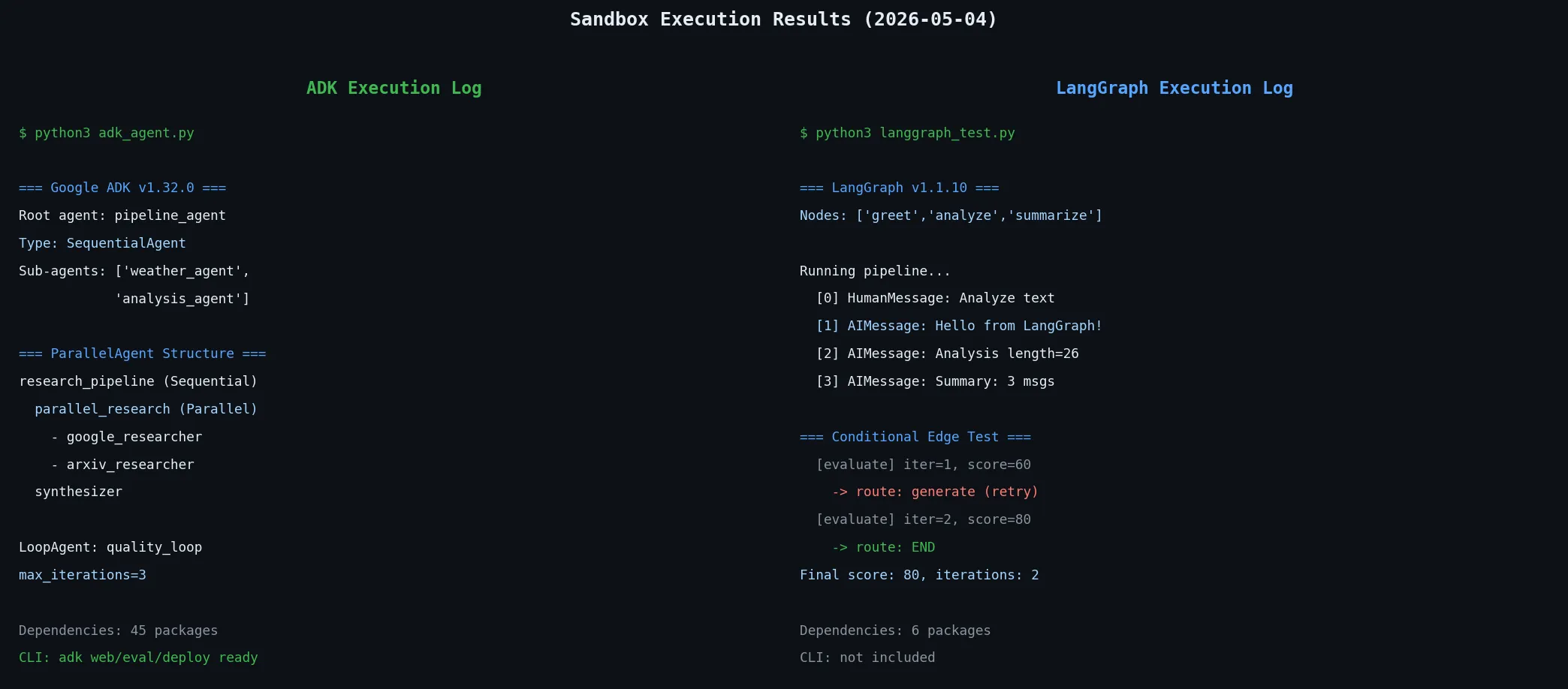
A 39-package gap. ADK bundles Google Cloud services (BigQuery, Spanner, Pub/Sub, Speech, etc.), OpenTelemetry exporters, a FastAPI server, and SQLAlchemy ORM. If you’re not using Google Cloud, those 39 extra packages are pure dead weight. The mcp entry in that list hints at it: ADK supports MCP server integration out of the box, and building your own MCP server to plug in is something I covered separately in building a Python MCP server with FastMCP.
LangGraph’s “bring what you need” philosophy is lighter but requires more configuration. You inject your own LLM client, choose your own checkpoint backend. Less magic, more control.
Multi-Agent Patterns: Where the Difference Matters Most
ADK parallel execution. This is actual code I ran:
parallel_research = ParallelAgent(
    name="parallel_research",
    sub_agents=[google_researcher, arxiv_researcher],
)

pipeline = SequentialAgent(
    name="research_pipeline",
    sub_agents=[parallel_research, synthesizer],
)
Execution: research_pipeline (SequentialAgent) → parallel_research (ParallelAgent) → synthesizer. Clean, readable, obvious.
LangGraph conditional edges. This is where ADK falls short:
def should_retry(state: State) -> str:
    if state.get("quality_score", 0) < 80:
        return "generate"  # quality too low → retry
    return END              # quality passed → done

builder.add_conditional_edges("evaluate", should_retry)
I ran this in my sandbox:
=== Conditional Edge Test ===
  [evaluate] iteration=1, score=60  → routed to: generate
  [evaluate] iteration=2, score=80  → routed to: END
Final score: 80, total iterations: 2
The agent retries automatically until quality passes. ADK’s LoopAgent supports iteration too, but termination is controlled by max_iterations. Dynamic branching is where LangGraph’s conditional edges shine: if this condition holds, go here; otherwise go there. Think generate-verify-retry loops, router agents, anything where the next step depends on a runtime judgment. In production pipelines like those, LangGraph is significantly more powerful.
ADK’s Killer Feature: The CLI and Built-in Evaluation
Installing ADK drops the adk CLI:
$ adk --help
Commands:
  api_server   Starts a FastAPI server for agents.
  conformance  Conformance testing tools for ADK.
  create       Creates a new app with prepopulated code.
  deploy       Deploys agent to hosted environments.
  eval         Evaluates an agent given eval sets.
  eval_set     Manage Eval Sets.
  migrate      ADK migration commands.
  optimize     Optimizes root agent instructions (GEPA).
  run          Runs an interactive CLI for an agent.
  web          Starts a FastAPI server with Web UI.
adk web is particularly useful. Point it at your agent code and a FastAPI-backed web UI spins up for local visual testing. adk eval lets you define evaluation sets and run regression tests against your agent automatically. LangGraph has none of this built in.
adk deploy supports direct deployment to Google Cloud Run or Vertex AI Agent Builder. If you’re on GCP, development to deployment stays within a single tool chain.
The downside: this CLI is entirely Google-ecosystem bound. adk deploy is useless on AWS or Azure. The built-in tracing outputs to GCP Cloud Trace — connecting to other observability stacks requires extra configuration.
That’s where a vendor-agnostic tool like Langfuse for LLM tracing fits more naturally with LangGraph’s approach.
State Management: Sessions vs Checkpoints
ADK’s state management is session-based:
from google.adk.runners import InMemoryRunner
from google.adk.sessions import InMemorySessionService

session_service = InMemorySessionService()
runner = InMemoryRunner(agent=root_agent, app_name="my_app")
ADK maintains multi-turn conversation state via session_id. In production, swap InMemorySessionService for VertexAiSessionService for persistence. Inter-agent data flows through a shared State dictionary.
LangGraph’s state management uses TypedDict + Checkpoint:
from langgraph.checkpoint.memory import MemorySaver

checkpointer = MemorySaver()
graph = builder.compile(checkpointer=checkpointer)

config = {"configurable": {"thread_id": "user-123"}}
result = graph.invoke({"messages": [HumanMessage(content="Hello")]}, config)
LangGraph’s checkpoint system is more flexible. Swap MemorySaver for PostgreSQL, Redis, or SQLite backends. It also supports time-travel debugging, where you rewind to a past checkpoint and re-run from there.
I consider LangGraph stronger here. Swapping checkpoint backends means dev and production can run identical code. No vendor lock-in.
ADK does beat LangGraph on one point: MCP tool server support is built in. MCPToolset works out of the box. With LangGraph, you need a separate package and adapter code.
Comparison Table
| Aspect | Google ADK v1.32.0 | LangGraph v1.1.10 |
|---|---|---|
| Direct dependencies | 45 | 6 |
| Orchestration style | Sequential/Parallel/LoopAgent (declarative) | StateGraph + nodes/edges (explicit graph) |
| Conditional branching | LoopAgent max_iterations (limited) | conditional_edges (powerful) |
| Default LLM | Gemini (others supported) | Model-agnostic (inject any LLM) |
| CLI | adk create/run/web/eval/deploy ✓ | None |
| Built-in Web UI | adk web ✓ | None |
| Built-in eval framework | adk eval ✓ | None (external tooling needed) |
| MCP support | MCPToolset built-in ✓ | Separate package needed |
| State management | Session-based (VertexAI backend) | TypedDict + Checkpoint (swappable backends) |
| Deployment | Google Cloud Run / Vertex AI | Cloud-agnostic |
| OpenTelemetry | GCP exporters built-in | Manual setup |
| Time-travel debugging | No | ✓ |
| Multi-language SDK | Python, Go, Java, TypeScript | Python (primary) |
| License | Apache 2.0 | MIT |
Which Framework for Which Team
Google ADK fits when:
- Your infrastructure is already on Google Cloud
- Gemini is your primary model
- You want development-to-deployment in a single toolchain
- You don’t want to build an agent evaluation pipeline from scratch
- Your team works in Go, Java, or TypeScript alongside Python
LangGraph fits when:
- Your agent workflows have complex branching logic
- You’re on AWS, Azure, or multi-cloud
- You mix multiple LLMs (OpenAI, Anthropic, Mistral, etc.)
- You have existing LangChain-based code
- You need time-travel debugging or checkpoint replay
- You’re minimizing dependencies for edge deployments
If I were starting a new project today, I’d reach for LangGraph. The reason is pragmatic: conditional branching and checkpoint flexibility become necessary in production-grade agents, and retrofitting them later often means redesigning the whole structure. Starting with ADK’s LoopAgent and needing dynamic routing later could force a significant rewrite.
That said, for teams already on GCP, the ADK toolchain is genuinely compelling. adk deploy to Cloud Run plus adk eval for regression testing would take real work to replicate in the LangGraph ecosystem.
Getting a First Agent Running in Each Framework
Comparison alone isn’t worth much, so here’s a quick note on how you actually start.
Starting with ADK:
The adk create command selects a model interactively, which makes it a poor fit for scripted automation. Creating the directory structure yourself is better.
mkdir my_agent_project
cd my_agent_project
touch __init__.py
touch agent.py
Minimal agent.py:
from google.adk.agents import Agent

def simple_tool(text: str) -> dict:
    """A simple tool that processes text"""
    return {"result": f"Processed: {text}", "length": len(text)}

root_agent = Agent(
    name="my_agent",
    model="gemini-2.5-flash",
    description="A simple text-processing agent",
    instruction="You are a helpful assistant. Use simple_tool to process text.",
    tools=[simple_tool],
)
Run adk web . and a local web UI comes up; adk run . tests it straight from the terminal. The structure is simple enough that someone joining the team can read and understand the code immediately.
Starting with LangGraph:
LangGraph starts from an empty graph.
from typing import TypedDict, Annotated
from langgraph.graph import StateGraph, END
from langgraph.graph.message import add_messages
from langchain_core.messages import HumanMessage, AIMessage
from langchain_openai import ChatOpenAI  # or ChatAnthropic

class AgentState(TypedDict):
    messages: Annotated[list, add_messages]

llm = ChatOpenAI(model="gpt-4o")  # swap in any LLM you like

def agent_node(state: AgentState):
    response = llm.invoke(state["messages"])
    return {"messages": [response]}

builder = StateGraph(AgentState)
builder.add_node("agent", agent_node)
builder.set_entry_point("agent")
builder.add_edge("agent", END)

graph = builder.compile()

# Run
result = graph.invoke({
    "messages": [HumanMessage(content="Hello!")]
})
print(result["messages"][-1].content)
LangGraph can serve a local dev server via the separate langgraph-cli package, but it’s not in the main package. The web UI requires LangGraph Studio, installed separately.
For a simple chatbot, both run within 10 minutes. But as agents grow complex, LangGraph’s explicit graph is easier to reason about and debug. ADK’s code-declaration style feels intuitive at first, yet the deeper the nested agents, the harder it becomes to trace execution flow in your head.
ADK’s MCP Integration in Code, and the Ecosystem Gap
The MCP advantage mentioned above deserves a concrete look — here is what the built-in MCPToolset actually looks like.
from google.adk.tools.mcp_tool import MCPToolset, StdioServerParameters

mcp_tools = MCPToolset(
    connection_params=StdioServerParameters(
        command="python",
        args=["-m", "my_mcp_server"],
    )
)

agent = Agent(
    name="mcp_agent",
    model="gemini-2.5-flash",
    toolsets=[mcp_tools],
    instruction="Use MCP tools to complete tasks."
)
Specify the server launch parameters and the MCP tools attach straight to the agent, while LangGraph needs langchain-mcp-adapters plus adapter code for the same result.
LangGraph’s ecosystem, on the other hand, is broad: rich LLM adapters (langchain-anthropic, langchain-openai, langchain-google-genai) and plenty of community tool integrations. ADK is optimized for the Gemini ecosystem, so other LLMs need extra configuration.
From a context-engineering angle, ADK defaults to session-scoped state injection, while LangGraph declares the whole context as a TypedDict at graph level. For production systems where you must trace what data flows between agents, LangGraph’s explicit State definition is far better for debugging.
If You Already Have a LangChain Codebase
Teams with existing LangChain code will find LangGraph the far more natural choice. LangGraph is designed to run on top of LangChain, so existing LLM wrappers like ChatOpenAI, ChatAnthropic, and ChatGoogleGenerativeAI are reused as is. Prompt templates, memory classes, and output parsers stay compatible.
ADK operates independently of the LangChain ecosystem. Migrating existing LangChain code to ADK is close to a rewrite — ADK’s Agent class differs conceptually from LangChain’s chain and agent abstractions, so porting isn’t easy.
If you pick ADK, realistically treat it as a new project. It shines when you design around the Gemini API and Google Cloud services from the start.
Observability and Debugging Experience
How easily you can diagnose a misbehaving agent in production matters a lot in practice.
ADK’s observability: ADK embeds OpenTelemetry and supports automatic export to GCP’s Cloud Trace and Cloud Monitoring. Agent execution timelines appear in the GCP console with no extra code. If you’re on Google Cloud, it works out of the box.
The local UI from adk web also shows execution history and the event stream. Being able to watch the agent flow while developing is one of ADK’s practical advantages.
LangGraph’s observability: LangGraph offers its own UI, LangGraph Studio. It visualizes graph execution node by node, and the time-travel feature — rewinding to a checkpoint and re-running — is especially useful for tracing “why did it branch this way at this node?”.
Integrating LangSmith (LangChain’s paid service) enables more detailed tracing, but it needs a paid plan. For free usage you configure OpenTelemetry yourself.
Neither tool fully embeds full-stack observability. If you already run on the GCP stack, ADK wins; in a vendor-neutral environment, LangGraph plus a separate observability tool is the better combination.
My Take: Design Philosophy Decides the Choice
Both frameworks are production-ready in 2026. The difference is what they optimize for.
ADK optimizes for “build an agent system fast and deploy it to GCP.” LangGraph optimizes for “precisely control the state transitions in your agent.”
The mistake I see in most framework comparisons is ranking by feature count. ADK has a CLI, eval, and deployment, so it wins? No. The real question is whether the framework’s growth direction matches my agent’s complexity growth direction.
If a simple pipeline will evolve toward complex branching, choose LangGraph early. If the goal is fast delivery within the Google Cloud ecosystem, ADK removes a lot of friction.
For broader context on how LangGraph compares with other frameworks, the LangGraph vs CrewAI vs Dapr comparison is worth reading. It benchmarks them on production KPIs before ADK entered the picture.
When to Use Each, and When to Avoid It
A feature table clouds the decision. The real call narrows to “does this tool fit our situation?” Here is when to reach for each framework, and when to walk away.
Choose Google ADK when:
- Your infrastructure already sits on Google Cloud (Vertex AI, BigQuery, Cloud Run). The value of
adk deployending the deployment story in one line is real. - Gemini is your primary model and you have no near-term plans to switch.
- You lack the time to build an eval pipeline and a web UI.
adk evalandadk webdo that work for you. - Your team writes agents in Go, Java, or TypeScript rather than Python.
Avoid Google ADK when:
- AWS or Azure is your primary platform, or you run multi-cloud.
adk deployand the GCP-bound tracing become dead weight. - You deploy to lightweight environments (serverless cold starts, edge) where 45 direct dependencies hurt.
- Dynamic conditional branching (generate-evaluate-regenerate) is the core of your workflow. The
LoopAgentmax_iterationsmodel expresses it awkwardly. - You need to reuse an existing LangChain codebase. ADK demands a near-rewrite to port.
Choose LangGraph when:
- Your workflow will clearly grow routers, branches, and retry loops.
conditional_edgesis a first-class citizen here. - You mix several LLMs (OpenAI, Anthropic, Gemini) or want room to swap them later.
- Time-travel debugging and checkpoint replay matter in operations.
- Portability across cloud vendors is important. Swap the checkpoint backend and the same code runs anywhere.
Avoid LangGraph when:
- You have a one-off linear pipeline that will not grow complex. The overhead of designing the graph upfront is too much.
- You want deployment, eval, and UI from a single tool but cannot assemble separate infrastructure. LangGraph gives you the runtime only.
- Your team has zero LangChain experience and works mainly in a language other than Python.
If the call is hard, looking at a wider set of options in the Python AI agent library comparison helps. For RAG-centric workflows, the LlamaIndex vs LangChain vs Haystack comparison shows another axis of the framework decision. And if type safety is your priority, the PydanticAI Practical Tutorial lays out yet another approach worth weighing.
Primary Sources
The measured data and code in this post were verified against the following official docs and repositories.
- Google ADK official docs — agent definitions, orchestrators, CLI, and deployment guides
- google/adk-python (GitHub) — ADK Python source, Apache 2.0 license
- LangGraph official docs — StateGraph, checkpoints, and conditional-edge concepts
- langchain-ai/langgraph (GitHub) — LangGraph source, MIT license
Frequently Asked Questions
Should I choose Google ADK or LangGraph?
What is the core difference between the two frameworks?
How big is the dependency difference at install time?
Which framework fits which team?
Read in Other Languages
Related Articles
-
PydanticAI Tutorial — Type-Safe AI Agents the FastAPI Way
Goes one level deeper into ai-agent.
-
Mastra.ai Practical Guide — Running a TypeScript AI Agent in 5 Minutes
Continues the hands-on ai-agent experience.
-
AI Agent Cost vs Human Labor: A Honest Analysis from Running 8 Agents
Worth reading alongside this in the same ai-agent track.