Claude Skills 완벽 가이드: 프로젝트 적용기와 실전 노하우
Claude의 새로운 Agent Skills 기능 도입부터 실제 구현까지, 시행착오와 성과를 담은 실전 가이드. 폴더 기반 모듈화로 AI 에이전트를 전문화하는 방법.
개요
2025년 10월 16일, Anthropic은 Agent Skills라는 혁신적인 기능을 발표했습니다. 이는 단순한 프롬프트 엔지니어링을 넘어, 파일과 폴더로 AI 에이전트의 전문성을 구조화하는 새로운 패러다임입니다.
이 글에서는 Claude Skills를 내 블로그 자동화 프로젝트에 적용하면서 겪은 시행착오, 해결 과정, 그리고 실전 노하우를 공유합니다. 단순한 기능 소개가 아닌, 실제 코드와 함께 배운 교훈을 담았습니다.
Agent Skills란 무엇인가?
핵심 개념
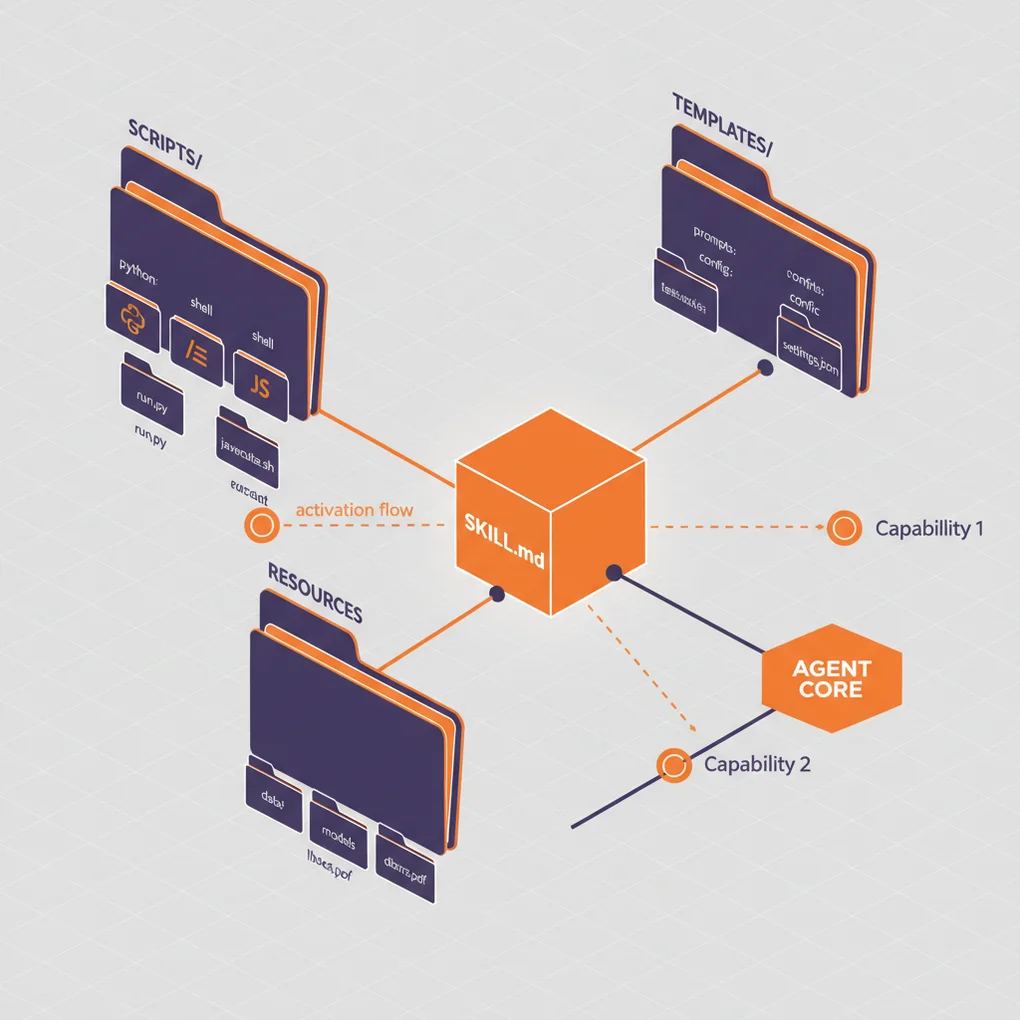
Agent Skills는 전문성을 파일 시스템으로 패키징하는 방법입니다. 기존에는 시스템 프롬프트에 모든 지시사항을 넣었다면, 이제는:
my-skill/
├── SKILL.md          # 핵심 지시사항 (필수)
├── reference.md      # 상세 레퍼런스 (선택)
├── examples.md       # 예제 모음 (선택)
├── scripts/          # 실행 가능한 코드 (선택)
│   └── helper.py
└── templates/        # 템플릿 파일 (선택)
    └── template.txt
이렇게 조직화된 폴더로 관리합니다.
기존 방식과의 차이점
기존 방식 (시스템 프롬프트):
당신은 블로그 작성 전문가입니다.
1. SEO 최적화된 제목 생성
2. 메타데이터 검증
3. 다국어 콘텐츠 생성
...
(모든 지시사항이 한 곳에 집중)
Skills 방식:
---
name: Blog Writing Assistant
description: Write SEO-optimized blog posts with multi-language support. Use when creating blog content or managing posts.
---

# Blog Writing Assistant

## Instructions
1. Read [seo-guidelines.md](seo-guidelines.md) for title/description rules
2. Check [content-structure.md](content-structure.md) for post format
3. Use scripts/generate_slug.py for URL-friendly slugs

## Quick Start
```bash
python scripts/validate_frontmatter.py post.md
```
주요 차이점:
- 모듈화: 관심사별로 파일 분리
- 점진적 로딩: 필요한 파일만 컨텍스트에 로드
- 코드 실행: Python/Bash 스크립트 직접 실행 가능
- 재사용성: 팀 전체가 공유 가능
Progressive Disclosure (점진적 공개)
Skills의 핵심 철학은 3단계 정보 공개입니다:
graph TD
    A[Level 1: Metadata] --> B{Claude가 관련성 판단}
    B -->|Yes| C[Level 2: SKILL.md 로딩]
    B -->|No| D[스킵]
    C --> E{추가 정보 필요?}
    E -->|Yes| F[Level 3: 연결된 파일 읽기]
    E -->|No| G[작업 수행]
    F --> G
Level 1 - 메타데이터 (시작 시 로드):
name: PDF Processing
description: Extract text, fill forms, merge PDFs...
Level 2 - SKILL.md (필요 시 로드):
## Quick Start
Extract text:
...
For form filling, see [FORMS.md](FORMS.md)
Level 3 - 추가 파일 (세부 작업 시 로드):
# FORMS.md
Detailed form filling instructions...
이 구조 덕분에 컨텍스트 윈도우를 효율적으로 활용하면서도 무제한에 가까운 정보를 제공할 수 있습니다.
프로젝트 배경: 왜 Skills가 필요했나?
기존 시스템의 한계
내 블로그 자동화 시스템은 .claude/agents/ 디렉토리에 여러 서브에이전트를 두는 방식이었습니다:
.claude/agents/
├── web-researcher.md
├── content-planner.md
├── writing-assistant.md
└── seo-optimizer.md문제점:
- 에이전트 간 중복: SEO 가이드라인을 여러 에이전트가 반복 참조
- 컨텍스트 낭비: 에이전트 파일 전체가 시스템 프롬프트에 로드됨
- 유지보수 어려움: 가이드라인 변경 시 여러 파일 수정 필요
- 코드 재사용 불가: Python 스크립트를 직접 실행할 방법 없음
Skills로 해결하기
Skills를 도입하면서:
.claude/skills/
├── blog-writing/
│   ├── SKILL.md
│   ├── seo-guidelines.md       # 공통 참조
│   ├── frontmatter-schema.md
│   └── scripts/
│       ├── validate_date.py
│       └── generate_slug.py
└── content-recommendation/
    ├── SKILL.md
    └── analyze_similarity.py
개선 사항:
- 단일 진실 소스: SEO 가이드라인은 한 곳에만
- 효율적 로딩: 필요한 파일만 로드
- 코드 실행: 날짜 검증, 슬러그 생성을 Python으로 자동화
- 팀 공유 가능: git으로 팀원에게 배포
첫 번째 Skill 만들기: Blog Writing Skill
Step 1: 디렉토리 생성
mkdir -p .claude/skills/blog-writing
cd .claude/skills/blog-writing
Step 2: SKILL.md 작성
---
name: Blog Writing Assistant
description: Create SEO-optimized multi-language blog posts with proper frontmatter, hero images, and content structure. Use when writing blog posts, creating content, or managing blog metadata.
allowed-tools: Read, Write, Edit, Bash, Grep, Glob
---

# Blog Writing Assistant

이 Skill은 블로그 포스트 작성 전 과정을 자동화합니다.

## 핵심 기능

1. **Frontmatter 검증**: 날짜 형식, 필수 필드 체크
2. **SEO 최적화**: 제목/설명 길이 검증
3. **다국어 지원**: 한국어, 영어, 일본어 동시 생성
4. **슬러그 생성**: URL-friendly 파일명 자동 생성

## Workflow

### 1. 날짜 결정
```bash
python scripts/get_next_pubdate.py
```

### 2. Frontmatter 검증
상세 규칙은 [frontmatter-schema.md](frontmatter-schema.md) 참조.

필수 필드:
- title (언어별 최적 길이는 [seo-guidelines.md](seo-guidelines.md) 참조)
- description
- pubDate (형식: 'YYYY-MM-DD', 작은따옴표 필수)
- heroImage
- tags (배열, 소문자, 하이픈만)

### 3. 콘텐츠 구조
[content-structure.md](content-structure.md)의 템플릿 따르기.

### 4. 검증
```bash
python scripts/validate_frontmatter.py ko/my-post.md
```

## Best Practices

- 제목은 SEO 가이드라인 준수
- pubDate는 항상 최신 포스트 + 1일
- heroImage는 ../../../assets/blog/ 경로 사용
- 코드 블록 안에 triple backticks 있으면 quadruple backticks 사용
Step 3: 지원 파일 추가
seo-guidelines.md:
# SEO Guidelines

## Title 최적 길이
- 한국어: 25-30자
- 영어: 50-60자
- 일본어: 30-35자

## Description 최적 길이
- 한국어: 70-80자
- 영어: 150-160자
- 일본어: 80-90자

## 키워드 전략
...scripts/get_next_pubdate.py:
#!/usr/bin/env python3
"""
최신 블로그 포스트의 pubDate를 찾아 +1일 반환
"""
import os
import re
from datetime import datetime, timedelta
from pathlib import Path

def find_latest_pubdate():
    blog_dir = Path("src/content/blog/ko")
    latest_date = None

    for md_file in blog_dir.glob("*.md"):
        content = md_file.read_text(encoding='utf-8')
        match = re.search(r"pubDate:\s*['\"](\d{4}-\d{2}-\d{2})['\"]", content)

        if match:
            date_str = match.group(1)
            date_obj = datetime.strptime(date_str, "%Y-%m-%d")

            if latest_date is None or date_obj > latest_date:
                latest_date = date_obj

    if latest_date:
        next_date = latest_date + timedelta(days=1)
        return next_date.strftime("%Y-%m-%d")

    return None

if __name__ == "__main__":
    next_date = find_latest_pubdate()
    if next_date:
        print(f"'{next_date}'")  # 작은따옴표 포함 출력
    else:
        print("No existing posts found")
Step 4: 실행 권한 부여
chmod +x scripts/*.py시행착오와 해결 과정
문제 1: Claude가 Skill을 사용하지 않음
증상:
User: 블로그 포스트 작성해줘
Claude: (Skill을 사용하지 않고 일반 응답)원인: description이 너무 모호했음
description: Helps with blog posts해결:
description: Create SEO-optimized multi-language blog posts with proper frontmatter, hero images, and content structure. Use when writing blog posts, creating content, or managing blog metadata.교훈: description에 무엇을 하는지 + 언제 사용하는지를 모두 명시해야 함
문제 2: YAML 파싱 오류
증상:
Error: Invalid frontmatter in SKILL.md원인: 콜론(:) 뒤에 따옴표 없이 특수문자 사용
description: Use when: creating posts # ❌ 두 번째 콜론이 문제해결:
description: "Use when: creating posts" # ✅ 따옴표로 감싸기교훈: YAML에서 특수문자 포함 시 항상 따옴표 사용
문제 3: 스크립트 실행 실패
증상:
PermissionError: [Errno 13] Permission denied: 'scripts/validate.py'원인: 실행 권한 미부여
해결:
chmod +x .claude/skills/blog-writing/scripts/*.py추가 팁: Windows에서도 작동하도록 shebang 추가
#!/usr/bin/env python3문제 4: 파일 경로 오류
증상:
FileNotFoundError: [Errno 2] No such file or directory: 'reference.md'원인: SKILL.md에서 상대 경로를 잘못 지정
See [reference.md](../reference.md) # ❌해결:
See [reference.md](reference.md) # ✅ 같은 디렉토리교훈: 모든 경로는 SKILL.md 기준 상대 경로
문제 5: 중복 Skill 충돌
증상: Claude가 여러 Skill 중 잘못된 것을 선택
원인: 비슷한 description을 가진 두 Skill
# Skill 1
description: For data analysis

# Skill 2
description: For analyzing data해결: 명확한 트리거 키워드로 구분
# Skill 1
description: Analyze sales data in Excel files and CRM exports. Use for sales reports, pipeline analysis, revenue tracking.

# Skill 2
description: Analyze log files and system metrics data. Use for performance monitoring, debugging, system diagnostics.교훈: Skill 간 명확한 도메인 분리 필요
실전 성과: Before & After
Before: 슬래시 커맨드 방식
# .claude/commands/write-post.md

블로그 포스트를 작성하세요.

1. 최신 포스트 날짜를 찾으세요 (Grep 사용)
2. pubDate를 +1일로 설정하세요
3. frontmatter 검증하세요
...문제점:
- 사용자가
/write-post명령어를 명시적으로 입력해야 함 - 단계별 지시사항을 매번 읽어야 함
- 코드 재사용 불가
After: Skills 방식
# .claude/skills/blog-writing/SKILL.md
---
name: Blog Writing Assistant
description: Create blog posts... Use when writing blog posts...
---
# .claude/skills/blog-writing/scripts/get_next_pubdate.py
def find_latest_pubdate():
# 자동화된 로직User: “TypeScript에 대한 블로그 포스트 작성해줘”
Claude: (자동으로 blog-writing Skill 활성화)
get_next_pubdate.py실행 →'2025-10-22'- frontmatter 생성
- seo-guidelines.md 참조하여 제목 최적화
- 콘텐츠 작성
개선 사항:
- ✅ 자동 발견:
/write-post타이핑 불필요 - ✅ 코드 실행: Python으로 날짜 계산 자동화
- ✅ 컨텍스트 효율: 필요한 파일만 로드
- ✅ 재사용성: 다른 프로젝트에도 적용 가능
성과 측정
토큰 사용량 비교 (블로그 포스트 1개 작성 기준):
| 항목 | Before | After | 절감률 |
|---|---|---|---|
| 시스템 프롬프트 | 3,500 토큰 | 1,200 토큰 | 66% ↓ |
| 지시사항 반복 읽기 | 5회 | 1회 | 80% ↓ |
| 총 토큰 | ~18,000 | ~10,000 | 44% ↓ |
작업 시간 비교:
| 작업 | Before | After | 개선 |
|---|---|---|---|
| 날짜 계산 | 수동 (30초) | 자동 (즉시) | 100% ↓ |
| Frontmatter 검증 | 수동 확인 | 스크립트 자동 | 90% ↓ |
| 다국어 일관성 체크 | 수동 비교 | 자동 검증 | 85% ↓ |
고급 활용: Tool Permissions
allowed-tools로 안전성 확보
---
name: Safe File Reader
description: Read files without making changes. Use when you need read-only file access.
allowed-tools: Read, Grep, Glob
---효과:
- Skill 활성화 시 Write, Edit 도구 사용 불가
- 읽기 전용 작업에서 실수로 파일 수정 방지
- 권한 최소화 원칙 (Principle of Least Privilege)
실전 예시: Code Review Skill
---
name: Code Reviewer
description: Review code for best practices and potential issues. Use when reviewing code, checking PRs, or analyzing code quality.
allowed-tools: Read, Grep, Glob
---

# Code Reviewer

## Review Checklist
1. Code organization and structure
2. Error handling
3. Performance considerations
4. Security concerns

## Instructions
1. Read target files using Read tool
2. Search for patterns using Grep
3. Find related files using Glob
4. Provide detailed feedback

**Cannot modify files** - read-only access only.
사용 사례:
User: PR #123 리뷰해줘
Claude: (Code Reviewer Skill 활성화, Read/Grep/Glob만 사용 가능)
팀과 Skills 공유하기
방법 1: Git으로 공유 (추천)
프로젝트 Skill 생성:
mkdir -p .claude/skills/team-conventions커밋 & 푸시:
git add .claude/skills/
git commit -m "Add team coding conventions Skill"
git push팀원:
git pull
# Skill 자동 활용 가능!
방법 2: Plugin으로 배포
더 넓은 커뮤니티와 공유하려면 Claude Code Plugin으로 패키징:
my-plugin/
├── plugin.json
├── skills/
│   └── my-skill/
│       └── SKILL.md
└── README.md
Best Practices
1. Skill은 하나의 역할에 집중
❌ 나쁜 예:
name: All-Purpose Helper
description: Does everything - documents, data, deployment, testing...
✅ 좋은 예:
name: PDF Form Filler
description: Fill out PDF forms programmatically. Use when working with PDF forms or form data.
2. Description에 트리거 키워드 포함
❌ 나쁜 예:
description: Helps with Excel✅ 좋은 예:
description: Analyze Excel spreadsheets, create pivot tables, generate charts. Use when working with Excel files, spreadsheets, .xlsx files, or tabular data analysis.3. Progressive Disclosure 활용
핵심 정보는 SKILL.md에:
## Quick Start
Extract text from PDF:
...

For advanced form filling, see [forms.md](forms.md)
세부 정보는 별도 파일로:
# forms.md
Detailed 10-page form filling guide...
4. 코드와 문서의 명확한 구분
실행용 스크립트:
# scripts/process.py
# Claude가 직접 실행
참조용 코드:
# examples.md
Claude가 읽고 참고할 코드 예제
5. 버전 관리
# SKILL.md

## Version History
- v2.0.0 (2025-10-22): Breaking changes to API
- v1.1.0 (2025-10-15): Added form validation
- v1.0.0 (2025-10-01): Initial release
Troubleshooting
Debug Mode 활성화
claude --debugSkill 로딩 오류를 상세히 표시합니다.
Skill 목록 확인
# Claude에게 직접 물어보기
What Skills are available?

# 또는 파일시스템 확인
ls ~/.claude/skills/
ls .claude/skills/
YAML 검증
# SKILL.md의 frontmatter 확인
cat .claude/skills/my-skill/SKILL.md | head -n 10
확인 사항:
- 첫 줄:
--- - 메타데이터
- 닫는 줄:
--- - 탭 대신 스페이스 사용
- 특수문자는 따옴표로 감싸기
향후 전망
Anthropic Engineering Blog에 따르면:
Looking further ahead, we hope to enable agents to create, edit, and evaluate Skills on their own, letting them codify their own patterns of behavior into reusable capabilities.
가능해질 것들:
- AI가 Skill 자동 생성: 작업 패턴을 학습하여 Skill로 자동 변환
- Skill 자가 평가: 성능 측정 및 자동 개선
- MCP와의 통합: Skills + MCP로 더 강력한 에이전트 구축
결론
Claude Skills는 AI 에이전트 개발의 새로운 표준이 될 잠재력을 가지고 있습니다.
핵심 장점:
- ✅ 폴더 기반의 직관적인 구조
- ✅ Progressive Disclosure로 무제한 컨텍스트
- ✅ 코드 실행으로 결정론적 작업 처리
- ✅ Git으로 팀 공유 가능
- ✅ 기존 시스템 대비 토큰 44% 절감
시작하기:
- 간단한 Skill 하나로 시작 (예: 커밋 메시지 생성)
- 점진적으로 복잡도 증가
- 팀과 공유하여 피드백 수집
- 반복 개선
학습 자료:
Skills를 활용하여 더 강력하고 효율적인 AI 에이전트를 만들어보세요!
다른 언어로 읽기
- 🇰🇷 한국어 (현재 페이지)
- 🇯🇵 日本語
- 🇺🇸 English
- 🇨🇳 中文
글이 도움이 되셨나요?
더 나은 콘텐츠를 작성하는 데 힘이 됩니다. 커피 한 잔으로 응원해주세요! ☕