BigQuery MCP 服务器:实现数据集前缀过滤
使用 TypeScript 构建 BigQuery MCP 服务器,通过数据集前缀过滤控制 AI 代理的数据访问权限。
概述
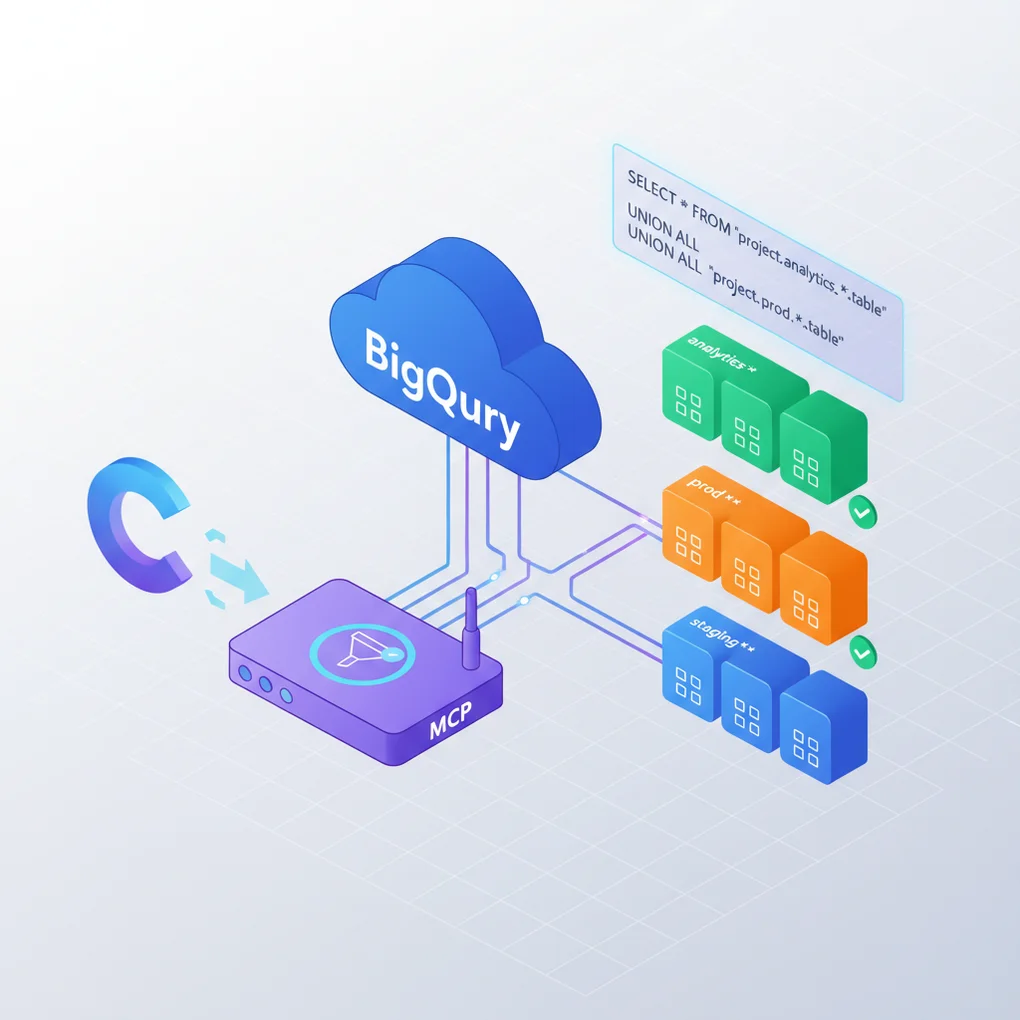
Model Context Protocol(MCP,模型上下文协议)是一个专为 AI 代理与外部系统安全交互而设计的标准协议。本文将介绍如何将 BigQuery 集成为 MCP 服务器,并实现数据集前缀过滤功能,以控制 AI 代理的数据访问范围。
为什么需要数据集前缀过滤?
在大规模 BigQuery 环境中,可能存在数百个数据集。将所有数据集暴露给 AI 代理会带来以下问题:
- 安全风险:对敏感数据授予不必要的访问权限
- 性能下降:由于加载大量元数据导致的响应延迟
- 可用性问题:不必要的信息导致上下文污染
通过数据集前缀过滤,只暴露具有特定前缀(例如:analytics_、marketing_)的数据集,可以有效解决这些问题。
MCP 服务器基础架构
MCP 架构
MCP 基于客户端-服务器架构,使用 JSON-RPC 2.0 协议进行通信。
graph LR
    A[AI 代理<br/>Claude, GPT] --> B[MCP 客户端]
    B --> C[MCP 服务器]
    C --> D[BigQuery API]
    D --> E[Google Cloud<br/>数据集]

    style A fill:#e1f5ff
    style C fill:#fff4e1
    style E fill:#f0f0f0
核心组件
MCP 服务器由以下三个核心要素组成:
- Server(服务器):实现 MCP 协议并管理客户端连接
- Tools(工具):定义 AI 代理可以调用的函数
- Transport(传输层):通信渠道(stdio、SSE 等)
import { Server } from "@modelcontextprotocol/sdk/server/index.js";
import { StdioServerTransport } from "@modelcontextprotocol/sdk/server/stdio.js";

// 创建 MCP 服务器实例
const server = new Server(
  {
    name: "bigquery-mcp-server",
    version: "1.0.0",
  },
  {
    capabilities: {
      tools: {}, // 启用工具功能
    },
  }
);

// 使用 Stdio 传输层进行连接
const transport = new StdioServerTransport();
await server.connect(transport);
BigQuery 客户端集成
认证配置
要使用 BigQuery API,需要配置 Google Cloud 服务账号认证。
import { BigQuery } from "@google-cloud/bigquery";

// 从环境变量加载项目 ID 和认证信息
const projectId = process.env.GOOGLE_CLOUD_PROJECT;
const keyFilename = process.env.GOOGLE_APPLICATION_CREDENTIALS;

// 初始化 BigQuery 客户端
const bigquery = new BigQuery({
  projectId,
  keyFilename, // 服务账号 JSON 密钥文件路径
});
环境变量设置
在 .env 文件中配置以下信息:
GOOGLE_CLOUD_PROJECT=your-project-id
GOOGLE_APPLICATION_CREDENTIALS=/path/to/service-account-key.json
DATASET_PREFIX=analytics_  # 要过滤的前缀
基本 API 操作
BigQuery 客户端支持以下基本操作:
// 查询数据集列表
async function listDatasets() {
  const [datasets] = await bigquery.getDatasets();
  return datasets.map(dataset => dataset.id);
}

// 查询表架构
async function getTableSchema(datasetId: string, tableId: string) {
  const [metadata] = await bigquery
    .dataset(datasetId)
    .table(tableId)
    .getMetadata();

  return metadata.schema.fields;
}

// 执行查询
async function executeQuery(query: string) {
  const [rows] = await bigquery.query({ query });
  return rows;
}
实现数据集前缀过滤
过滤逻辑
数据集前缀过滤在两个级别实现:
- 数据集列表过滤:从 API 响应中只返回与前缀匹配的数据集
- 访问控制:阻止对不匹配前缀的数据集的直接访问
// 从环境变量加载前缀配置
const DATASET_PREFIX = process.env.DATASET_PREFIX || "";

// 检查数据集 ID 是否以允许的前缀开头
function isAllowedDataset(datasetId: string): boolean {
  if (!DATASET_PREFIX) {
    return true; // 如果未设置前缀,则允许所有数据集
  }
  return datasetId.startsWith(DATASET_PREFIX);
}

// 返回过滤后的数据集列表
async function getFilteredDatasets() {
  const [datasets] = await bigquery.getDatasets();

  return datasets
    .map(dataset => dataset.id!)
    .filter(isAllowedDataset)
    .sort();
}

// 验证数据集访问权限
function validateDatasetAccess(datasetId: string): void {
  if (!isAllowedDataset(datasetId)) {
    throw new Error(
      `Access denied: Dataset '${datasetId}' does not match required prefix '${DATASET_PREFIX}'`
    );
  }
}
安全增强
在所有工具中一致地应用访问控制:
// 查询表列表时进行访问验证
async function listTables(datasetId: string) {
  validateDatasetAccess(datasetId); // 检查访问权限

  const [tables] = await bigquery.dataset(datasetId).getTables();
  return tables.map(table => ({
    tableId: table.id,
    type: table.metadata.type,
  }));
}

// 执行查询时提取并验证数据集
async function executeQuery(query: string) {
  // 从查询中提取引用的数据集
  const referencedDatasets = extractDatasetsFromQuery(query);

  // 检查所有引用的数据集的访问权限
  for (const datasetId of referencedDatasets) {
    validateDatasetAccess(datasetId);
  }

  const [rows] = await bigquery.query({ query });
  return rows;
}

// 从查询中提取数据集(使用正则表达式)
function extractDatasetsFromQuery(query: string): string[] {
  // 匹配 `project.dataset.table` 或 `dataset.table` 模式
  const pattern = /(?:FROM|JOIN)\s+(?:`?(?:\w+\.)?(\w+)\.\w+`?)/gi;
  const matches = [...query.matchAll(pattern)];
  return [...new Set(matches.map(m => m[1]))];
}
MCP 工具设计
工具定义原则
有效的 MCP 工具遵循以下原则:
- 单一职责:每个工具执行一个明确的任务
- 清晰的输入输出:使用 JSON Schema 定义参数和返回值
- 错误处理:提供清晰的错误消息
- 文档化:包含工具说明和示例
工具列表
BigQuery MCP 服务器提供以下四个工具:
1. list_datasets
返回过滤后的数据集列表。
server.setRequestHandler(ListToolsRequestSchema, async () => ({
  tools: [
    {
      name: "list_datasets",
      description: `List BigQuery datasets${DATASET_PREFIX ? ` with prefix '${DATASET_PREFIX}'` : ''}`,
      inputSchema: {
        type: "object",
        properties: {},
        required: [],
      },
    },
    // ... 其他工具
  ],
}));
2. list_tables
返回特定数据集的表列表。
{
  name: "list_tables",
  description: "List tables in a BigQuery dataset",
  inputSchema: {
    type: "object",
    properties: {
      datasetId: {
        type: "string",
        description: "Dataset ID to list tables from",
      },
    },
    required: ["datasetId"],
  },
}
3. get_schema
返回表的架构信息。
{
  name: "get_schema",
  description: "Get schema information for a BigQuery table",
  inputSchema: {
    type: "object",
    properties: {
      datasetId: {
        type: "string",
        description: "Dataset ID",
      },
      tableId: {
        type: "string",
        description: "Table ID",
      },
    },
    required: ["datasetId", "tableId"],
  },
}
4. execute_query
执行 BigQuery SQL 查询。
{
  name: "execute_query",
  description: "Execute a BigQuery SQL query",
  inputSchema: {
    type: "object",
    properties: {
      query: {
        type: "string",
        description: "SQL query to execute",
      },
      maxResults: {
        type: "number",
        description: "Maximum number of results to return (default: 100)",
        default: 100,
      },
    },
    required: ["query"],
  },
}
实战实现
完整的 MCP 服务器代码
以下是应用了数据集前缀过滤的完整 BigQuery MCP 服务器实现:
#!/usr/bin/env node

import { Server } from "@modelcontextprotocol/sdk/server/index.js";
import { StdioServerTransport } from "@modelcontextprotocol/sdk/server/stdio.js";
import {
  CallToolRequestSchema,
  ListToolsRequestSchema,
} from "@modelcontextprotocol/sdk/types.js";
import { BigQuery } from "@google-cloud/bigquery";
import dotenv from "dotenv";

// 加载环境变量
dotenv.config();

// 初始化 BigQuery 客户端
const projectId = process.env.GOOGLE_CLOUD_PROJECT;
const DATASET_PREFIX = process.env.DATASET_PREFIX || "";

if (!projectId) {
  throw new Error("GOOGLE_CLOUD_PROJECT environment variable is required");
}

const bigquery = new BigQuery({
  projectId,
  keyFilename: process.env.GOOGLE_APPLICATION_CREDENTIALS,
});

// 数据集访问验证函数
function isAllowedDataset(datasetId: string): boolean {
  if (!DATASET_PREFIX) return true;
  return datasetId.startsWith(DATASET_PREFIX);
}

function validateDatasetAccess(datasetId: string): void {
  if (!isAllowedDataset(datasetId)) {
    throw new Error(
      `Access denied: Dataset '${datasetId}' does not match required prefix '${DATASET_PREFIX}'`
    );
  }
}

// 从查询中提取数据集
function extractDatasetsFromQuery(query: string): string[] {
  const pattern = /(?:FROM|JOIN)\s+(?:`?(?:\w+\.)?(\w+)\.\w+`?)/gi;
  const matches = [...query.matchAll(pattern)];
  return [...new Set(matches.map(m => m[1]))];
}

// 创建 MCP 服务器
const server = new Server(
  {
    name: "bigquery-mcp-server",
    version: "1.0.0",
  },
  {
    capabilities: {
      tools: {},
    },
  }
);

// 工具列表处理器
server.setRequestHandler(ListToolsRequestSchema, async () => ({
  tools: [
    {
      name: "list_datasets",
      description: `List BigQuery datasets${DATASET_PREFIX ? ` with prefix '${DATASET_PREFIX}'` : ''}`,
      inputSchema: {
        type: "object",
        properties: {},
        required: [],
      },
    },
    {
      name: "list_tables",
      description: "List tables in a BigQuery dataset",
      inputSchema: {
        type: "object",
        properties: {
          datasetId: {
            type: "string",
            description: "Dataset ID to list tables from",
          },
        },
        required: ["datasetId"],
      },
    },
    {
      name: "get_schema",
      description: "Get schema information for a BigQuery table",
      inputSchema: {
        type: "object",
        properties: {
          datasetId: {
            type: "string",
            description: "Dataset ID",
          },
          tableId: {
            type: "string",
            description: "Table ID",
          },
        },
        required: ["datasetId", "tableId"],
      },
    },
    {
      name: "execute_query",
      description: "Execute a BigQuery SQL query",
      inputSchema: {
        type: "object",
        properties: {
          query: {
            type: "string",
            description: "SQL query to execute",
          },
          maxResults: {
            type: "number",
            description: "Maximum number of results to return",
            default: 100,
          },
        },
        required: ["query"],
      },
    },
  ],
}));

// 工具调用处理器
server.setRequestHandler(CallToolRequestSchema, async (request) => {
  const { name, arguments: args } = request.params;

  try {
    switch (name) {
      case "list_datasets": {
        const [datasets] = await bigquery.getDatasets();
        const filtered = datasets
          .map(d => d.id!)
          .filter(isAllowedDataset)
          .sort();

        return {
          content: [
            {
              type: "text",
              text: JSON.stringify(filtered, null, 2),
            },
          ],
        };
      }

      case "list_tables": {
        const { datasetId } = args as { datasetId: string };
        validateDatasetAccess(datasetId);

        const [tables] = await bigquery.dataset(datasetId).getTables();
        const tableList = tables.map(t => ({
          tableId: t.id,
          type: t.metadata.type,
        }));

        return {
          content: [
            {
              type: "text",
              text: JSON.stringify(tableList, null, 2),
            },
          ],
        };
      }

      case "get_schema": {
        const { datasetId, tableId } = args as {
          datasetId: string;
          tableId: string;
        };
        validateDatasetAccess(datasetId);

        const [metadata] = await bigquery
          .dataset(datasetId)
          .table(tableId)
          .getMetadata();

        return {
          content: [
            {
              type: "text",
              text: JSON.stringify(metadata.schema.fields, null, 2),
            },
          ],
        };
      }

      case "execute_query": {
        const { query, maxResults = 100 } = args as {
          query: string;
          maxResults?: number;
        };

        // 验证查询中引用的数据集
        const referencedDatasets = extractDatasetsFromQuery(query);
        for (const datasetId of referencedDatasets) {
          validateDatasetAccess(datasetId);
        }

        const [rows] = await bigquery.query({
          query,
          maxResults,
        });

        return {
          content: [
            {
              type: "text",
              text: JSON.stringify(rows, null, 2),
            },
          ],
        };
      }

      default:
        throw new Error(`Unknown tool: ${name}`);
    }
  } catch (error) {
    return {
      content: [
        {
          type: "text",
          text: `Error: ${error instanceof Error ? error.message : String(error)}`,
        },
      ],
      isError: true,
    };
  }
});

// 启动服务器
async function main() {
  const transport = new StdioServerTransport();
  await server.connect(transport);
  console.error("BigQuery MCP server running on stdio");
}

main().catch((error) => {
  console.error("Fatal error:", error);
  process.exit(1);
});
package.json 配置
{
  "name": "bigquery-mcp-server",
  "version": "1.0.0",
  "type": "module",
  "bin": {
    "bigquery-mcp-server": "./build/index.js"
  },
  "scripts": {
    "build": "tsc",
    "start": "node build/index.js",
    "dev": "tsx src/index.ts"
  },
  "dependencies": {
    "@google-cloud/bigquery": "^7.9.0",
    "@modelcontextprotocol/sdk": "^0.6.0",
    "dotenv": "^16.4.5"
  },
  "devDependencies": {
    "@types/node": "^22.10.5",
    "tsx": "^4.19.2",
    "typescript": "^5.7.3"
  }
}
TypeScript 配置
{
  "compilerOptions": {
    "target": "ES2022",
    "module": "Node16",
    "moduleResolution": "Node16",
    "outDir": "./build",
    "rootDir": "./src",
    "strict": true,
    "esModuleInterop": true,
    "skipLibCheck": true,
    "forceConsistentCasingInFileNames": true,
    "resolveJsonModule": true,
    "declaration": true
  },
  "include": ["src/**/*"],
  "exclude": ["node_modules", "build"]
}
安全性与优化
安全最佳实践
1. 保护认证信息
// ❌ 硬编码的认证信息(绝对禁止)
const bigquery = new BigQuery({
  projectId: "my-project",
  credentials: {
    client_email: "service@project.iam.gserviceaccount.com",
    private_key: "-----BEGIN PRIVATE KEY-----\n...",
  },
});

// ✅ 使用环境变量
const bigquery = new BigQuery({
  projectId: process.env.GOOGLE_CLOUD_PROJECT,
  keyFilename: process.env.GOOGLE_APPLICATION_CREDENTIALS,
});
2. 最小权限原则
仅授予服务账号必需的最小权限:
# BigQuery Data Viewer(只读)
gcloud projects add-iam-policy-binding PROJECT_ID \
  --member="serviceAccount:SERVICE_ACCOUNT_EMAIL" \
  --role="roles/bigquery.dataViewer"

# BigQuery Job User(查询执行)
gcloud projects add-iam-policy-binding PROJECT_ID \
  --member="serviceAccount:SERVICE_ACCOUNT_EMAIL" \
  --role="roles/bigquery.jobUser"
3. 防止 SQL 注入
使用 BigQuery 参数化查询:
// ❌ 字符串拼接(SQL 注入风险)
const query = `SELECT * FROM dataset.table WHERE id = '${userId}'`;

// ✅ 参数化查询
const query = {
  query: "SELECT * FROM `dataset.table` WHERE id = @userId",
  params: { userId: userId },
};

const [rows] = await bigquery.query(query);
性能优化
1. 结果缓存
虽然 BigQuery 默认会缓存查询结果 24 小时,但也可以在 MCP 服务器层实现缓存:
import { LRUCache } from "lru-cache";

// 元数据缓存(最多 100 个条目,1 小时 TTL)
const schemaCache = new LRUCache<string, any>({
  max: 100,
  ttl: 1000 * 60 * 60, // 1 小时
});

async function getCachedSchema(datasetId: string, tableId: string) {
  const cacheKey = `${datasetId}.${tableId}`;

  // 从缓存查询
  let schema = schemaCache.get(cacheKey);

  if (!schema) {
    // 缓存未命中:调用 API
    const [metadata] = await bigquery
      .dataset(datasetId)
      .table(tableId)
      .getMetadata();

    schema = metadata.schema.fields;
    schemaCache.set(cacheKey, schema);
  }

  return schema;
}
2. 查询优化
// 结果限制和超时设置
async function executeOptimizedQuery(query: string, maxResults = 100) {
  const options = {
    query,
    maxResults,
    timeoutMs: 30000, // 30 秒超时
    useLegacySql: false, // 使用标准 SQL
    useQueryCache: true, // 启用查询缓存
  };

  const [rows] = await bigquery.query(options);
  return rows;
}
3. 并行处理
在查询多个数据集的表列表时使用并行处理:
async function listAllTables(datasetIds: string[]) {
  // 并行查询所有数据集的表
  const tablePromises = datasetIds.map(async (datasetId) => {
    const [tables] = await bigquery.dataset(datasetId).getTables();
    return {
      datasetId,
      tables: tables.map(t => t.id),
    };
  });

  return await Promise.all(tablePromises);
}
错误处理
1. 清晰的错误消息
function handleBigQueryError(error: any): string {
  if (error.code === 404) {
    return "Resource not found. Please check dataset/table name.";
  }

  if (error.code === 403) {
    return "Access denied. Please check your permissions.";
  }

  if (error.message?.includes("Syntax error")) {
    return `SQL syntax error: ${error.message}`;
  }

  return `BigQuery error: ${error.message || String(error)}`;
}
2. 重试逻辑
针对暂时性网络错误的重试机制:
async function retryableQuery(
  query: string,
  maxRetries = 3,
  delayMs = 1000
) {
  for (let attempt = 1; attempt <= maxRetries; attempt++) {
    try {
      return await bigquery.query({ query });
    } catch (error: any) {
      // 检查是否为可重试错误
      const isRetryable =
        error.code === 500 ||
        error.code === 503 ||
        error.message?.includes("timeout");

      if (!isRetryable || attempt === maxRetries) {
        throw error;
      }

      // 指数退避等待
      await new Promise(resolve =>
        setTimeout(resolve, delayMs * Math.pow(2, attempt - 1))
      );
    }
  }
}
运行与测试
构建和运行
# 1. 安装依赖
npm install

# 2. TypeScript 构建
npm run build

# 3. 设置环境变量
cat > .env << EOF
GOOGLE_CLOUD_PROJECT=your-project-id
GOOGLE_APPLICATION_CREDENTIALS=/path/to/service-account.json
DATASET_PREFIX=analytics_
EOF

# 4. 开发模式运行
npm run dev

# 5. 生产模式运行
npm start
Claude Desktop 集成
要将 MCP 服务器连接到 Claude Desktop,需要修改配置文件:
macOS:~/Library/Application Support/Claude/claude_desktop_config.json
Windows:%APPDATA%\Claude\claude_desktop_config.json
{
  "mcpServers": {
    "bigquery": {
      "command": "node",
      "args": [
        "/absolute/path/to/bigquery-mcp-server/build/index.js"
      ],
      "env": {
        "GOOGLE_CLOUD_PROJECT": "your-project-id",
        "GOOGLE_APPLICATION_CREDENTIALS": "/path/to/service-account.json",
        "DATASET_PREFIX": "analytics_"
      }
    }
  }
}
测试场景
1. 查询数据集列表
用户:显示 BigQuery 的数据集列表

Claude:[调用 list_datasets 工具]

结果:
[
  "analytics_events",
  "analytics_users",
  "analytics_sessions"
]
2. 确认表架构
用户:告诉我 analytics_events 数据集中 events 表的架构

Claude:[调用 get_schema 工具]

结果:
[
  {
    "name": "event_date",
    "type": "DATE",
    "mode": "REQUIRED"
  },
  {
    "name": "event_name",
    "type": "STRING",
    "mode": "NULLABLE"
  },
  {
    "name": "user_id",
    "type": "STRING",
    "mode": "NULLABLE"
  }
]
3. 执行查询
用户:统计今天发生的事件数量

Claude:[调用 execute_query 工具]

查询:
SELECT event_name, COUNT(*) as count
FROM `analytics_events.events`
WHERE event_date = CURRENT_DATE()
GROUP BY event_name
ORDER BY count DESC
LIMIT 10
4. 访问控制测试
用户:显示 finance_data 数据集的表

Claude:[调用 list_tables 工具]

错误:Access denied: Dataset 'finance_data' does not match
required prefix 'analytics_'
结论
通过实现应用了数据集前缀过滤的 BigQuery MCP 服务器,可以获得以下优势:
核心成果
- 安全增强:明确限制 AI 代理的数据访问范围
- 性能提升:通过最小化不必要的元数据加载来改善响应速度
- 可用性改进:仅暴露相关数据集,提升上下文质量
- 灵活配置:通过环境变量轻松更改前缀
扩展可能性
基于此实现,可以添加以下功能:
- 多前缀支持:允许多个前缀模式(例如:
analytics_*、marketing_*) - 基于角色的访问控制(RBAC):为不同用户/组应用不同前缀
- 审计日志:记录和监控所有查询执行
- 成本跟踪:衡量每个查询的 BigQuery 使用成本
- 查询模板:将常用查询模式作为资源提供
后续步骤
- 生产部署:Docker 容器化和 Kubernetes 部署
- 监控设置:使用 Prometheus/Grafana 收集性能指标
- 集成测试:为各种场景编写自动化测试
- 文档编写:创建 API 文档和用户指南
使用 MCP 的 BigQuery 集成为 AI 代理安全高效地分析数据提供了基础。数据集前缀过滤是显著提升此类集成的安全性和性能的核心功能。
参考资料
官方文档
相关资源
社区
阅读其他语言版本
- 🇰🇷 한국어
- 🇯🇵 日本語
- 🇺🇸 English
- 🇨🇳 中文(当前页面)
这篇文章有帮助吗?
您的支持能帮助我创作更好的内容。请我喝杯咖啡吧!☕