Claude Skills完全指南:项目应用与实战技巧
从Claude全新Agent Skills功能的引入到实际实现,记录试错与成果的实战指南。通过基于文件夹的模块化让AI代理专业化的方法。
概述
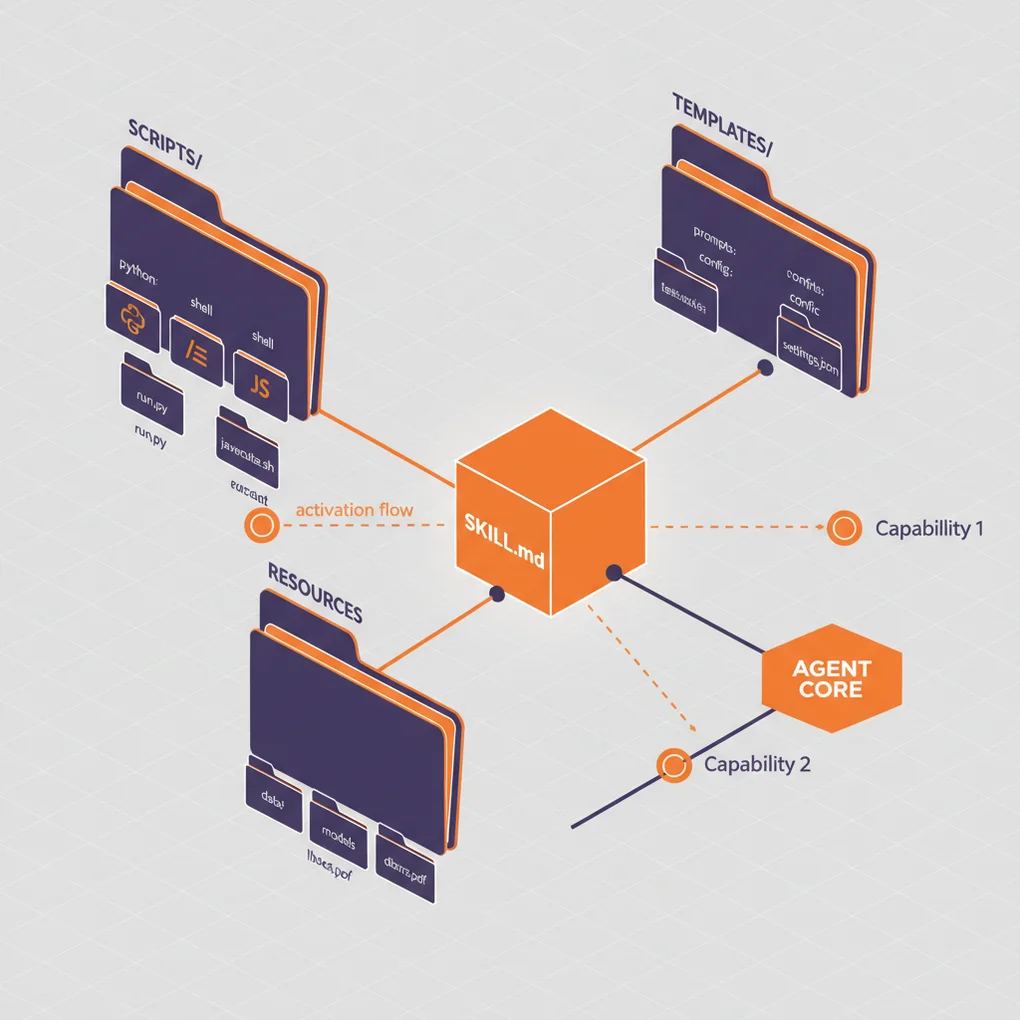
2025年10月16日,Anthropic发布了Agent Skills这一革命性功能。这不仅仅是简单的提示工程,而是一种通过文件和文件夹结构化AI代理专业能力的全新范式。
本文将分享在我的博客自动化项目中应用Claude Skills时遇到的试错过程、解决方案以及实战经验。这不是简单的功能介绍,而是结合实际代码的经验总结。
什么是Agent Skills?
核心概念
Agent Skills是一种将专业知识打包到文件系统的方法。以往我们将所有指令都放在系统提示词中,而现在可以这样:
my-skill/
├── SKILL.md          # 核心指令(必需)
├── reference.md      # 详细参考文档(可选)
├── examples.md       # 示例集合(可选)
├── scripts/          # 可执行代码(可选)
│   └── helper.py
└── templates/        # 模板文件(可选)
└── template.txt通过组织化的文件夹来管理。
与传统方式的差异
传统方式(系统提示词):
你是博客写作专家。
1. 生成SEO优化的标题
2. 验证元数据
3. 生成多语言内容
...
(所有指令集中在一处)Skills方式:
---
name: Blog Writing Assistant
description: Write SEO-optimized blog posts with multi-language support. Use when creating blog content or managing posts.
---

# Blog Writing Assistant

## 说明
1. 阅读 [seo-guidelines.md](seo-guidelines.md) 了解标题/描述规则
2. 查看 [content-structure.md](content-structure.md) 了解文章格式
3. 使用 scripts/generate_slug.py 生成URL友好的slug

## 快速开始
```bash
python scripts/validate_frontmatter.py post.md
```
主要差异:
- 模块化:按关注点分离文件
- 渐进式加载:只加载必要的文件到上下文
- 代码执行:可直接执行Python/Bash脚本
- 可复用性:整个团队都可共享
Progressive Disclosure(渐进式披露)
Skills的核心哲学是三阶段信息披露:
graph TD
    A[Level 1: 元数据] --> B{Claude判断相关性}
    B -->|是| C[Level 2: 加载SKILL.md]
    B -->|否| D[跳过]
    C --> E{需要更多信息?}
    E -->|是| F[Level 3: 读取关联文件]
    E -->|否| G[执行任务]
    F --> G
Level 1 - 元数据(启动时加载):
name: PDF Processing
description: Extract text, fill forms, merge PDFs...
Level 2 - SKILL.md(需要时加载):
## 快速开始
提取文本:
...
关于表单填充,参见 [FORMS.md](FORMS.md)
Level 3 - 附加文件(详细任务时加载):
# FORMS.md
详细的表单填充说明...这种结构使得高效利用上下文窗口的同时,可以提供近乎无限的信息。
项目背景:为什么需要Skills?
现有系统的局限
我的博客自动化系统在 .claude/agents/ 目录中使用多个子代理:
.claude/agents/
├── web-researcher.md
├── content-planner.md
├── writing-assistant.md
└── seo-optimizer.md问题点:
- 代理间重复:多个代理重复引用SEO指南
- 上下文浪费:整个代理文件被加载到系统提示词
- 维护困难:修改指南时需要更新多个文件
- 代码无法复用:没有办法直接执行Python脚本
用Skills解决
引入Skills后:
.claude/skills/
├── blog-writing/
│   ├── SKILL.md
│   ├── seo-guidelines.md       # 通用参考
│   ├── frontmatter-schema.md
│   └── scripts/
│       ├── validate_date.py
│       └── generate_slug.py
└── content-recommendation/
    ├── SKILL.md
└── analyze_similarity.py改进之处:
- 单一真实来源:SEO指南只在一处
- 高效加载:只加载必要的文件
- 代码执行:用Python自动化日期验证、slug生成
- 团队共享:通过git分发给团队成员
创建第一个Skill:博客写作Skill
步骤1:创建目录
mkdir -p .claude/skills/blog-writing
cd .claude/skills/blog-writing
步骤2:编写SKILL.md
---
name: Blog Writing Assistant
description: Create SEO-optimized multi-language blog posts with proper frontmatter, hero images, and content structure. Use when writing blog posts, creating content, or managing blog metadata.
allowed-tools: Read, Write, Edit, Bash, Grep, Glob
---

# Blog Writing Assistant

这个Skill自动化博客文章创作的全过程。

## 核心功能

1. <strong>Frontmatter验证</strong>:检查日期格式、必需字段
2. <strong>SEO优化</strong>:验证标题/描述长度
3. <strong>多语言支持</strong>:同时生成韩语、英语、日语版本
4. <strong>Slug生成</strong>:自动生成URL友好的文件名

## 工作流程

### 1. 确定日期
```bash
python scripts/get_next_pubdate.py
```

### 2. 验证Frontmatter
详细规则参见 [frontmatter-schema.md](frontmatter-schema.md)。

必需字段:
- title(各语言最佳长度参见 [seo-guidelines.md](seo-guidelines.md))
- description
- pubDate(格式:'YYYY-MM-DD',必须使用单引号)
- heroImage
- tags(数组,仅小写字母和连字符)

### 3. 内容结构
遵循 [content-structure.md](content-structure.md) 的模板。

### 4. 验证
```bash
python scripts/validate_frontmatter.py ko/my-post.md
```

## 最佳实践

- 标题遵守SEO指南
- pubDate始终为最新文章日期+1天
- heroImage使用 ../../../assets/blog/ 路径
- 代码块中有三重反引号时使用四重反引号
步骤3:添加支持文件
seo-guidelines.md:
# SEO指南

## 标题最佳长度
- 韩语:25〜30字符
- 英语:50〜60字符
- 日语:30〜35字符

## 描述最佳长度
- 韩语:70〜80字符
- 英语:150〜160字符
- 日语:80〜90字符

## 关键词策略
...scripts/get_next_pubdate.py:
#!/usr/bin/env python3
"""
查找最新博客文章的pubDate并返回+1天
"""
import os
import re
from datetime import datetime, timedelta
from pathlib import Path

def find_latest_pubdate():
    blog_dir = Path("src/content/blog/ko")
    latest_date = None

    for md_file in blog_dir.glob("*.md"):
        content = md_file.read_text(encoding='utf-8')
        match = re.search(r"pubDate:\s*['\"](\d{4}-\d{2}-\d{2})['\"]", content)

        if match:
            date_str = match.group(1)
            date_obj = datetime.strptime(date_str, "%Y-%m-%d")

            if latest_date is None or date_obj > latest_date:
                latest_date = date_obj

    if latest_date:
        next_date = latest_date + timedelta(days=1)
        return next_date.strftime("%Y-%m-%d")

    return None

if __name__ == "__main__":
    next_date = find_latest_pubdate()
    if next_date:
        print(f"'{next_date}'")  # 输出包含单引号
    else:
        print("No existing posts found")
步骤4:授予执行权限
chmod +x scripts/*.py试错与解决过程
问题1:Claude不使用Skill
现象:
用户:帮我写篇博客文章
Claude:(不使用Skill,给出一般回答)原因:description太模糊
description: Helps with blog posts解决:
description: Create SEO-optimized multi-language blog posts with proper frontmatter, hero images, and content structure. Use when writing blog posts, creating content, or managing blog metadata.教训:description必须明确说明做什么+何时使用
问题2:YAML解析错误
现象:
Error: Invalid frontmatter in SKILL.md原因:冒号(:)后使用特殊字符而未加引号
description: Use when: creating posts # ❌ 第二个冒号有问题解决:
description: "Use when: creating posts" # ✅ 用引号包裹教训:YAML中包含特殊字符时始终使用引号
问题3:脚本执行失败
现象:
PermissionError: [Errno 13] Permission denied: 'scripts/validate.py'原因:未授予执行权限
解决:
chmod +x .claude/skills/blog-writing/scripts/*.py额外提示:添加shebang以在Windows上也能工作
#!/usr/bin/env python3问题4:文件路径错误
现象:
FileNotFoundError: [Errno 2] No such file or directory: 'reference.md'原因:SKILL.md中相对路径指定错误
参见 [reference.md](../reference.md) # ❌解决:
参见 [reference.md](reference.md) # ✅ 同一目录教训:所有路径都是相对于SKILL.md的相对路径
问题5:重复Skill冲突
现象:Claude在多个Skill中选择了错误的那个
原因:两个Skill的description相似
# Skill 1
description: For data analysis

# Skill 2
description: For analyzing data解决:用明确的触发关键词区分
# Skill 1
description: Analyze sales data in Excel files and CRM exports. Use for sales reports, pipeline analysis, revenue tracking.

# Skill 2
description: Analyze log files and system metrics data. Use for performance monitoring, debugging, system diagnostics.教训:Skills之间需要明确的领域划分
实战成果:前后对比
Before:斜杠命令方式
# .claude/commands/write-post.md

写一篇博客文章。

1. 查找最新文章日期(使用Grep)
2. 将pubDate设置为+1天
3. 验证frontmatter
...问题点:
- 用户必须显式输入
/write-post命令 - 每次都要读取分步说明
- 无法复用代码
After:Skills方式
# .claude/skills/blog-writing/SKILL.md
---
name: Blog Writing Assistant
description: Create blog posts... Use when writing blog posts...
---
# .claude/skills/blog-writing/scripts/get_next_pubdate.py
def find_latest_pubdate():
# 自动化逻辑用户:“写一篇关于TypeScript的博客文章”
Claude:(自动激活blog-writing Skill)
- 执行
get_next_pubdate.py→'2025-10-22' - 生成frontmatter
- 参考seo-guidelines.md优化标题
- 编写内容
改进之处:
- ✅ 自动发现:无需输入
/write-post - ✅ 代码执行:用Python自动化日期计算
- ✅ 上下文效率:只加载必要文件
- ✅ 可复用性:可应用于其他项目
成效测量
令牌使用量对比(创建1篇博客文章):
| 项目 | Before | After | 节省率 |
|---|---|---|---|
| 系统提示词 | 3,500令牌 | 1,200令牌 | 66% ↓ |
| 重复读取指令 | 5次 | 1次 | 80% ↓ |
| 总令牌数 | ~18,000 | ~10,000 | 44% ↓ |
工作时间对比:
| 任务 | Before | After | 改进 |
|---|---|---|---|
| 日期计算 | 手动(30秒) | 自动(即时) | 100% ↓ |
| Frontmatter验证 | 手动检查 | 脚本自动化 | 90% ↓ |
| 多语言一致性检查 | 手动比对 | 自动验证 | 85% ↓ |
高级应用:工具权限
用allowed-tools确保安全性
---
name: Safe File Reader
description: Read files without making changes. Use when you need read-only file access.
allowed-tools: Read, Grep, Glob
---效果:
- Skill激活时无法使用Write、Edit工具
- 在只读操作中防止意外修改文件
- 最小权限原则(Principle of Least Privilege)
实战示例:代码审查Skill
---
name: Code Reviewer
description: Review code for best practices and potential issues. Use when reviewing code, checking PRs, or analyzing code quality.
allowed-tools: Read, Grep, Glob
---

# Code Reviewer

## 审查清单
1. 代码组织和结构
2. 错误处理
3. 性能考虑
4. 安全问题

## 说明
1. 使用Read工具读取目标文件
2. 使用Grep搜索模式
3. 使用Glob查找相关文件
4. 提供详细反馈

<strong>无法修改文件</strong> - 仅限只读访问。使用场景:
用户:审查PR #123
Claude:(激活Code Reviewer Skill,仅可使用Read/Grep/Glob)
与团队共享Skills
方法1:通过Git共享(推荐)
创建项目Skill:
mkdir -p .claude/skills/team-conventions提交和推送:
git add .claude/skills/
git commit -m "Add team coding conventions Skill"
git push团队成员:
git pull
# 可以自动使用Skill!
方法2:作为插件分发
要与更广泛的社区共享,可打包为 Claude Code Plugin:
my-plugin/
├── plugin.json
├── skills/
│   └── my-skill/
│       └── SKILL.md
└── README.md
最佳实践
1. Skill专注于单一职责
❌ 不好的例子:
name: All-Purpose Helper
description: Does everything - documents, data, deployment, testing...
✅ 好的例子:
name: PDF Form Filler
description: Fill out PDF forms programmatically. Use when working with PDF forms or form data.
2. Description中包含触发关键词
❌ 不好的例子:
description: Helps with Excel✅ 好的例子:
description: Analyze Excel spreadsheets, create pivot tables, generate charts. Use when working with Excel files, spreadsheets, .xlsx files, or tabular data analysis.3. 利用Progressive Disclosure
核心信息放在SKILL.md中:
## 快速开始
从PDF提取文本:
...

关于高级表单填充,参见 [forms.md](forms.md)详细信息放在单独文件中:
# forms.md
详细的10页表单填充指南...
4. 代码和文档明确分离
可执行脚本:
# scripts/process.py
# Claude直接执行参考代码:
# examples.md
Claude阅读和参考的代码示例
5. 版本管理
# SKILL.md

## 版本历史
- v2.0.0(2025-10-22):API重大变更
- v1.1.0(2025-10-15):添加表单验证
- v1.0.0(2025-10-01):初始版本
故障排除
启用调试模式
claude --debug详细显示Skill加载错误。
确认Skill列表
# 直接询问Claude
What Skills are available?

# 或检查文件系统
ls ~/.claude/skills/
ls .claude/skills/
验证YAML
# 检查SKILL.md的frontmatter
cat .claude/skills/my-skill/SKILL.md | head -n 10
检查项:
- 首行:
--- - 元数据
- 结束行:
--- - 使用空格而非制表符
- 特殊字符用引号包裹
未来展望
根据Anthropic工程博客:
Looking further ahead, we hope to enable agents to create, edit, and evaluate Skills on their own, letting them codify their own patterns of behavior into reusable capabilities.
即将实现的功能:
- AI自动创建Skill:学习工作模式并自动转换为Skill
- Skill自我评估:性能测量和自动改进
- 与MCP集成:Skills + MCP构建更强大的代理
结论
Claude Skills具有成为AI代理开发新标准的潜力。
核心优势:
- ✅ 基于文件夹的直观结构
- ✅ 通过Progressive Disclosure实现无限上下文
- ✅ 代码执行处理确定性任务
- ✅ 通过Git与团队共享
- ✅ 相比现有系统节省44%令牌
开始使用:
- 从一个简单的Skill开始(例如:生成提交消息)
- 逐步增加复杂度
- 与团队共享并收集反馈
- 迭代改进
学习资源:
使用Skills创建更强大、更高效的AI代理吧!
阅读其他语言版本
- 🇰🇷 한국어
- 🇯🇵 日本語
- 🇺🇸 English
- 🇨🇳 中文(当前页面)
这篇文章有帮助吗?
您的支持能帮助我创作更好的内容。请我喝杯咖啡吧!☕