AutoGen 0.7.x多智能体实战 — AssistantAgent到GraphFlow从零构建
基于AutoGen 0.7.x新API从零实现多智能体系统的实战指南。逐步运行RoundRobinGroupChat、SelectorGroupChat、GraphFlow、FunctionTool,通过真实代码对比0.2.x差异。
第一次尝试使用AutoGen时,Google搜索结果里0.2.x示例代码和0.4.x示例代码混在一起,相当令人困惑。有的代码用 llm_config={"model": "gpt-4"} 配置,另一些则用 model_client=OpenAIChatCompletionClient(...) 的方式。这两种写法针对的AutoGen版本完全不同,无法互换。
当前最新稳定版是 autogen-agentchat 的 0.7.5 系列。这个版本与0.2.x的API完全不同,照着旧教程走根本跑不起来。本文基于在macOS上直接安装和运行的结果,从头梳理0.7.x的新API。
AutoGen 0.7.x为何完全重写API
在0.2.x中,创建 AssistantAgent 是这样的:
# 0.2.x写法(现已不可用)
from autogen import AssistantAgent

assistant = AssistantAgent(
    name="assistant",
    llm_config={"model": "gpt-4", "api_key": "..."}
)
0.7.x中,模型客户端被分离为独立的注入对象:
# 0.7.x写法
from autogen_agentchat.agents import AssistantAgent
from autogen_ext.models.openai import OpenAIChatCompletionClient

model_client = OpenAIChatCompletionClient(model="gpt-4o", api_key="...")
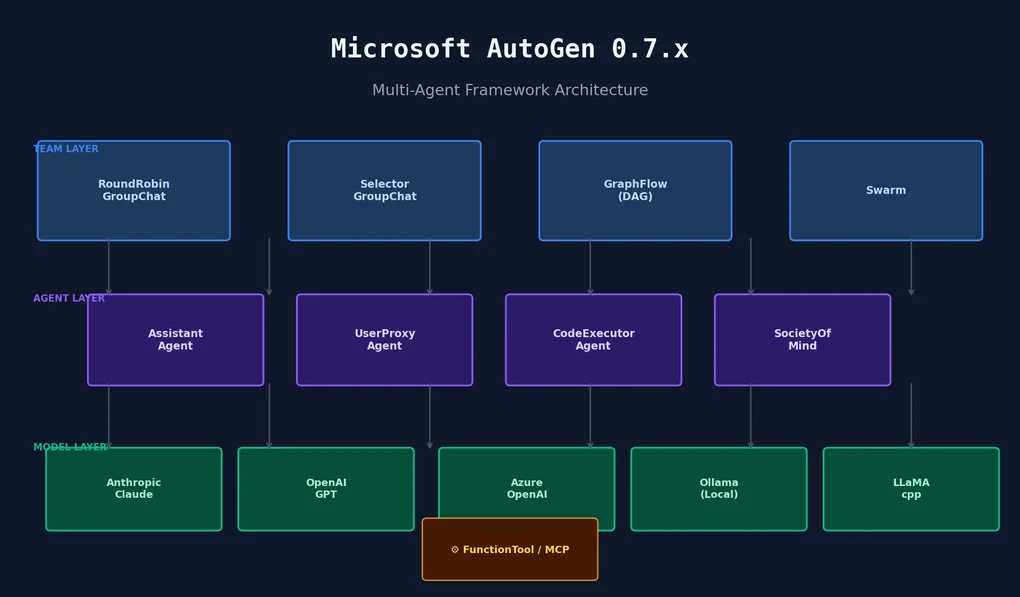
assistant = AssistantAgent(name="assistant", model_client=model_client)这一变化的原因是支持多模型后端。在0.7.x中,Anthropic Claude、Azure OpenAI、Ollama(本地LLM)、LLaMA.cpp都可以通过相同接口切换。不修改智能体代码,只换模型即可。
安装(5分钟搞定)
python3 -m pip install autogen-agentchat autogen-ext在我的环境(macOS、Python 3.12.8)中,autogen-agentchat-0.7.5、autogen-core-0.7.5、autogen-ext-0.7.5 一起安装了。三个包是分层架构,协同工作:
autogen-core:消息路由、运行时、基础抽象autogen-agentchat:面向人类可读性设计的高层智能体/团队APIautogen-ext:模型客户端(OpenAI、Anthropic、Ollama等)+ CodeExecutor等
使用Anthropic Claude作为后端无需额外安装,autogen_ext.models.anthropic 已包含在 autogen-ext 中。
三个核心构建块
1. AssistantAgent — 最基本的单元
from autogen_agentchat.agents import AssistantAgent
from autogen_ext.models.openai import OpenAIChatCompletionClient

model_client = OpenAIChatCompletionClient(model="gpt-4o-mini")

developer = AssistantAgent(
    name="Developer",
    model_client=model_client,
    system_message="你是一位Python高级工程师。请简洁回答问题。",
    tools=[],           # FunctionTool列表(可选)
    handoffs=[],        # Swarm中转交给其他智能体时用(可选)
)
AssistantAgent 做三件事:LLM调用、工具执行、消息缓冲区管理。它在内部维护状态,加入团队后由团队负责消息路由。
2. FunctionTool — 赋予智能体真正能力的方式
from autogen_core.tools import FunctionTool

def get_weather(city: str) -> str:
    """获取城市的天气信息。"""
    return f"{city}:22°C,多云"

weather_tool = FunctionTool(
    get_weather,
    name="get_weather",
    description="查询城市的当前天气状况"
)
函数签名的类型提示和docstring会自动转换为JSON Schema。实际运行后生成的Schema是这样的:
Tool Schema:
  name: get_weather
  description: 查询城市的当前天气状况
  parameters: {
    'city': {'description': 'city', 'title': 'City', 'type': 'string'}
  }
描述直接来自docstring,所以要写清楚。模糊的描述会导致LLM错误地调用工具。
3. 终止条件 — 防止对话无限循环
from autogen_agentchat.conditions import (
    MaxMessageTermination,
    TextMentionTermination,
    TokenUsageTermination,
    TimeoutTermination,
)

# 支持 | (OR) 和 & (AND) 组合
termination = (
    MaxMessageTermination(max_messages=10) | TextMentionTermination("TERMINATE")
)
实践中最稳的组合是用 MaxMessageTermination 作为硬性上限,用 TextMentionTermination 作为任务完成信号。
四种团队类型 — 各适合什么场景
AutoGen 0.7.x中,团队决定智能体之间以什么顺序和方式进行交流。
RoundRobinGroupChat
智能体按顺序依次发言。最可预测的模式。
from autogen_agentchat.teams import RoundRobinGroupChat

team = RoundRobinGroupChat(
    participants=[developer, reviewer],
    termination_condition=MaxMessageTermination(4),
)
result = await team.run(task="请审查这段代码:def add(a, b): return a + b")
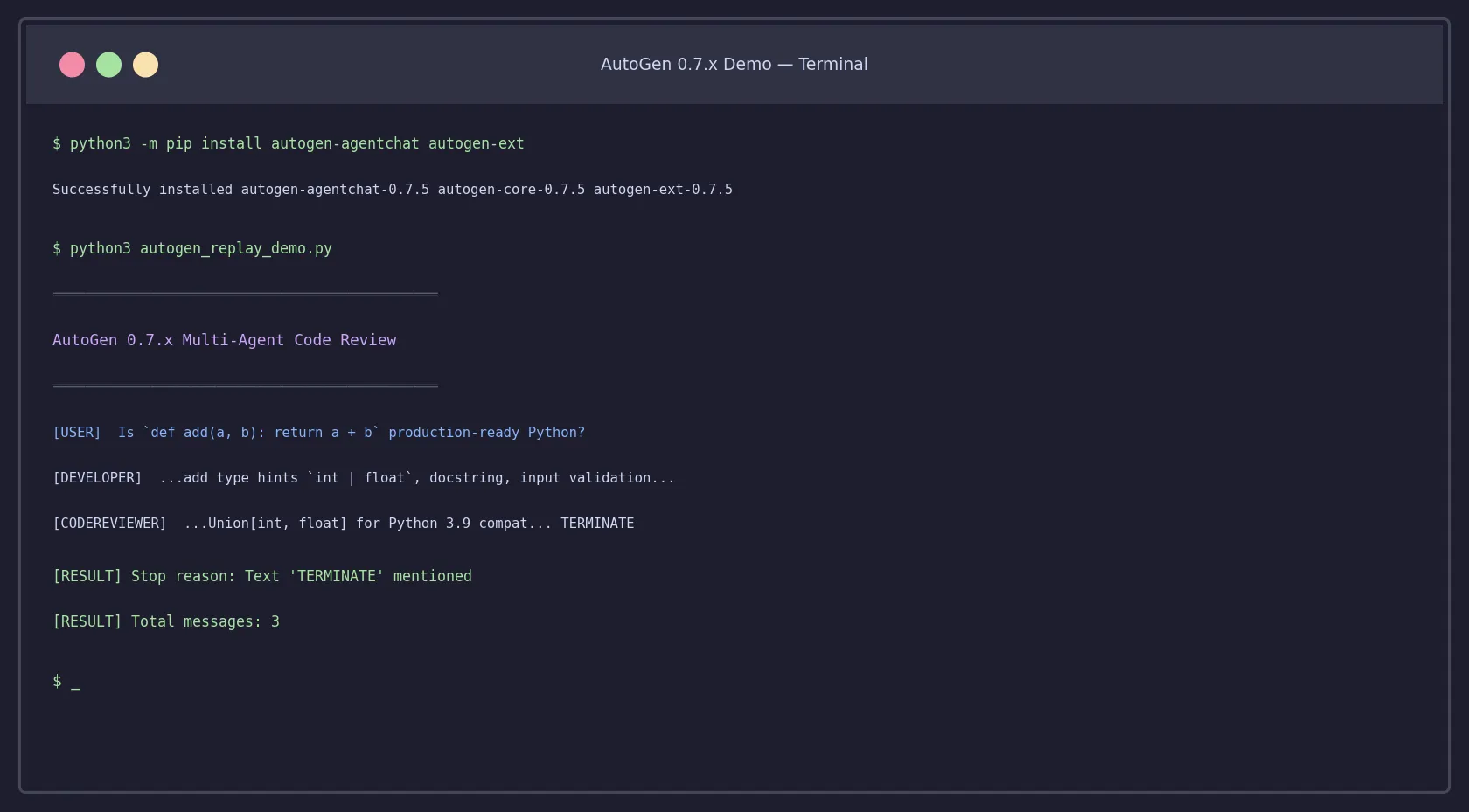
实际运行结果如下:
[USER] Is `def add(a, b): return a + b` production-ready Python?

[DEVELOPER]
...建议添加类型提示 `int | float`、文档字符串、输入验证...

[CODEREVIEWER]
...Union[int, float] 兼容 Python 3.9... TERMINATE

[RESULT] Stop reason: Text 'TERMINATE' mentioned
[RESULT] Total messages: 3
Developer → Reviewer 的顺序严格执行。
SelectorGroupChat
LLM动态选择下一个发言者。适合角色明确区分的团队。
from autogen_agentchat.teams import SelectorGroupChat

team = SelectorGroupChat(
    participants=[planner, coder, tester, reviewer],
    model_client=model_client,
    termination_condition=termination,
)
比RoundRobin更灵活但难以预测。智能体数量超过3个时效果更好;只有2个的话,RoundRobin更简单直接。
GraphFlow — 0.7.x最显眼的新功能
基于DAG(有向无环图)的路由。根据条件决定下一个运行的智能体。
from autogen_agentchat.teams import GraphFlow, DiGraphBuilder

builder = DiGraphBuilder()
builder.add_node(planner)
builder.add_node(coder)
builder.add_node(tester)

builder.add_edge(planner, coder)
builder.add_edge(coder, tester)

graph = builder.build()
team = GraphFlow(participants=[planner, coder, tester], graph=graph)
也支持条件边。测试失败时将执行重新路由到coder的反馈循环可以用图来表达。
说实话,GraphFlow的API目前还略显冗长。没有LangGraph add_conditional_edges 那样的便捷方法,边的定义写起来比较长。不过在Python智能体框架中,显式支持图路由的目前只有AutoGen。我在AI智能体框架对比文章中对此进行了更详细的比较。
Swarm
基于Handoff的路由。智能体自行判断”这个任务应该由X来处理”并转交。
from autogen_agentchat.teams import Swarm
from autogen_agentchat.conditions import HandoffTermination

triage_agent = AssistantAgent(
    name="Triage",
    model_client=model_client,
    handoffs=["billing_agent", "technical_agent"],
)

team = Swarm(
    participants=[triage_agent, billing_agent, technical_agent],
    termination_condition=HandoffTermination(target="human") | MaxMessageTermination(10),
)
适合客服等根据请求类型分配不同智能体的场景。由于转交决策由LLM做出,每个智能体的 system_message 需要明确写明转交条件。
层级智能体:SocietyOfMindAgent
这是我在0.7.x中觉得最有意思的功能。整个智能体团队可以被包装成单个智能体,插入到另一个团队中。
from autogen_agentchat.agents import SocietyOfMindAgent

inner_team = RoundRobinGroupChat(
    participants=[developer, tester],
    termination_condition=MaxMessageTermination(6),
)

coding_unit = SocietyOfMindAgent(
    name="CodingUnit",
    team=inner_team,
    model_client=model_client,
    response_prompt="请用一段话总结内部团队的讨论。",
)

outer_team = RoundRobinGroupChat(
    participants=[coding_unit, product_manager],
    termination_condition=MaxMessageTermination(4),
)从外部看,coding_unit 像一个普通智能体,但内部实际上在运行 developer → tester 的循环。只有摘要会暴露给外部团队。这与Claude Agent SDK中编排子智能体的方式概念相似,但AutoGen在代码中更明确地表达了团队结构。
实际使用中遇到的限制
1. 状态管理限于会话级别
AutoGen 0.7.x的智能体记忆只在会话内保持。没有内置的跨会话记忆支持,需要自行接入外部数据库或记忆层。
2. 调试仍然不方便
用 run_stream() 流式输出可以看到每个智能体的发言,但难以一目了然地看到中间工具调用结果。接入Langfuse等外部追踪工具在实际开发中是必要的。我在Langfuse自托管追踪指南中介绍了配置方法。
3. 仅支持异步代码
所有API都基于 async/await。在同步代码中使用时需要用 asyncio.run() 包装,在FastAPI或Django中集成时需要考虑异步处理。
完整代码 — 可直接复制使用的2智能体审查团队
import asyncio
from autogen_agentchat.agents import AssistantAgent
from autogen_agentchat.teams import RoundRobinGroupChat
from autogen_agentchat.conditions import MaxMessageTermination, TextMentionTermination
from autogen_ext.models.anthropic import AnthropicChatCompletionClient

async def main():
    model_client = AnthropicChatCompletionClient(
        model="claude-haiku-4-5-20251001",
    )

    developer = AssistantAgent(
        name="Developer",
        model_client=model_client,
        system_message="""你是一位Python高级开发者。
请简洁地提出不超过3条代码质量改进建议。""",
    )

    reviewer = AssistantAgent(
        name="Reviewer",
        model_client=model_client,
        system_message="""你是代码审查员。
请审查开发者的建议,补充你的意见,然后加上TERMINATE结束对话。""",
    )

    termination = (
        MaxMessageTermination(max_messages=6) |
        TextMentionTermination("TERMINATE")
    )

    team = RoundRobinGroupChat(
        participants=[developer, reviewer],
        termination_condition=termination,
    )

    async for message in team.run_stream(
        task="请审查这段代码:def add(a, b): return a + b"
    ):
        from autogen_agentchat.base import TaskResult
        if not isinstance(message, TaskResult):
            print(f"[{message.source}]\n{message.content}\n")
        else:
            print(f"终止原因:{message.stop_reason}")

    await model_client.close()

asyncio.run(main())
在环境变量中设置 ANTHROPIC_API_KEY 即可直接运行。
无API密钥测试:ReplayChatCompletionClient
不想花费API调用费用来测试逻辑时,ReplayChatCompletionClient 可以按顺序返回预定义的响应。
from autogen_ext.models.replay import ReplayChatCompletionClient
from autogen_core.models import CreateResult, RequestUsage

model_client = ReplayChatCompletionClient(
    [
        CreateResult(
            finish_reason="stop",
            content="建议添加类型提示和文档字符串。",
            usage=RequestUsage(prompt_tokens=50, completion_tokens=20),
            cached=False,
        ),
        CreateResult(
            finish_reason="stop",
            content="同意。还可以考虑使用Union类型以提高兼容性。TERMINATE",
            usage=RequestUsage(prompt_tokens=70, completion_tokens=18),
            cached=False,
        ),
    ]
)
在单元测试和CI流水线中很实用,无需真实LLM即可验证团队路由逻辑。注意Replay客户端按顺序消耗响应,如果智能体调用LLM的次数超过响应列表长度会报 StopIteration。
从0.2.x迁移到0.7.x的检查清单
如果已有0.2.x代码,按以下步骤处理:
- 包替换:
pyautogen/autogen→autogen-agentchat autogen-ext - 修改import路径:
from autogen import AssistantAgent→from autogen_agentchat.agents import AssistantAgent - 移除llm_config:将所有
llm_config字典替换为model_client对象 - 整理UserProxyAgent的角色:0.7.x中
UserProxyAgent不再负责代码执行,代码执行由CodeExecutorAgent承担 - 转为异步:将所有
initiate_chat()调用替换为await team.run()或await team.run_stream() - 明确终止条件:0.2.x的
human_input_mode="NEVER"方式已废弃,必须在团队中明确指定termination_condition
最耗时的步骤通常是将 llm_config 转换为 model_client。如果多个智能体使用相同模型,共享一个客户端实例更高效。
何时使用AutoGen,何时不用
我的直接判断:当智能体间协作协议较复杂时,AutoGen有优势。团队组合、跨团队路由、层级智能体结构在API中都是一等公民。
对于只给单个智能体挂很多工具的场景,PydanticAI 的代码更简洁——AutoGen的团队抽象反而显得多余。Python AI智能体库对比文章梳理了各库的定位。
如果需要Kubernetes级别的基础设施持久性,应该看Dapr Agents。AutoGen专注于智能体对话层,而非基础设施层。
总结
AutoGen 0.7.x与0.2.x时代是完全不同的框架。新API更明确、类型更安全。GraphFlow和SocietyOfMind是实现复杂多智能体工作流时真正有用的工具——不只是架构展示。
生态系统目前还在稳定过程中。官方文档和示例代码因版本不同而混杂,导致初始学习成本偏高。实践中的第一步:搜索结果中先确认是0.2.x还是0.7.x的示例,再复制代码。
测试环境:macOS、Python 3.12.8、autogen-agentchat 0.7.5(2026-05-19)
安装命令:pip install autogen-agentchat autogen-ext
阅读其他语言版本
- 🇰🇷 한국어
- 🇯🇵 日本語
- 🇺🇸 English
- 🇨🇳 中文(当前页面)
这篇文章有帮助吗?
您的支持能帮助我创作更好的内容。请我喝杯咖啡吧。
相关文章
-
AI智能体框架比较2026: LangGraph vs CrewAI vs Dapr 生产选型指南
比较AutoGen 0.7.x为何选择与LangGraph或Dapr不同的方案,能让设计意图更清晰。

-
Python AI智能体库比较2026 — Pydantic AI vs Instructor vs Smolagents 实战选择指南
有助于了解AutoGen在PydanticAI、Smolagents等Python智能体库生态中的定位。

-
Claude Agent SDK 子代理编排实战指南 — 多代理并行处理完全掌握
对比Claude Agent SDK的子智能体编排与AutoGen的团队编排方式,能清晰看出各方案的权衡。